


How to Improve Accounts Payable Efficiency: Beginner Tips
The only way to keep your business running smoothly is to pay all your due bills on time. And doing that task efficiently is not easy. If done manually, it can get quite tough to keep track of the whole process. And don’t forget, it is also quite tedious and is very subject to errors. To improve accounts payable (AP) efficiency, all we need to do is apply a few simple AP practices. And this, in turn, will pay your vendors faster and help you save time and money.
In this guide, we will be showing you how to do just that. So, read on to learn more!
Key Takeaways
- Reduce manual work, errors, and invoice processing by automating the whole AP process.
- Standardise and digitise workflows for easier invoice processing, approval, tracking and management.
- Improve invoice matching as well as vendor management to catch errors, prevent duplicate payments, and speed up processing.
- Take note of areas for improvement by identifying key AP performance metrics such as payment time, invoice processing cost, exception rate, and automation ROI.
What is Accounts Payable Efficiency?
Accounts payable(AP) efficiency is the term used for how accurate, fast and cost-effective the team is at processing vendors’ invoices and outgoing payments. High accounts payable(AP) efficiency helps to keep every invoice cost low, speed up approvals, prevent duplicate payments and protect vendor relationships. On the other hand, inefficient accounts payable (AP) leads to higher labour costs, very frequent data errors and high-cost late fees.
How to Improve Accounts Payable Efficiency
Every organisation needs to improve their financial operations. Here are some simple ways to do that by making accounts payable more efficient and avoiding costly payment delays.
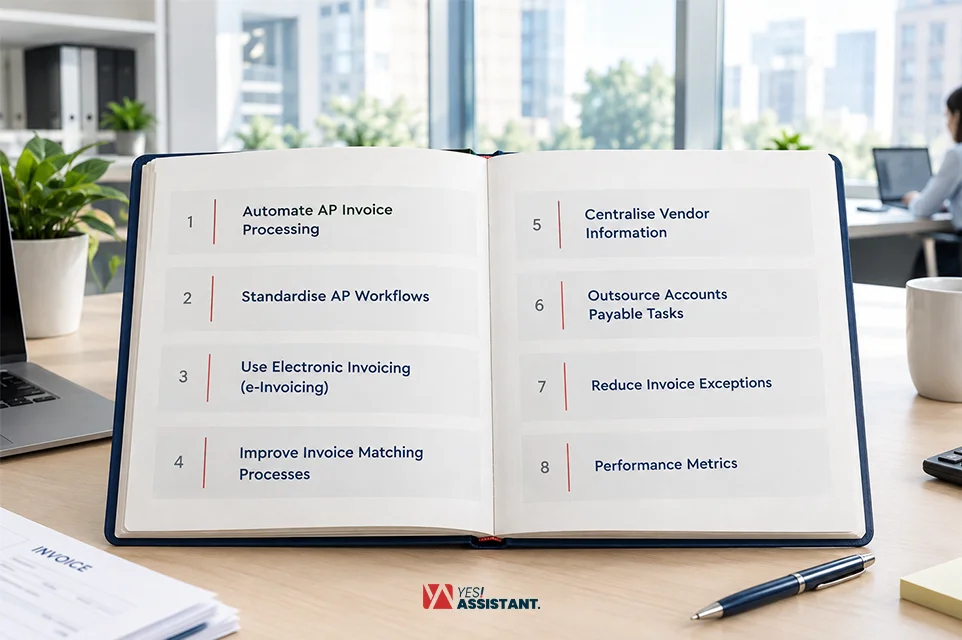
1. Automate AP Invoice Processing
In 2026, accounts payable teams should not be restricted to just spreadsheets and manual data entry. Instead, automate AP invoice processing. This makes the whole process much easier by removing physical work. It increases overall accuracy, speed and ease of management.
For beginners, start with high volume and simple invoices. After automating those first and building confidence, move on to more complex tasks. If you do not know how AP invoice automation works. You can always use professional outsourced invoice processing services to help you do it easily.
2. Standardise AP Workflows
Most documents don’t reach the accounts payable team with the right documents. They skip approvals. When purchase volumes are high, settlement issues, audit risk and payment hold-ups.
Using standardised AP workflow methods at the time of purchase can make sure that every purchase is well documented, coded and approved. This drastically improves internal control and reduces errors. With proper workflows and automated AP invoice processing taken into account. Follow-ups are reduced, and the overall transaction becomes clearer for compliance and reporting.
3. Use Electronic Invoicing (e-Invoicing)
The best step you can take to make your accounts payable process more efficient is to leave the whole physical invoices behind. And convert every invoice, contract, receipt, and purchase order to digital versions. This will make them easier to process, find and track. Transferring from paper to digital will also make them less likely to be lost, even if a lot of them pile up.
4. Improve Invoice Matching Processes
An important step towards a better invoice management system is a proper invoice matching process. We can do this by matching every invoice with the right purchase order or receipts before making the final payment. This will make it easier to find errors, clear out duplicate records and reduce payment hold-ups.
5. Centralise Vendor Information
It is really useful to place all your vendor information in one central database. Instead of spreading it out on multiple docs, spreadsheets or emails. This makes it very easy to access this information anytime without a hassle. Information like contact information, payment details and all the contracts with them. A centralised vendor management system can help the AP team to keep vendor management information up to date, work faster and process invoices and payments even faster.
6. Outsource Accounts Payable Tasks
With a rising number of invoices, your accounts payable team is struggling. It may be a good idea to hire an accounts payable outsourcing company to reduce errors and costs. They can carry out some of the workload from your team, like invoice processing, payments, vendor questions and even monetary settlements. This helps reduce your team’s manual labour and process invoices faster.
7. Reduce Invoice Exceptions
Before an invoice enters the AP workflow, reduce exceptions by making sure all the information provided is correct and there are no missing entries. A good way to make sure of it is by using automated data capture and validation to capture and validate wrong information early on. This clears approval workflows and can reduce delays by helping the invoices move through the process faster.
8. Track AP Performance Metrics
A great way to know if your chosen methods are working or not is by tracking the key metrics. It also helps determine if any part of it needs any improvements. We can start by tracking simpler metrics like invoice processing cost, time, error rate, payment times and discounts. These numbers can help you find delays, reduce errors and help make better decisions.
Accounts Payable Efficiency Metrics to Track
Keeping track of the correct accounts payable(AP) metrics is very important to keep efficiency high. These main metrics help keep track of your speed, accuracy, and costs.
Here are the 10 most important AP metrics to always keep track of:
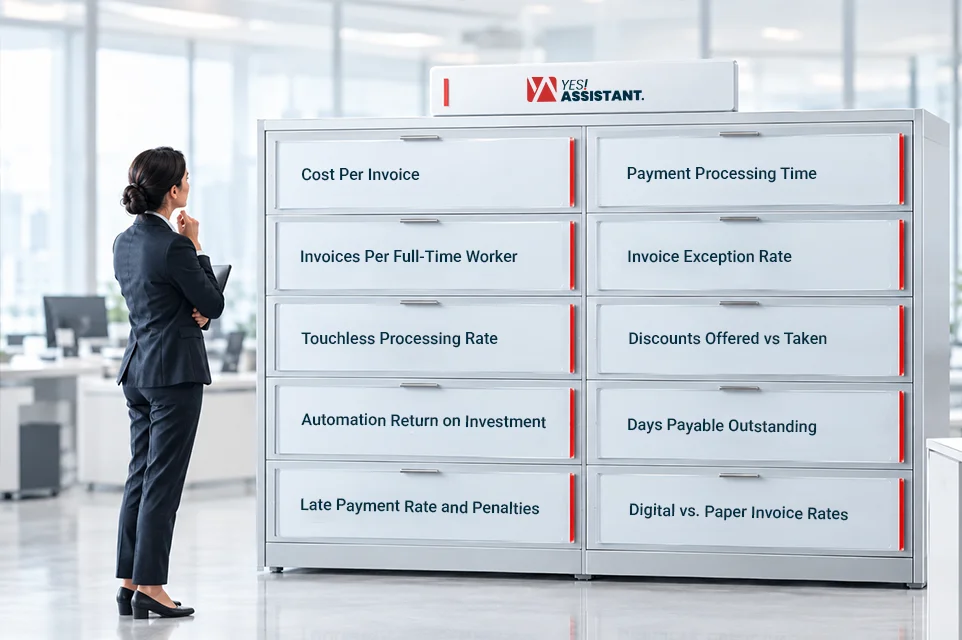
1. Cost Per Invoice
Shows the total expenses to process a single Invoice. This also includes labour, software and overhead costs. Lower Costs mean higher efficiency.
Formula –
Total AP Cost ÷ Total Invoices Processed
Divide your total AP costs by the number of invoices processed during a specific time.
2. Payment Processing Time
Measures how many days an invoice needs to be approved and paid after you receive it.
Formula –
Total Processing Time for all Invoices ÷ Number of Invoices Processed
Track the processing time for each invoice and calculate the average over a specific period.
3. Invoices Per Full-Time Worker (FTW)
This tracks the number of invoices processed by each of the employees in a given period of time.
Formula –
Total Invoices Processed ÷ Number of FTW’s
Divide the total number of invoices processed by the number of full-time workers.
4. Invoice Exception Rate
Shows the percentage of invoices with mistakes. Mistakes like wrong prices or missing orders.
Formula –
(Invoices with Exceptions ÷ Total Invoices Processed) × 100
Count the total number of invoices with exceptions and divide that number by the total invoices processed. Then multiply the result by 100 to get the rate.
5. Touchless Processing Rate
This Key Performance Indicator(KPI) metric shows how many invoices are automatically processed without any physical involvement. A higher percentage means the automation is working fine.
Formula –
(Straight-Through Invoices ÷ Total Invoices Processed) × 100
Count the invoices that go from receipt to payment without any physical manual involvement. Divide this by the total number of invoices processed.
6. Discounts Offered vs Taken
Tracks how many early discounts you managed to get and how many were actually offered during a specific period.
Formula –
(Captured Discounts ÷ Total Discounts Offered) × 100
Compare the total discounts offered by the vendors with the discounts taken during a specific period.
7. Automation Return on Investment (ROI)
This metric checks if the automation method you were using actually saves money.
Formula –
[(Savings from Automation − Cost of Automation) ÷ Cost of Automation] × 100
Compare AP performance before and after creating automation. Look at savings such as lower processing costs and compare them with the money saved from the automation.
8. Days Payable Outstanding (DPO)
This metric shows how long a company takes to pay its suppliers. This helps to maintain a healthy vendor relationship.
Formula –
(Accounts Payable ÷ Cost of Goods Sold) × Number of Days
Calculate the average time your company takes to pay its suppliers.
9. Late Payment Rate and Penalties
Late payments can seriously damage vendor relationships. To prevent that, this metric keeps track of late payments and the possible penalties they create.
Formula –
Late Payment Rate = (Number of Late Payments ÷ Total Payments) × 100
Late Payment Penalty Cost = Total Penalties Paid for Late Payments
We can also keep track of the penalty rate by using the formula –
Penalty Rate = (Total Penalties Paid ÷ Total Amount Paid Late) × 100
Document late payments and calculate the total penalties during a specific period.
10. Digital vs. Paper Invoice Rates
The metric that shows how many paper invoices have moved to digital invoices. A higher rate indicates faster and better payment efficiency.
Formula –
(Electronic Invoices ÷ Total Invoices) × 100
Count the electronic invoices processed. Then divide this number by the total invoices processed during the same period.
Technologies That Improve Accounts Payable Efficiency
Modern technologies can improve accounts payable and make it more accurate. Some of these software includes:
AP Automation Software
By using automated invoice matching software, we can automate invoice capture, data entry, approvals and payment processing with ease. This helps reduce repetitive manual tasks.
OCR Technology
OCR is widely used for reducing manual data entry. It easily reads data from the invoices and turns it into digital data. This reduces data entry errors and speeds up invoice processing.
Invoice Matching Tools
Invoice matching tools compare the invoice details between the purchase orders and receipts. They can quickly find the differences in prices, quantities, or other details. This helps AP teams catch hidden problems before making the final payment.
Electronic Invoicing
Replacing paper-based invoices with E-invoicing can significantly improve invoice management. With the ease of receiving and process invoices digitally. It can go into any system quite easily while removing manual data entry and improving accuracy, making those e-invoices easier to track.
Automated Approval Workflows
Automated workflows directly send the invoices to the right AP team member for approval based on set rules. This reduces the need for manual follow-ups and helps prevent invoices from sitting in inboxes for too long without processing.
Cloud-Based AP Systems
Cloud-based systems keep AP information in one secure central location. The accounts team can access these invoices, approvals, and payment details without searching through different files or systems. This also makes it easier to track AP activity live.
Enterprise Resource Planning (ERP) Integration
Connecting AP tools with your ERP or accounting system allows for information to be moved between systems automatically without hassle. This reduces repeated data entry and helps keep the financial records accurate and up to date.
AI-Powered AP Tools
AI can help with tasks such as reading invoices, classifying data, finding unusual transactions, and handling common routine tasks. This allows AP teams to spend less time on recurring tasks and focus on other more important work.
Conclusion
According to Ardent Partners’ 2025 research, the average AP team takes 8.2 days to process an invoice. The best organisations using advanced automation can reduce processing time to just around 2.9 days. This shows how automation can significantly speed up invoice processing and reduce payment delays. It can be easily done by automating invoice processing, digitising documents, standardising workflows, and tracking key AP metrics. Using the right AP technology can also make your processes faster and easier to manage.
Frequently Asked Questions
What is the best KPI for accounts payable?
The best KPI for accounts payable is invoice processing cost. It shows how much your business spends to process each invoice.
What are the golden rules of accounts payable?
Approval of purchases, keeping accurate records, matching invoices with supporting documents, preventing duplicate payments and paying suppliers on time are the golden rules of accounts payable.
What are some good goals for accounts payable?
A clear, measurable goal that drives productivity, growth and efficiency is a good goal for accounts payable. Goals like increasing sales by a certain percent or maintaining customer satisfaction levels. All while reducing processing costs, increasing automation and making payments on time.
What are the common challenges in accounts payable?
Manual data entry, invoice errors, missing documents, slow approvals, duplicate payments, late payments and disconnected AP systems are some of the common challenges in accounts payable.
What are the current trends in accounts payable?
Current trends for accounts payable include digitisation of the whole process and making operations fully tech-driven using AGENTIC AI and Touchless processing.
How can I improve my accounts payable process?
We can improve our accounts payable process by automating invoice processing, standardising workflows, digitising documents, improving matching, centralising vendor information and tracking AP performance metrics.