

10 Essential Self-Organization Tips for Virtual Assistants to Boost Productivity
Staying organized is essential for virtual assistants since they usually work with multiple clients and handle multiple types of tasks. This is why they need to make the most out of their work hours, as delaying performing a small task can cause them to miss a deadline. So virtual assistants need to have strong self-organization skills, such as time management, maintaining a daily routine, and file or document organization.How
10 Top Self-Organization Tips for Virtual Assistants
Here are some self-organization tips that you should follow to become more productive and efficient in your role:
1. Centralize Your Task Management
Organizations often work on multiple tasks, and keeping track of them can be difficult. Task management is considered an important part by which teams track and execute their tasks step by step. Teams need to prioritize their tasks and share visible progress in a centralized system.
But when team members keep track of their individuality in sticky notes or diaries, important details can often get missed, and prioritizing tasks becomes difficult. The cost of poor task organization can have several negative impacts on a business, and this is why you need to centralize your task management.
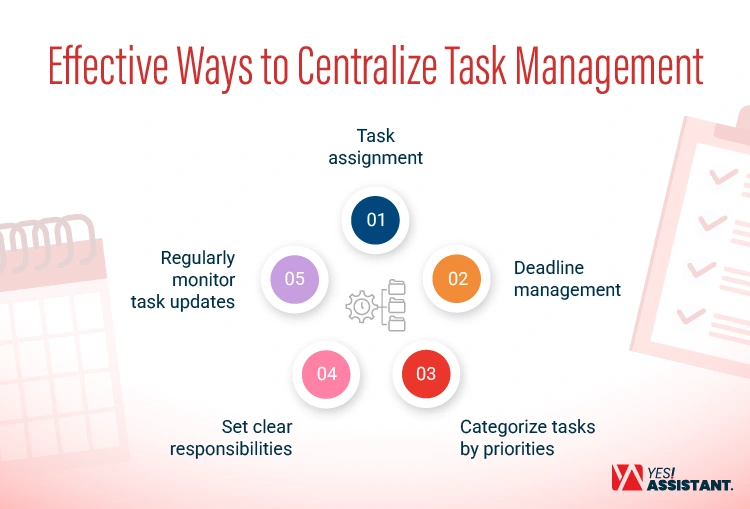
There are many tools, such as ClickUp, Asana, and Trello, that you can use for the following:
- Task assignment: Create a separate workspace or board for every client and record all the tasks they have assigned you.
- Deadline management: Set deadlines for every task and subtask so the team members don’t delay in task completion.
- Categorize tasks by priorities: Use labels such as “high”, “medium” or “low” so that you know how to distribute your time while completing tasks.
- Set clear responsibilities: Record every key detail of a task, including the deliverables the assigned team members need to submit.
- Regularly monitor task updates: Give a clear brief to the task members on how they should update the status of work once it is assigned to them, such as ongoing, complete, or on review.
2. Implement Time Blocking for Deep Work
Juggling multiple tasks can impact a virtual assistant’s ability to perform deep work. Let’s say, for example, you are preparing a budget report for an executive and suddenly, some email notification pops up, so you open that email. This is known as context switching or task switching that can lower your efficiency.
Time blocking is a productivity technique that allows you to stay focused on your tasks for a particular period of time in a day. It is basically a way to segment the time of a day so you can execute your tasks in a well-organized way.
Here is how you can implement it:
- Create a task list: Identify all the tasks you need to do in a day, then make a to-do list.
- Set priorities: Sort your to-do list based on priority and keep the tasks you must complete within the day at the top.
- Schedule tasks in your calendar: You can use Google Calendar to manage the tasks and block specific periods of time for them.
- Try to be consistent with the schedule: Book your most productive hours for priority tasks, and do your recurring tasks at the same time every day. For example, you can keep 4-5 pm every day for reading and replying to emails.
- Review and adjust time blocks: Sometimes, you may not be able to stick to your time block due to shifted priorities, cancelled events, or other reasons. In that case, make necessary adjustments to your calendars to reorganize your time block.
3. Create Standard Operating Procedures (SOPs)
Documenting the process you follow to perform your required tasks can help you become more productive at work as a virtual assistant. This is why you should create a standard operating procedure detailing all the steps you follow to perform regular tasks such as email management, invoice preparation, web scraping, or lead generation.
Here is how you should create standard operating procedures for various recurring tasks:
- Document your workflow: Write down the steps for executing a particular task. For example, to create an email scheduling workflow, you can write: create an email template, add the recipients’ addresses, draft the message, check attachments to include, etc.
- Select a format: Choose a structure and template that is clear and easy to understand for you and everyone.
- Include visual resources and tools: Sometimes writing instructions in detail is not enough, so you need to add visual images, screenshots, or tables where necessary. You can also recommend tools for performing some tasks.
- Store and organize: You need to store and organize your SOPs inside a specific task folder or share them with someone with a relevant resource.
- Review and update the SOP: After finally creating the SOPs, you receive a new instruction or change your work process for performing a particular task.
4. Set Up a Dedicated Client Communication Hub
Many virtual assistants experience communication challenges with their clients as they receive important updates and messages in their personal inbox. This type of inbox chaos can hurt the business growth of your clients because you will experience severe difficulties in managing key information and updates on their behalf.
When you use your personal inbox for professional communication, important messages can often get buried under your personal messages.
A dedicated communication hub can help you keep all your client conversations, files, and updates in the same place. Here is how you can do it:
- Choose communication tools: Decide which communication tools will be used for which purpose. For example, you can use Slack or Microsoft Teams for messaging and Google Meet or Zoom for video conferencing.
- Use a professional email: Create a professional mailbox and alias for different types of email messages, such as support + @ + “company domain” for handling support requests.
- Create shared resource libraries: Decide how to share important resources as a part of client communication, such as using Google Drive for sharing docs and media files instead of using WhatsApp for sending them.
- Set rules and restrictions for communication: Establish clear rules for client communication, including the approach and channels to use. For example, you can allow general inquiries through social media DMs but restrict sharing quotes using those channels.
5. Audit and Structure Digital Files Weekly
Poor file organization can be a big problem when you need to search for a document. Studies show that poor file organization can cause, on average, 23 interruptions per day for an employee. When you don’t regularly check and structure your documents and files, they can get disorganized and difficult to find.
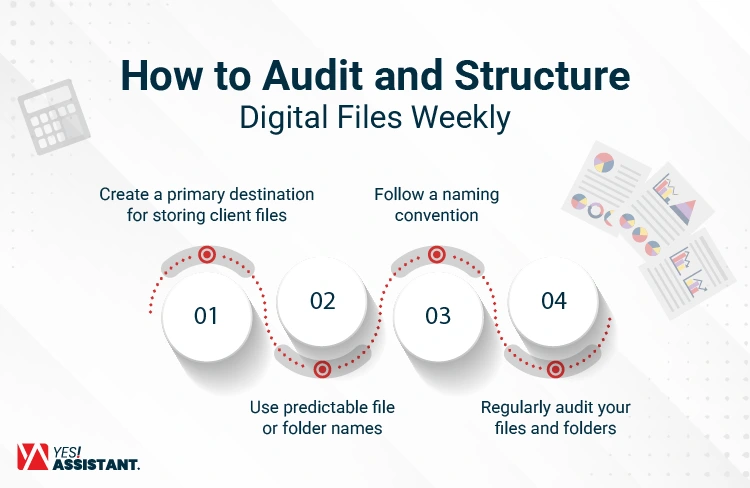
Here are some tips you can follow to organize your files every week:
- Create a primary destination for storing client files: Create a primary folder in Google Drive or Dropbox where you will store the documents of your clients.
- Use predictable file or folder names: Avoid random or generic naming of your clients’ files or folders, such as “final-report” or “may-invoices.”
- Follow a naming convention: Use a naming convention to save and store files for every client, such as [Client Name] _ [Project Type] _ [YYYY-MM].
- Regularly audit your files and folders: Check the primary directory and subfolders to identify misplaced files, inconsistent naming conventions, duplicate documents, or outdated resources.
6. Master the Eisenhower Matrix for Prioritization
As a virtual assistant, you have to pay attention to multiple tasks and deliver them within the deadline. This is why you need to have excellent task prioritization skills. The Eisenhower Matrix is a tool that is widely known for helping workers sort their tasks based on their urgency and importance.
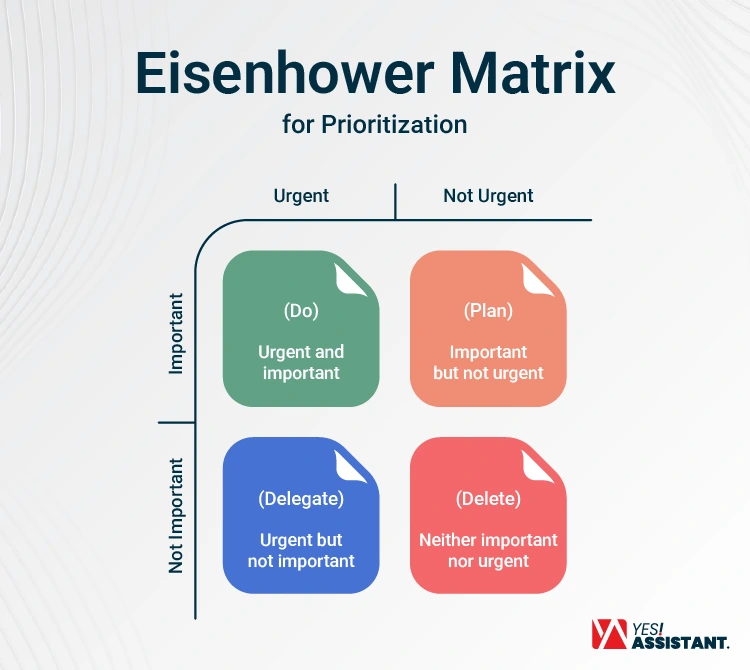
The framework divides tasks into four quadrants:
Urgent and important (Do): It includes the tasks that you should execute first because they are urgent and important.
Important but not urgent (Plan): It includes the tasks that are important, but you don’t need to do them immediately. So you can schedule them to do later.
Urgent but not important (Delegate): It includes the tasks that you need to do, but they don’t need your direct attention. So you can automate them or skip them for a while.
Neither important nor urgent (Delete): It includes the tasks that don’t need your immediate attention and are not important. So you can remove them from your priority list or minimize them.
The Eisenhower Matrix allows virtual assistants to stop spending time on low-value tasks. It helps them to reduce distractions and make better utilization of their productive hours.
7. Automate Onboarding and Recurring Workflows
Client onboarding and performing recurring tasks manually can take a major part of your productive hours. Virtual assistants can automate their workflow to reduce the need for manual work, minimize error, and focus more on high-value work.
Here is how you can automate your onboarding and recurring tasks:
- Document client onboarding process and recurring tasks: Write down the process of onboarding new clients and the tasks that you perform for them on a regular basis.
- Create task workflow: Write down the sequences or steps in your recurring tasks.
- Select automation tools: Automate those workflows using tools such as Zapier, Make, n8n, or Microsoft Power Automate.
- Review progress and performance: Monitor the automation process and identify if any fixes are necessary.
8. Maintain a Strict Digital Sieve for Your Inbox
Business owners and leaders can receive so many emails in their inboxes. Manually reviewing them and sorting them to reply to urgent messages can be very difficult. Successful virtual assistants know how to manage their clients’ inboxes efficiently and filter out the messages that are not important, such as newsletters, cold emails, and other promotional messages. They need to know how to filter emails with advanced rules and automatic labels.
Here is how they can do it:
- Use rules and filters: Create customer filters and rules to send the message and send promotional messages into a separate folder.
- Sort out important messages: Create a “VIP” filter to sort the messages received from key clients, business partners, or other important contacts of their clients.
- Label messages: Use a label to identify message status, such as “need action” or “waiting for reply.”
- Use color codes: Color-code messages if they need immediate attention.
- Set time for manual review: Check your emails and organize inboxes regularly at a specific time, such as 9 AM or 1 PM.
9. Set Clear Boundaries for Asynchronous Communication
Virtual assistants often need to use asynchronous communication channels such as chat or email to establish contact with their clients as they work in remote settings. Some of their clients live in different time zones. So, having live communication and responding to their urgent queries can be difficult for you.
It is not unusual to have a dispute with your client over delayed responses. This is why you need to include some standard response time parameters in your client agreement.
Here are some tips you can follow for keeping your client updated about your standard response time:
- Set standard response time: Decide your average time for responding to different types of messages and channels.
- Create a communication policy: Write a communication policy about your response time for different types of requests and messages, including specific situations in which standard response time may not be applicable.
- Review and include the policy in the agreement: After creating and reviewing the policy, include it in your client agreement, contract, or onboarding documentation.
- Use an auto-reply or status message: Send an auto-reply to your chats and emails about how soon a client is expected to receive a reply from you.
10. Conduct a Friday Wrap-up and Next-Week Prep
Friday is a day when you close your activities for the week and prepare for the next week. So take 30 minutes to review the work you planned to do in the week. Then, set anything that you should keep for the next week. Open your calendar and schedule your time block for Monday.
Don’t use this day for doing lengthy tasks because you don’t want to be stressed about completing them over the weekend. This day should be meant for organizing the tasks of your next week.
Essential Tools for Virtual Assistant
In modern days, many tools can help virtual assistants be more productive and manage their tasks more efficiently.
Here are some of them:
| Category | Recommended Tools | Purpose / Use Case |
| Task Management | ClickUp, Asana, Notion, Trello, Jira, Wrike, Smartsheet | These tools come with many useful features for project management, such as creating a task list, Kanban, and to-do lists. The team can write down project details and comments and upload files using these tools. |
| Time Tracking | Toggl Track, Clockify, Hubstaff, Evenhour, Harvest | Track time based on clients, projects, and activity. Take screenshots and keep records of billable work hours. |
| File Organization | Google Drive, Dropbox, OneDrive | Store and share files with clients. |
| Communication | Email (Gmail, Outlook, Yahoo, Zoho Mail), Slack, Microsoft Teams, Zoom, Discord | Send messages and files. Participate in live audio or video calls. Have virtual meetings or video conferences with clients and their teams. |
| Automation | Zapier, Make (Integraomat), n8n, Tray, Microsoft Power Automate | Connect with AI apps automatically and perform repeatable administrative work such as email sequences, billing, and data processing. Some of these apps include AI agents for workflow creation. |
Conclusion
The productivity of a virtual assistant depends a lot on how they manage and execute their task. So while working with multiple clients and their projects, you must be very well organized. Some of the effective techniques you can use for this purpose can be task prioritization, keeping time blocks for deep work, using automation to execute your recurring work, and establishing clear rules to communicate with your clients. By staying organized and automating your workflow, you can do more in less time.
Frequently Asked Questions (FAQ)
How do virtual assistants manage multiple clients without getting overwhelmed?
Virtual assistants use different techniques to manage multiple clients efficiently by prioritizing their tasks with the Eisenhower Matrix, automating recurring tasks, creating time blocks, and using modern project management tools.
What is the most common organizational mistake virtual assistants make?
Some of the common mistakes virtual assistants make in task organization are not prioritizing tasks based on their urgency and importance, relying heavily on manual processes and workflows, not using time tracking or project management tools, etc.
Can a virtual assistant remain organized using only free tools?
Yes. Most of the time, management, file organization, project management, and communication tools have a free subscription package. Virtual assistants can use tools like Notion, Google Drive, Google Calendar, or Slack for free.