


What is Data Capture? Types, Methods, Process and Examples
Data capture is the process of pulling information from paper documents, PDFs, images and online forms. It structures data and input to a computer for it to read. Significantly, it replaces typing, invoicing and forms to create an effective searchable record in seconds.
This guide covers the types, methods, processes and examples of data capture. You’ll learn about data capturing tools, operations and offers for your business.
Key Takeaways
- Understand the types and methods of data-capture workflows before you record your process.
- See insights into the data-capturing workflow through a step-by-step process, such as receiving the source of information, scanning, extracting, and storing or transferring to your business system.
- Learn the benefits of data capturing, common problems. Between automation or outsource, choose the right model for your business.
What is Data Capture?
Data capture is the process of extracting raw information from papers, images, electronic documents, websites, PDFs and converting it into a structured readable format by a computer. These documents are invoices, receipts, bills, surveys, purchase orders, videos and images.
What Are the Main Types of Data Capture?
Major data capture types can be divided into three categories. These are manual, automated and hybrid data capture. See the following:
Manual Data Capture
The manual data capture process mainly involves two core ways (keying and validating).
- Using Keying Process: An operator reads data from a digital or hand-written format and input to the computer system.
- In the Validation Process: A human operator (basic check system) reviews the entered data to confirm all fields are filled out and typed correctly.
Automated Data Capture
Automated data capture is processed mainly in three methods, categorized by how it is captured and handled.
- Optical Recognition method: Capturing data from physical or digital documents. These are OCR, ICR & OMR.
- Direct Electronic or Sensor Method: Reading data directly from physical or wireless signals. Barcode scan or RFID.
- Software-Driven Automation: Using a digital bot or code to collect data from websites, databases or documents.
Hybrid Data Capture
Hybrid data capture is processed using mainly three methods.
- Batch Processing: Batch processing captures data in bulk at a periodic schedule. This method works when you need bulk or high-volume data.
- Streaming Processing: Streaming processing captures data continuously as it is generated and processed instantly. These include credit card swipe information and text messages.
- Hybrid Ingestion or Pipeline: Integrate with batch and streaming approaches to balance speed and deep data capture processes.
What Are the Common Data Capture Methods?
Common data capture methods turn normal information into computer files. These methods are mainly OCR, ICR, OMR, barcode and QR scanning, digital forms and intelligent document processing. See the following:
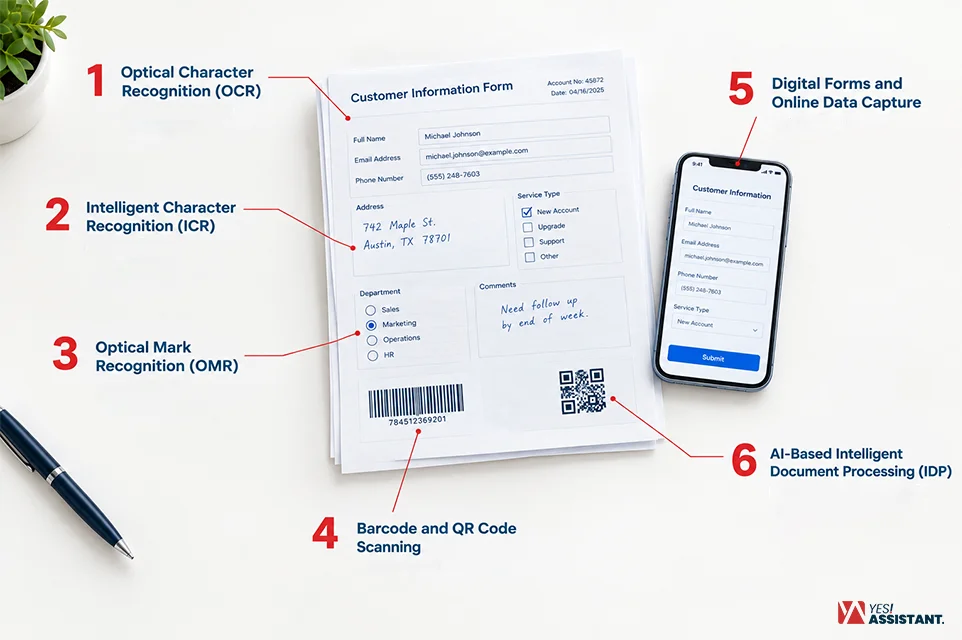
1. Optical Character Recognition (OCR)
Optical character recognition (OCR) can automatically read different documents. These are scanned invoices, PDFs and images. For example, OCR supports 2-way or 3-way matching for accurate figure analysis.
2. Intelligent Character Recognition (ICR)
Intelligent character recognition (ICR) reads and interprets handwritten text. It is an advanced version of OCR software that works with image files.
For example, a bank office processes a handwritten name or dollar amount that is filled out on a paper check.
3. Optical Mark Recognition (OMR)
Optical mark recognition (OMR) is used for tracking marked or unmarked points from printed documents.
For example, input your bulk answers into the OMR machine to make a results sheet.
4. Barcode and QR Code Scanning
Barcodes and QR codes are printed symbols on product labels that machines read to share item details or web links.
For example, a restaurant guest scans a square matrix code on their table tent with a smartphone camera to open a digital food menu on a webpage.
5. Digital Forms and Online Data Capture
Digital forms and online data capture utilize web interfaces and inputs to collect user data directly into structured databases or spreadsheets.
Example: filling out customer information and payment details, integrating an e-commerce checkout page.
6. AI-Based Intelligent Document Processing (IDP)
AI-Based Intelligent Document Processing (IDP) can read and understand documents. Then, collect information from a structured or messy record with a template.
Example: automatically extracting users’ names, contract numbers, and contact details from bulk documents (structured or messy) without a fixed template.
How Does Data Capture Work (The Process)?
Data capture works by collecting your required information from different sources like paper documents or computer screens and save into the system. It collects records, scans documents, reads details, checks for mistakes and sends them to the predefined folder. This simple process structures your messy documents into clear digital files fast.
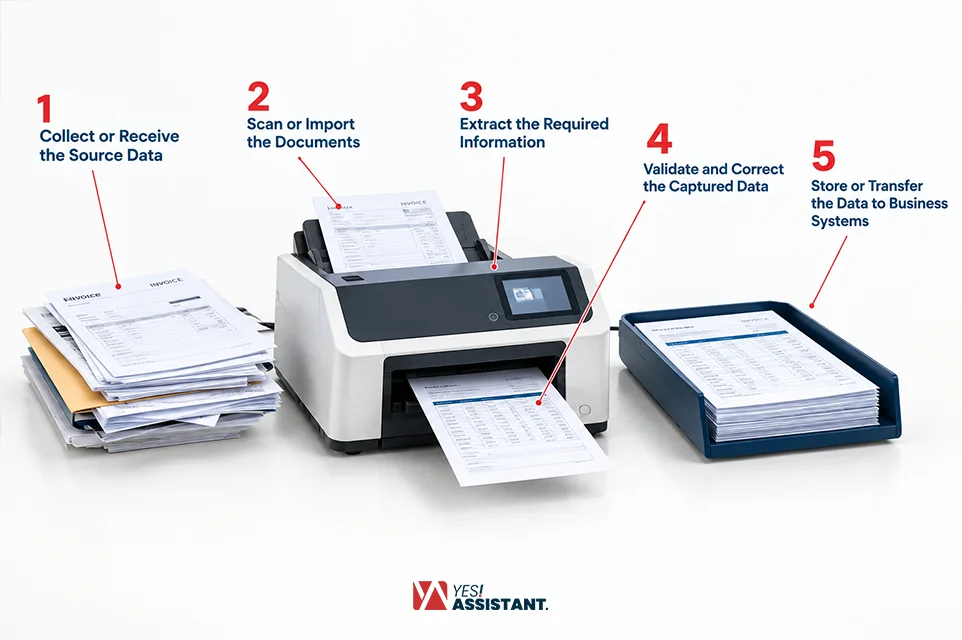
Step 1. Collect or Receive the Source Data
Collect or receive source data, such as gathering all the papers, forms or emails you need. It helps the data capture process to start by getting all the necessary files into one place. This helps you to integrate all your essential tasks together without anything being lost.
You can find and choose paper forms and emails. This step incorporates all your files into one place. It starts the data capture process smoothly.
Step 2. Scan or Import the Documents
Data capture scans or imports documents from sources, turning a paper page into a digital image. Thus, the picture from the scanner connects with data capture by turning actual paper into files a computer can see. Also, this turns your paper page into easy digital images.
| Pattern | What Happens |
| Machine Inputs | Machines take digital pictures of paper pages. |
| Input Into System | You upload paper files into your computer system. |
| Transform the document | It changes paper into computer pictures fast. |
Step 3. Extract the Required Information
Extracting the required information means you are collecting the exact words and numbers you need from a page. It helps data capture process documents by reading key details like names, dates and costs automatically. This step finds the important facts without reading every single word.
Smart tools read words and numbers on pages. You can choose names, dates and total costs. It pulls the key details out without giving extra effort.
Step 4. Validate and Correct the Captured Data
Validating and correcting data means checking all the words and fixing any wrong letters or numbers. It keeps the data capture process accurate by fixing mistakes before saving. This ensures all your facts are correct and true.
- You check all words for small mistakes.
- People fix wrong numbers and misspelled names.
- It makes sure every single record is right.
Step 5. Store or Transfer the Data to Business Systems
Storing or transferring data means putting the clean files into your main computer database or folder. It finishes data capture by saving your work safely where your team can find it later. This completes the whole process so you can use your files anytime.
| Category | What to Include |
| Input Stage | You send clean files to safe computer folders. |
| What System Syncs | Smart systems store all new information. |
| Final steps | It finishes the process so files are easy to use. |
What Are Some Practical Examples of Data Capture?
Data capture collects physical or digital information, connecting various systems. These are invoice and receipt capture, customer registration forms, employee or hr records, healthcare information and inventory records. See more practical examples:
Invoice and Receipt Data Capture
Invoice and receipt data capture integrates with OCR and IDP systems. Scans incoming vendor bills and sales receipts. It extracts financial data automatically. The line items include vendor details, tax amounts, invoice numbers and total balances due.
This data is directly connected to the accounting and ERP system. The QuickBooks or SAP system accelerates your accounts payable workflows.
Employee and HR Records
HR departments use employee and hr records to process benefits, tax forms (like W-2 or W-4), timesheets and performance management. Intelligent document processing categorizes the records and uploads employee details into the HRIS system. These records also help you to smooth your business’s payroll management and compliance tracking.
Healthcare and Insurance Forms
Healthcare providers and insurance forms are connected to OCR tools to digitize your patients’ information. These records help you to keep a patient’s medical histories, handwritten doctor notes and insurance claims.
Besides, data captured directly sends information into the Electronic Health Record (EHR) system. This will speed up claims processing without errors in patient care management.
Inventory and Shipping Records
Inventory and shipping records capture actual data using logistics and retail operations. Use barcode scanners, RFID readers and bill-of-lading information. This also facilitates tracking stock levels, incoming shipments and outgoing deliveries across warehouse management without manual logging.
What is the Difference Between Data Capture and Data Entry?
The difference between data capture and data entry are two distinctive functions. Data entry is a manual process to collect resources and data capture is an auto system that collects information from images and forms into a machine-readable format.
| Particulars | Data Capture | Data Entry |
| Method of Input | Integrated with automated software or tools. These are OCR, ICR and barcode scanners to capture data automatically. | Depends on the human operator physically typing text, numbers or records. |
| Speed of Process | Data entry requires a long time to collect records with human typing. | Automatically collects lots of information from digital sources. |
| Cost and Efficiency | It is an expensive process due to taking a lot of human hours and finding errors in inputted data. | Considering the long-term goal, it took a lower price due to integration with automation. |
| Handling Type | Handling critical handwritten documents and messy files. | Automatically works with the best structures and clear codes. |
What Are the Benefits of Data Capture for Businesses?
Data capture provides key advantages for businesses. The benefits include reducing repetitive work, improving accuracy, accelerating record-keeping, and providing easy access. See the benefits in the following steps.
Reduces Repetitive Manual Work
Reduces your repetitive manual work using automation. The data capture, extracts, and validates records. They automatically collect information from emails, images and forms.
Improves Data Accuracy Through Validation
Improve your data accuracy rate through validation checks. Data capture flags error, standardize format. These lower human errors and ensure reliable records.
Speeds Up Document Processing
Speeds up your document processing and structures your messy documents in seconds. It significantly reduces turnaround times for customer requests and invoices.
Makes Business Records Easier to Access
Data capture makes business records easier to access. It converts your physical papers and unstructured files into structured, searchable data.
What Are the Common Challenges in Data Capture?
The common challenges in data capture are lowering or degrading source documents. These are manual errors, high setup costs, strictly security or compliance risks. Significant challenges are followings:
Manual Data Entry Errors: Manual data entry errors are affecting business due to taking lots of human hours and rework costs. These cost you more in high-volume data workflows.
High Setup Costs: High-cost setups can make your data capture challenging. Because automated and large-scale systems require heavy upfront investment. The expense goes on hardware, software, integration and specialized infrastructure.
Security & Compliance Risks: Security and compliance risks can create a blind spot. So, strict data rules, unidentified third-party involvement, and cross-border restrictions.
Should Your Business Automate or Outsource Data Capture?
You can automate or outsource your data capture workflow. So, you need to choose an option depending on your current situation, consistent volume and specialized expertise. Consider this situation and decide which one is the best option for your business.
Building In-House Automation: In-house automation works best for companies that have a consistent workflow, document formation and an internal IT team. Besides, in-house automation requires advanced investment, software licensing, staff training and a ready-to-maintain infrastructure.
Outsourcing Data Capture: Your team handles a high volume of unstructured or handwritten records. Also, face seasonal volume spikes, or you want to avoid heavy setup costs. You can look into specialized data capture services to scale up immediately.
Your team can get access to advanced technology, scalable hybrid workflows and trained experts. So, your team can focus on big-screens and avoid painstaking jobs.
Closing Discourse: Building an internal system requires a high initial investment. You choose the right partner to ensure profits from the beginning.
First, evaluate your needs, regulatory requirements and budgets. These evaluations help you choose which one can fit for your business.
Conclusion
Data capture makes your unstructured or messy documents into a clear, editable format. An intelligent data capture tool works as a digital scanner that reads and understands the words.
You can automate or choose a partner to accelerate your business. The right one depends on your document types, work volumes and your team.
FAQs
What is an example of data capture?
An example of data capture is scanning a barcode at a supermarket checkout to know the price and production details in a computer or digital system.
What is the difference between data capture and data collection?
Data capture is the process of extracting raw information from different sources. These are papers, images and PDFs and are converted into a structured, readable format. In contrast, data collection is the broader process of collecting raw information from various sources like surveys, answers, specific sites, interviews, etc.
Is data capture the same as data extraction?
No, data capture and data extraction are not the same, though closely related steps. Data capture means collecting information from different digital sources, like images, PDFs, barcodes, etc. Data extraction is the process of converting unstructured documents into targeted and structured fields.
What software is used for data capture?
Software used for data capture includes JetForm, Typeform, Microsoft Excel, Airtable, and FasField.