

Time Blocking vs Calendar Scheduling: Key Differences, Pros & Cons
Managing a busy workday often like chasing a moving target. Without having a concrete plan, your plan become overwhelming, leading to distractions and missed deadlines. To regain your control over your workflow, you need a structured system.
Understanding how time blocking and calendar scheduling works and build a highly efficient, and stress-free workflow.
What is Time Blocking
Time blocking is related to a time management method where you split your day into blocks of time. Besides, each block is dedicated to a specific task or group of tasks. The idea of time block stops interruption of deep work, and helps you to stay focused on your defined tasks.
How Time Blocking Works
Time blocking is a productivity method by which you determine a fixed timing for a task rather than working from a generic to-do list. The techniques of blocking time involves proactive planning, like using Asana calendar to assign tasks to slots, grouping similar activities, batching, etc.
How Time Blocking Works:
- Assign Tasks to Fixed Time Slots
- Focus on One Task Per Block
- Include Buffer Time Between Blocks
- Review and Adjust Daily
Example of Time Blocking
You’ve got 8 hours a day to complete your job, and you planned to set time accordingly. For example, you’ve planned to spend 2 hours with clients, 3 hours for project report completion, and 3 hours follow-up clients.
Benefits of Time Blocking
There significant benefits of time-blocking that help you to boosts product with following:
- Your mindset is to limit time and complete accordingly.
- This enhances your time focus and reduces mental fatigue.
- You’ll prioritize specific tasks with deep focus.
What is Calendar Scheduling
Calendar scheduling is a strategic planning and structuring of tasks, meetings, and events to optimize productivity and ensure effective time utilization. Therefore, both management and staff will not forget or miss any schedule to attend a meeting in due time. It aligns with personal and company goals and utilizes projection slots within a specific timeframe to enhance productivity.
How Calendar Scheduling Works
Calendar scheduling works on calendar, organized calendars in digital tools and share corresponding responsibility to bring participants under a timing commitment. See how calendar scheduling works:
- Time Blocking: Set a specific time to centralize all other participants under a calendar to focus on work or specific schedules.
- Set Automation: Dedicate specific time in the calendar, remind everyone before meeting time and give space to get ready for the meeting.
- Shared Calendar: All participants get shared under a specific arrangement or events.
- Color-Coding: If there are more events, separate those within color-coding.
Example of Calendar Scheduling
Suppose, you need to update your team on product updates, like new features, pricing and adjustment.
- Available time setup: After getting management approval, book a calendar on Thursday 02:30 PM to 04:30 PM for the meeting.
- Booking Link: Share time-booking link to all participants through email.
- Automatic Update: Before meeting, the system sends a reminder on your email notification, like 3 hours, 1 hour or 30 minutes before a meeting held at a defined place.
Benefits of Calendar Scheduling
Calendar scheduling has benefits on personal and professional advances.
- Improved your daily time management and managed workflow.
- Increase your team’s productivity rather than single achievement.
- Reduce conflicts or double booking.
- Increase Professionalism and maintain collaboration.
- Digital notification maintains work-life balance.
Scheduling in calendar can facilitate business owners workflow like schedule appoint, book meeting, travel booking but long-time to manage. Therefore, assign a remote assistant, who manage calendar on your behalf and create free space for you to focus on your core strategies.
Key Differences Between Time Blocking and Calendar Scheduling
Both time blocking and calendar scheduling are important to your personal improvement and professional growth. While calendar scheduling involves group commitment regarding combined team work or events, and time-blocking is related overall personal or grouping time to a dedicated task.
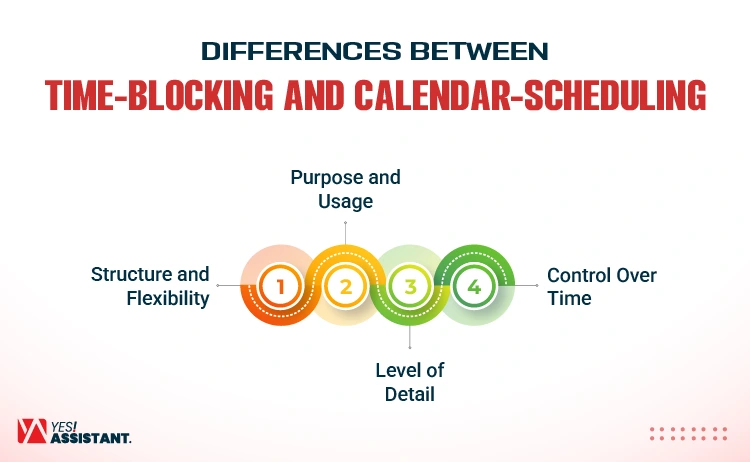
Structure and Flexibility
Calendar scheduling regards external commitment for meeting, and time scheduling is related to personal allocation to full workdays.
- Proactive vs. Reactive: Time blocking is proactive, like planning your full days in advance. While the calendar is populated with other requests for meetings or events.
- Categories vs. Commitments: Time blocking includes grouping your tasks into “batches” (like, “1-2 PM: Admin building”), whereas calendar scheduling is used for fixed appointments.
- Ownership: Time blocking turns your calendar into a “working plan,” making sure your time is dedicated to your priorities, and deadlines.
Purpose and Usage
Time blocking and Calendar scheduling is primarily focused on increasing productivity and proper time utilization with specific time slots. Instead generic “to-do” list time blocking ensures to spend time on specific tasks. Again, calendar scheduling focuses on meeting before setting a strategy or taking actions on a project.
- Time Blocking: This step deeply on specific tasks that reduce your procrastination on delaying tasks, maintaining urgency to ensure deep work. This is best for workers, freelancers, and contractual hiring staff who need to work within a set of time periods.
- Calendar Scheduling: Designed to keep consistency on scheduled meeting, events and avoid double-booking. This keeps everyone on track to maintain consistency.
Level of Detail
The level of time block is a proactive method to determine your list of work under a dedicated schedule. Again, managing a calendar, like committing with others to dedicate a fixed time for meetings or events.
- Time Blocking: Requires high-level of detail and dedicated to deep focus. It treats all tasks, even small ones like checking emails as “appointment with yourself.”
- Calendar Scheduling: This is a lower-level of detail rather than focus on group commitment to a specific schedule. It often only focuses on meetings, or “to-do” dates without mentioning when the work will get done during that day.
Control Over Time
Time blocking and calendar scheduling both provide significant control, and move from reactive to proactive approach. Moreover, time blocking controls the nature and focus on deep work, while calendar schedule controls the visibility and organization of tasks.
- Time Blocking: Maximizes the utilization of working hours and controls wastes. Through prioritizing the essential work, like blocking times for “high-valued” tasks to control procrastination or delays.
- Calendar Scheduling: Provide less control as the calendar tends to get filled with other people’s meetings. This is often called reactive scheduling.
Time Blocking vs Calendar Scheduling: Which is Better
Both time blocking and calendar scheduling are powerful methods to organize your workflow but have different purposes. Time blocking is generally better for deep work and productivity, while calendar scheduling is ideal for managing fixed commitments.
When to Use Time Blocking
Time blocking is best used when you need to focus on deep work, prioritize high-value work that requires high mental energy.
- Applicable for deep work and high-priority projects
- Required to complete work within defined time, reduce procrastination.
- Group similar tasks, like answering customers, and replying to slack messages.
- Protect focus and help you to avoid distractions.
When to Use Calendar Scheduling
Calendar scheduling is best for managing a time slots based on urgent requirement of business needs with following steps:
- Calendar schedule applicable for fixed appointments and meetings.
- Managing project deadline with following deadline.
- It’s balancing your workload availability.
- Routine maintenance of daily, week and monthly project works.
Tools for Time Blocking and Calendar Scheduling
Most popular time-blocking tools like Google Calendar, Outlook, Notion, and Todoist help structure days by merging tasks with calendars. The key features of these tools include drag-and drop scheduling, robust notifications, cross-device synchronization, and AI-driven automation.
Popular Tools
Use the following tools for easy integration with time-blocking tasks with the calendar.
- Google Calendar: Easy to handle, from beginners to experts can use Google Calendar. Besides, Google Calendar has built-in integration with AI to automate meeting schedule, time-blocking, and meeting management.
- Microsoft Outlook: This tool is powerful for enterprise, offering deep work in Microsoft 365 that integrated with “private” time blocking to robust scheduling.
- Notion: Offering highly customized and rich-context scheduling, Notion Calendar especially for users who manage projects and tasks within Notion.
- Todoist: This tool can facilitate calendar scheduling and time blocking through combining natural calendar views. Also can synchronize two-way calendar and natural language processing (NLP) to set specific times and duration for tasks.
Features to Look for
Besides using productivity tools, see popular features and how these facilitate your time block and calendar management.
- Drag-and-drop scheduling: Connect tasks with tools and turn into “to-do” automatically.
- Reminders and notifications: Connect with time blocks and send reminders or notifications from the calendar.
- Cross-device sync: Ensure schedules are consistent in web, desktop and mobile.
FAQs
Is time blocking effective for productivity?
Yes, time blocking is definitely effective for productivity as it forces you to work under an intentional routine, reduce your mental fatigue and align with your workflow.
Can you use time blocking in Google Calendar?
Yes, you can effectively use time blocking in Google Calendar by creating dedicated events or tasks to structure your working days.
What are the disadvantages of time blocking?
The main disadvantage of time blocking: it’s extremely rigid, leading to mental burnout when overscheduling occurs or interrupts tasks in any situation.
How do professionals schedule their day?
Professionals proactively analyze workflow and prioritize high-impact tasks under the schedule to manage both professional and personal commitments.
Conclusion
Time-blocking is a turning point when you implement it correctly. Besides, you can set different time blocks in the calendar to schedule meetings, events, and appointments that simplify your workflows. Both functions facilitate your tasks: time-blocking ensures personal improvement, while calendar schedules manage commitment with others.