

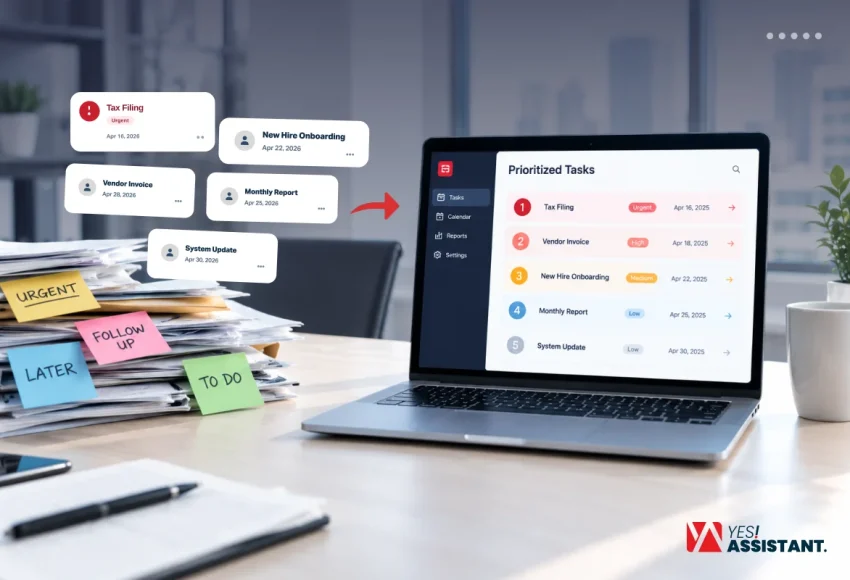
Back Office Task Prioritization: How to Decide What Gets Done First
Back office prioritization is the process of organizing and scoring your internal administrative tasks using a structured approach. Besides task prioritization, integrating all tasks into a centralized system can smooth your workflow. Without a clear system, daily paperwork and administrative bottlenecks can easily overwhelm your workflow.
Key Takeaways
- Follow a 5-scoring model (1 to 5), based on urgency and perform the tasks in order.
- Bring all tasks into a centralized system, like an inbox, spreadsheet and a single dashboard to maintain total visibility.
- Review your priority list every week to adjust to business needs and keep your operations smooth.
What is Back Office Task Prioritization?
Back office task prioritization is the systematic process of organizing and setting administrative, operational and support tasks in order. It automatically determines which tasks should come first from the queue and executes them. Therefore, your team will not miss any important tasks.
Why Back Office Prioritization Matters
Back office task prioritization matters to keep your operation smooth. You’ll not wait for the next task after completing one. Also, when you know what comes next, you will not waste time on unnecessary matters and can stay focused at every moment.
- Task prioritization helps you to complete important tax filing and meet legal deadlines.
- It also helps you to finish tasks with a predefined time while others are waiting.
- Prioritization keeps your daily work organized and focused.
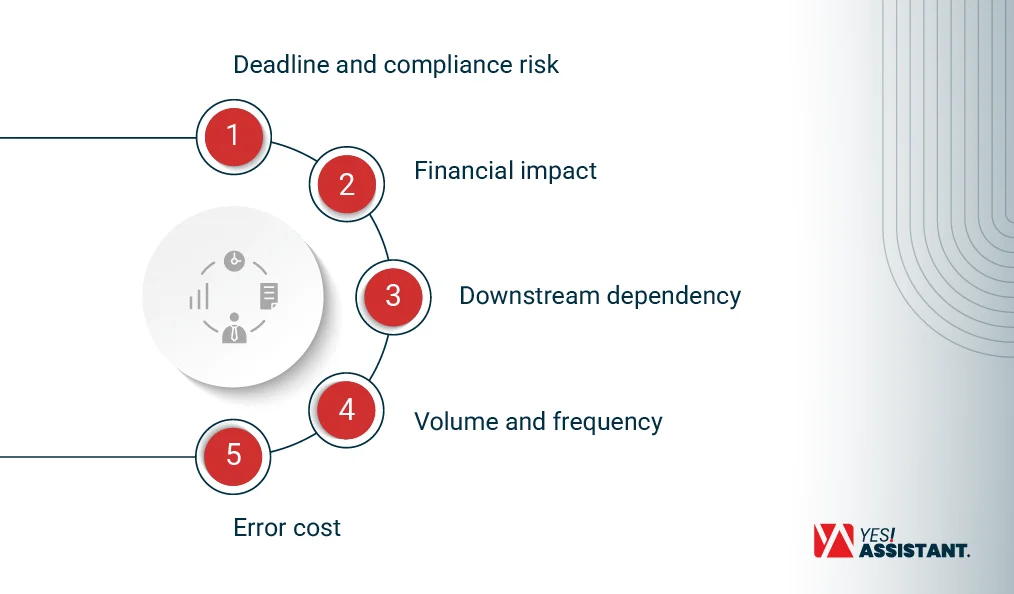
The 5 Factors to Score Every Back Office Task
Follow the 5 factors to score every back-office task into an organized process. The factors are mainly deadline risk, financial impact, downstream dependency and error cost. The scoring method guides you to start top tasks first and the remaining tasks get scheduled, automated or deleted.
Use the same scale at every step; score 5 for the most urgent or highest risk. Score 2 and 4 if the task falls between two anchors.
Deadline and Compliance Risk
Deadline and compliance risk for Tax filings, Payroll cutoffs, and regulatory dates has no alternative options. Missing deadlines results in you being faced with regulatory penalties or legal actions.
- Score 5: Maintain a strict deadline. It’s a fixed date; if it fails, businesses will face legal action or regulatory penalties.
- Score 3: This is under an internal deadline that affects your planning.
- Score 1: No deadline at all, So, your task can wait during other busy work.
Example: A tax filing or a payroll cutoff has an outside deadline. So, it scores a 5.
Financial Impact
Financial impact: follow the money. Late fees and cash flow gaps add up fast. Also, early payment allows you to get discounts. If your invoice stops in a pile, you will miss the discount opportunity.
- Score 5: Cash is lost or locked up within days.
- Score 3: Money is at risk, but you have time to recover it.
- Score 1: No money moves either way.
Example: A payroll run scores a 5, while a vendor batch with a late fee gets a 4.
Downstream Dependency
The Downstream dependency: some tasks have no sync with other work. If another team is waiting for your task completion, it will impact their success. Find out the exact cause of what stops your sales and support.
- Score 5: It blocks sales, support or another team today.
- Score 3: It will slow another team this week.
- Score 1: Nobody is waiting on it.
Example: New-hire paperwork that blocks a laptop order scores a 4, while a stalled sales contract gets a 5.
Volume and Frequency
Check volume and frequency: how often your task is handed to you. Daily tasks add up quickly. Any kind of delay at your work creates a backlog.
- Score 5: Daily work in high volume.
- Score 3: Weekly or semi-regular work.
- Score 1: A one-off, ad hoc or seasonal task.
Example: A daily data entry task scores a 5, while a monthly report gets a 2.
Error Cost
Error cost adds when your work is wrong or delayed. If there are simple mistakes, they need easy steps to fix. Any kind of complex mistakes can affect your teams and customers.
- Score 5: These mistakes are expensive, visible to all and hard to fix.
- Score 3: Just needs rework but causes significant hardship.
- Score 1: Errors take minutes to fix.
Example: A wrong payroll run is a major issue and scores a 5. A mislabeled archive file is minor and scores a 1.
How to Prioritize Back Office Tasks in 5 Steps
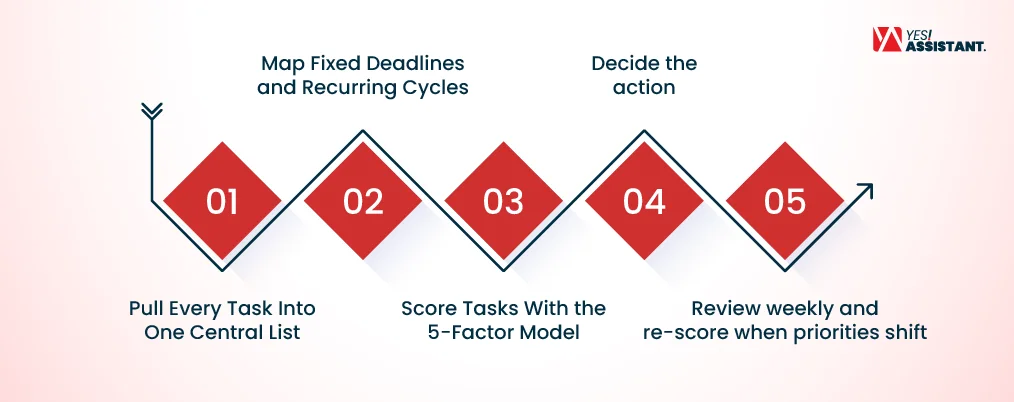
Prioritize your back office tasks following a 5-step method to work consistently. You can set priority tasks by mapping schedules, scoring work and choosing the right action and reviewing your plan.
This five-steps plan helps you to start one-by-one tasks in order following a smoother routine.
Step 1: Pull Every Task Into One Central List
Pull every task into one integrated system to centralize scattered work. Therefore, your team can track a series of tasks from a single list.
| Source of Actions | What to Do |
| All systems | Pull tasks from your different business software into one system. So, you will not miss anything. |
| Inboxes | Check all emails and chat messages to identify pending requests or assigned tasks from other team members. |
| Spreadsheets | Collect all tracking sheets and manual logs into one main hub to see your data in a single place. |
Step 2: Map Fixed Deadlines and Recurring Cycles
Map your fixed deadlines and recurring cycles on a calendar by marking dates before adding other tasks. This helps you to see key schedules and stops you from missing important legal and financial deadlines.
- Month-end close: Fix the last week of the month to finalize accounts and review financial reports.
- Payroll: Mark the exact date (at the end of the month or in week one to payments. So, employees’ payments go on time.
- Quarterly filings: Set a reminder or notification on your calendar for tax submissions or regulatory reports.
Step 3: Score Tasks With the 5-Factor Model
Score tasks with the 5-factor model and check each job against clear rules. The score system is a simple 1-to-5 scale, where 5 means the highest urgency or risk. Also, use 2 or 4 when tasks sit between two anchors. Maintain the same scale to keep your work consistent.
- Deadline and compliance risk: Score 5 for fixed dates where missing them causes legal penalties or regulatory fines. If the score is 3, this means planning an internal deadline. Also, score 1 means tasks have no deadline at all. For tax filing or payroll deadlines, use score 5.
- Financial impact: Give a score of 5 when cash is lost or locked up within days. Score 3 if money is at risk but recoverable, and 1 if no money moves. A payroll run scores a 5, while a vendor batch with a late fee scores a 4.
- Downstream dependency: For ongoing sales, support and other team collaboration, score 5. If the score is 3 means a team performance down this week. For a score of 1, nobody takes responsibility.
- Volume and frequency: For high-volume daily work, a score of 5 causes a backlog when delayed. Score 3 focuses on weekly tasks and 1 on ad hoc jobs. For daily data entry, a score of 5 points, which signals a great opportunity for automation.
- Error cost: A score of 5 means errors are critical and hard to fix. If the score is 3, it needs rework and 1 is for quick fixes. When your process has a wrong payroll score of 5, a mislabeled archive gets a 1.
Step 4: Decide the Action
Decide the right action for each task according to its score and find out the best way to handle it. This helps you to do the most important work and allow others to do the rest.
- Do now: Lead the top-scoring task following right away if you are busy with other work.
- Schedule: Keep your secondary-priority tasks on the schedule for later when you have free time.
- Automate: Computerize your daily repetitive tasks. So you can concentrate on other work.
- Delegate or outsource: Choose a back-office outsource to a partner or external parties to save your valuable time.
Step 5: Review Weekly and Re-score When Priorities Shift
Review your tasks scores weekly to find new things to do work quickly. This will keep your work smooth.
| Review Stage | How to Execute |
| Weekly check-in | At the end of the week, what tasks are already completed? Also, see what you do next week. |
| Re-score tasks | Change your ongoing tasks if new ones have more urgency to meet the deadline. |
| Adjust your plan | Always put your most prioritized tasks at the top. This keeps you on the right track. |
Which Back Office Tasks Should You Automate or Outsource First?
Automate or outsource your daily repetitive, rules-based back office tasks quickly. Use technology or outsource partner help for daily tasks which keep your business smooth. So your teams can focus on core activities.
- Automate first: Use tools. Zapier or Microsoft Power Automate are effective tools to use for data entry, invoice processing, sorting files and recurring appointment reminders.
- Outsource first: Find a convenient outsourcing partner to hand over your manual non-core tasks. These include payroll, customer support ticketing, data cleanup, and routine bookkeeping.
- Explore professional support: To facilitate your operations, partner with specialized back office support services. This allows your business to delegate heavy administrative loads securely and effectively.
Common Back Office Prioritization Mistakes
The most common mistake in back-office prioritization, like many business owners, is to rush to every desk and treat every task as urgent. These back-office delays affect your business by increasing the risk of missed deadlines.
1. Deadline and scoring mistakes
| Deadline & Scoring Mistakes | How to Execute Tasks Without Prioritization |
| Failed to score the task | Managers often forget to set a consistent scoring system for their daily workload. |
| Follow no rules | Without applying rules, business owners dictate what employees do instead of checking deadlines. |
| Haphazard strategy | This dictatorial approach leaves critical compliance deadlines completely exposed to failure. |
2. Common mistakes in regular review and updates
| Review & Updating Mistakes | How Priority Tasks Mislead the Team |
| Failed to review lists | No team members review and update their task list on a weekly basis. |
| Need update | Businesses need to change first. Old lists stop working. |
| Push regular review | Regular Reviews are essential to keep your operations running smoothly and effectively. |
Tools That Help Prioritize Back Office Work
Prioritize back-office work using specific software to organize, track, and score effectively. Use platforms like Gusto for financial administration or compliance software like Vanta, you can see how technology changes back-office support to centralize your data and avoid missing the most urgent task deadlines.
Payroll software: Both employee payroll and other benefits follow strict internal deadlines. Use Gusto and QuickBooks to track and manage payout cycles.
Tax management tools: Tax filing deadlines are essential to regulatory rules. Use TurboTax and FreeTaxUSA to ensure accurate and timely filings.
Compliance trackers: Vanta, Drata, and ComplyScore help monitor regulatory dates and compliance tracking.
Workflow automation platforms: For workflow automation, Zapier and Microsoft Power Automate, help you to facilitate your administrative tasks.
Conclusion
Back office task prioritization balances your workflow and allows you to structure work from most urgent to strategic work in order. Besides, back-office prioritization can easily change your messy schedule into a smooth structure. Use the organized framework, automate tasks and ensure business growth.
FAQs
What is the best way to prioritize back office tasks?
The best way to use the 5 factors is task scoring and evaluating the deadline model, financial impact, downstream dependency, volume, and error cost.
How do you prioritize tasks when everything is urgent?
Prioritize tasks when you see everything is important; just separate actual emergencies and sort work into urgent and important by scoring 1 to 5.
What is the difference between front office and back office priorities?
Front office priorities focus on business revenue, sales, and client relationships. Back office priorities focus on internal operations, like compliance, payroll, and administrative support.
Which back office tasks should be done daily vs. weekly?
Daily back-office tasks include urgent communication and report generation, while financial reporting, payroll reviews, and schedule updates are typically weekly.
How often should back office priorities be reviewed?
Back office priorities should be reviewed weekly to revise scores and adjust to shifting business needs.