


How to Clear a Back Office Work Backlog: Step-by-Step Guide
Back office backlogs are just like tiny cracks in a water dam, looking harmless but very dangerous. You can clear back office work backlogs easily by separating pending tasks, measuring the workload, removing unnecessary work, prioritizing tasks, batching similar work, automating repetitive tasks, and adding extra capacity when needed.
Once backlogs start affecting daily operations, back office teams can get stuck in loops. Rather than paying attention to top priority, the daily routine looks like fixing errors. To clear it, the root causes of backlogs must be identified, as well as their impact and priority. This article talks through how to clear a back office work backlog.
Key Takeaways
- A back office backlog usually occurs when workload is higher than the back office team’s processing capacity. It does not happen overnight but slowly.
- Before using any methods for the removal of backlogs or precautionary measures, analyze the main reasons for the emergence of backlogs.
- When removing backlogs, it is essential to create a master list of backlogs and complete them in order of priority and impact on the business.
- Automation and grouping techniques are very effective for removing backlogs. They include batch processing, automation techniques for rule-based tasks and assigning critical backlogs to experts.
- One reason for investigating the backlog is to stop it from occurring in the future.
What is a Back Office Backlog?
A back office backlog is a pile of unfinished back office tasks that are not done in time, such as administrative, support or operational tasks. These tasks often include data entry, document review, processing invoices, document processing, reporting data, and many more.
Backlogs start forming when incoming workload crosses the available capacity of back office teams. For example, a business receives 1000 invoices per month. The business’s back office team is only capable of processing 800 invoices per month. As a result, they could only process 800 invoices, and 200 invoices were added to the backlog.
Every backlog requires different measures and techniques. Temporary or seasonal spikes are quite easy to handle but long-term backlogs are a real issue. It indicates that there must be some critical issue within the process.
The real goal of clearing back office backlogs is not just to finish the piled-up tasks. A successful backlog fix means clearing the piled-up tasks and creating a workflow that can handle upcoming tasks efficiently and within a fixed time period.
Why Back Office Backlogs Build Up
Back office backlogs usually build up when the load of incoming work is higher than the back office team can handle. However, there can be many underlying reasons why back office backlogs build up. To effectively clear backlogs from the workflow, it is important to know and understand the underlying reasons.
Here are some common reasons behind back office buildup:
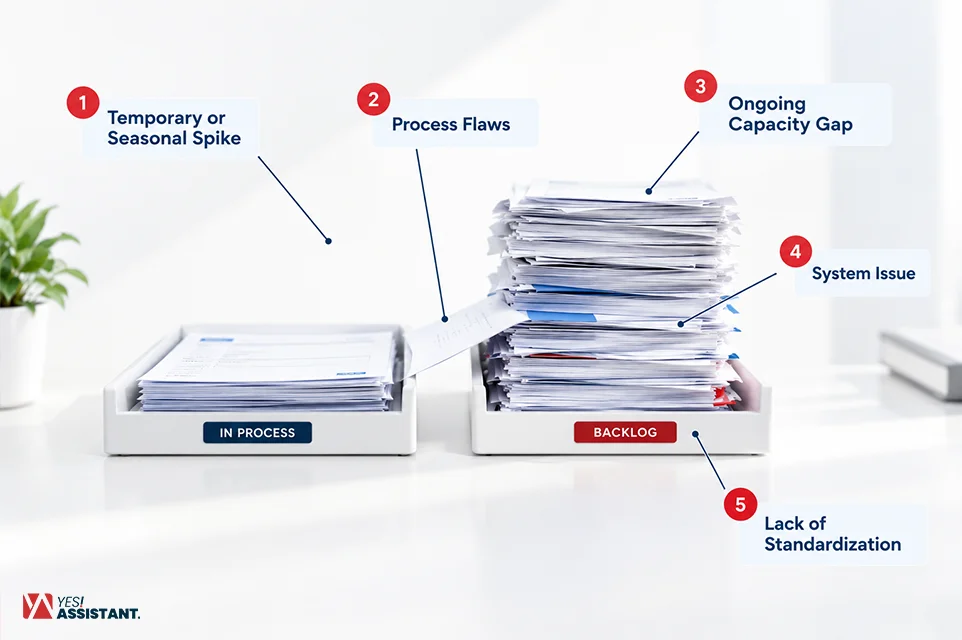
- Temporary or Seasonal Spike: Tasks can build up temporarily or seasonally. This may include seasonal spikes, month-end closing or new client onboarding.
- Process Flaws: This is a very common cause behind backlog buildup. Process flaws can be in the form of inconsistent data, duplicate data entry, manual direction, or lack of fixed ownership.
- Ongoing Capacity Gap: An ongoing capacity gap refers to understaffing, lack of necessary resources, lack of proper knowledge, and many more.
- System Issue: System issues can consist of many issues inside the processing system. It can be structural, such as a disconnected system; license issues, such as outdated software. In many cases, adaptability issues, such as switching tools frequently, are a big concern as well.
- Lack of Standardization: Lack of standardization means every employee uses their own tricks to solve issues. But proper backlog clearance does not work like that. Tasks must be standardized and fixed under the same rule.
Diagnose the Cause Before You Fix It
The universal and basic rule of fixing any problem is to understand the problem. In matters of backlog clearance, this rule hits harder than ever. Here, understanding the cause, signal and best way to fix issues will help your back office team stay connected, standardized and ahead of others.
Here is an information table for you to diagnose back-office backlogs before you try to fix them.
| Cause | Signal | Best fix |
| Temporary spike | Backlog appeared after a peak in workload | Add short-term extra capacity |
| Process flaw | The same errors, rework, or delays keep repeating | Apply a process fix, then clear the backlog |
| Ongoing capacity gap | Backlog continues to grow every month | Add permanent capacity or consider outsourcing |
| System issue | Significant time is lost switching between tools or transferring data manually | Integrate systems or automate the affected work |
How to Clear a Back Office Work Backlog in 7 Steps
Once you have diagnosed and found the reason behind a backlog, it is time to clear those backlogs through effective measures. The following are methods to clear a backlog in only 7 steps. These steps help to clear a backlog without piling up new work.
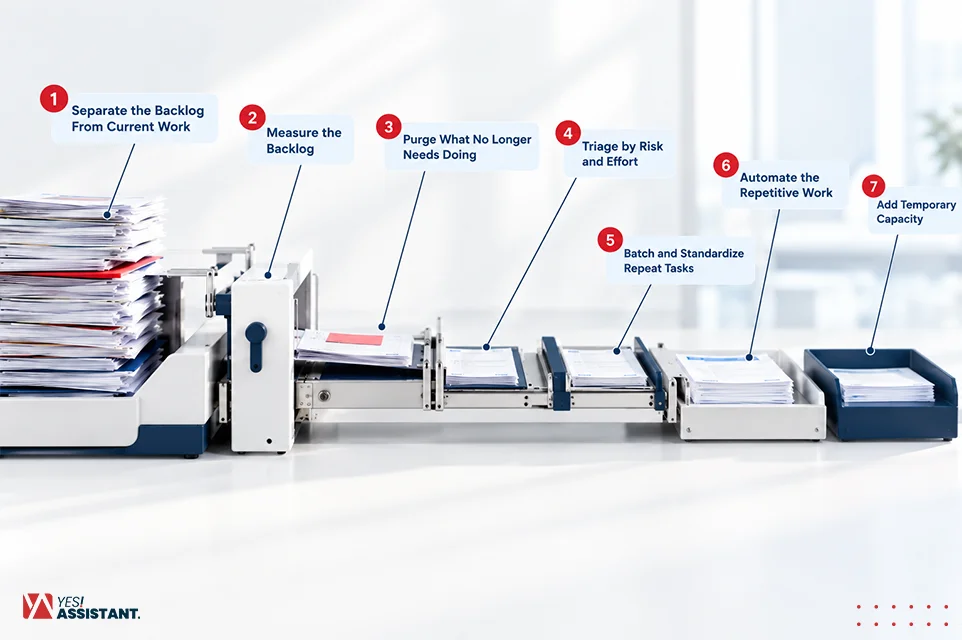
Step 1: Separate the Backlog From Current Work
Creating a new list for backlogs by separating them from combined lists is a reasonable approach. It sorts out the backlogs that need to be conducted first. Create a different queue just for backlogs to differentiate them from the current workflow.
To Do This:
- Move all the unfinished work into a separate special queue.
- Assign an owner for each backlog depending on the person’s expertise.
- Keep incoming tasks in a different regular workflow.
- Create a list of backlogs and differentiate based on type, department, or age if required.
This is how your back office team members can stay away from regularly switching between old and new work. So, updated and older work backlogs can easily be managed with an appropriate priority. Let’s take an example. You have to shift 300 pending tasks from the previous month and you have a new batch of tasks. Now separate them for handling by different teams.
Step 2: Measure the Backlog
Measuring backlogs is a critical step in clearing backlogs, as it provides a clear picture of the nature of the backlog and the solutions to deal with them. Measure the backlogs in terms of their age, importance and the effort required to clear them.
The following 5 vital points can be tracked to measure backlogs:
- Backlog Volume: Number of unfinished tasks.
- Backlog Age: How long the tasks have been unfinished.
- Work Required: The effort required to finish the task.
- Incoming Volume: Number of new tasks joining the workflow.
- Processing Capacity: Number of tasks the back office team can process within the predefined time.
Tracking these vital points helps in measuring the estimated time of how long it might take to clear backlogs.
For instance, a back office team that has 400 pending invoices calculates the estimated time and checks it against weekly capacity.
Step 3: Purge What No Longer Needs Doing
Purging what is no longer needed makes the process faster and easier to execute. Remove the unnecessary tasks before processing the backlog. The tasks may include duplicate, cancelled, outdated tasks, document management requests, etc.
While removing, look for these things:
- Duplicate requests, meaning a single request available multiple times.
- Cancelled transactions.
- Outdated requests.
- Tasks that are already done somewhere else.
- Items that do not add value to the business anymore.
Create clear rules with advanced reasoning and maintain an audit trail before removing or deleting anything. Do not make changes only based on instinct or just because they are old.
For example, an HR removes existing duplicates and cancelled requests before trying to process the backlog.
Step 4: Triage by Risk and Effort
Judging a task by its risk and effort is a critical step and very effective. It helps prioritize the work based on importance, such as high-priority tasks should be done first, and other tasks can wait. Whenever clearing backlogs, focus on importance, not age.
| Priority | Examples |
| High risk | Payment issues, customer experience, compliance deadlines |
| Medium Risk | Important work that can wait briefly |
| Low Risk Examples | Routine tasks with limited immediate impact |
Inside each group, consider the risks and efforts. Make sure to do the fastest and easiest tasks in batches. At the same time, assign the high-risk activities to a specific person who will concentrate on them closely.
For instance, the group of Accounts Payable will prioritize the tasks related to payments and not spend time on trail checks or data updates.
Step 5: Batch and Standardize Repeat Tasks
Standardizing repeat tasks by batching them is a good way to clear backlogs fast. For faster and more effective processing of backlogs, group similar tasks together and follow the same procedure for each of them.
Follow these steps to standardize the work:
- Create a checklist containing simple procedures.
- Group the similar tasks under the same category.
- Define the information needed to complete each task.
- Sweep out unnecessary steps that consume time.
- Document the common exceptions available in the backlogs.
Taking these measures helps reduce inconsistent processing and rework.
For example, a back office AP processes a group of 500 invoices that follow the same rule rather than processing each of them individually.
Step 6: Automate the Repetitive Work
Implementing automation for repetitive tasks is an intelligent and reliable choice. This is due to the fact that it is convenient, saves time, focuses on more important work, and invests in higher-priority tasks. It becomes possible by using advanced technologies. Among these technologies are RPA and OCR, which help to automate high-volume and repetitive tasks that follow the same rules.
Tasks that can be automated include:
- Data entry.
- Document classification.
- Validation checks.
- Status updates.
- Notifications.
- Workflow routing.
Launch the process with simple tasks featuring easily defined rules. All the exceptions and other activities that require approval via an escalation path have to be delegated to particular owners.
For instance, the back office team automates invoice processing and escalates other exceptions to the appropriate employee for review and approval.
Step 7: Add Temporary Capacity
In the case of significant backlogs, temporary capacity added to the process can produce outstanding results. If your backlog is substantial, you may think about back-office outsourcing to clear your process of exceptional cases by hiring temporary workers.
Possible resources may include:
- Overtime.
- Temporary staff.
- Cross-trained employees or remote teams.
- External support from a managed services provider.
Set a backlog reduction target and monitor it consistently. If the backlogs start to reduce, it is a good sign. But if the backlogs keep growing, investigate which part of your process might carry a problem.
For example, a payroll team hires external support such as a back-office support service which helps them clear month-end backlogs.
Overtime vs. Temp Staff vs. Automation vs. Outsourcing
The solution depends on many things rather than just deadlines. Choosing between overtime, temp staff, automation and outsourcing is a tough decision. The decision should be made upon business challenges, priorities, deadlines, budget per backlog and many other things.
Here is a comparison table for better understanding of each method:
| Strategy | Best Used For | Key Advantage | Main Risk |
| Overtime | Short-term workload spike | Fast to implement | Can increase employee fatigue |
| Temp Staff | Temporary capacity shortage | Adds processing capacity quickly | Requires training and supervision |
| Automation | High-volume, repetitive work | Reduces manual processing | Requires setup and clear processes |
| Outsourcing | Large or recurring backlog | Provides scalable capacity | Requires onboarding and quality controls |
A 30-60-90 Day Backlog Recovery Plan
A planned decision is always better than an unplanned decision and when the matter is backlog recovery, planning is a must. Keeping a recovery plan in the back of your mind helps you stay one step ahead and helps the process perform at its best. You can follow this recovery plan to recover from backlogs.
| Timeline | Focus | Key actions |
| Days 1–30 | Stabilize and reduce | Separate, measure, purge, triage and start reducing the highest-risk backlog. |
| Days 31–60 | Improve processing | Batch work, standardize processes, introduce initial automation and add capacity. |
| Days 61–90 | Prevent recurrence | Fix root causes, move to steady-state processing and set backlog alert thresholds. |
Conclusion
Clearing back-office backlog is critical and crucial. It involves making decisions based on smart planning, as well as involving yourself in hard work. Instead of making mistakes others do, such as rushing through tasks, go for a structured approach. This follows the higher-priority-first and lower-priority-last rule.
You can clear back office backlogs by using batching, automation, or adding extra capacity when needed. But the goal isn’t just to get rid of the current backlog. It’s also about fixing the causes behind it and putting better processes in place so backlogs don’t slow down the workflow again.
FAQs
How long does it take to clear a back office backlog?
Clearing backlogs can take a few days to several weeks based on the size and needs of the business. For example, a small business with a month’s backlog can be cleared with 2-4 days of focused work. In that way, a larger company with year-long backlogs can take weeks to clear.
What is the first step to clearing a work backlog?
The first step in clearing a backlog is creating a different queue for normal tasks and backlogs. Separating the backlog into different queues is effective and helps detect, measure, and prioritize the backlogs. It also helps apply all of the necessary steps needed to clear a backlog.
Should I clear the oldest items first?
No, you should not. Because every decision in backlog clearing matters more than it seems. Each decision here must be logical and fact-backed. Select which backlogs should be processed first depending on importance, deadline, and urgency. Ultimately, look for which one impacts your business most.
Can automation clear a backlog on its own?
No, automation can not clear backlogs on its own; however, it can help address a variety of repetitive and rule-based tasks. Tasks requiring judgment or approvals are outside the scope of automation.
How do I calculate how long my backlog will take to clear?
You can calculate it by dividing the total pending work by your team’s total capacity. Formula: Estimated clearance time = Backlog workload ÷ (Processing capacity − Incoming workload).
For example, if your backlog is 400 hours, your team processes 50 hours per week, and 10 hours of new work comes in, the calculation is 400 / (50 − 10) = 10 weeks.