

The Rise of Remote Support Roles: Tools, Skills, & Growth
Remote support roles involve a person, integrated with tools, or remote assistance provided necessary supports from distance. These support roles troubleshoot problems like customer service, IT helpdesk, and track issues. Besides, remote assistants use a distance tool to access your PC, identify problems, and quickly fix them without being physically presented at the workplace.
Key communication Channel used remote assistant:
- Livechat, or chatbot
- Phone call
- Support ticket
- Customer data
Why Remote Support Roles Are Growing
During the worldwide covid-19 pandemic, businesses start remote work due to countrywide-lockdown and restriction on gatherings. Later entrepreneurs found it very effective and ensured long-term scalability. See, why remote support roles are growing with followings steps:
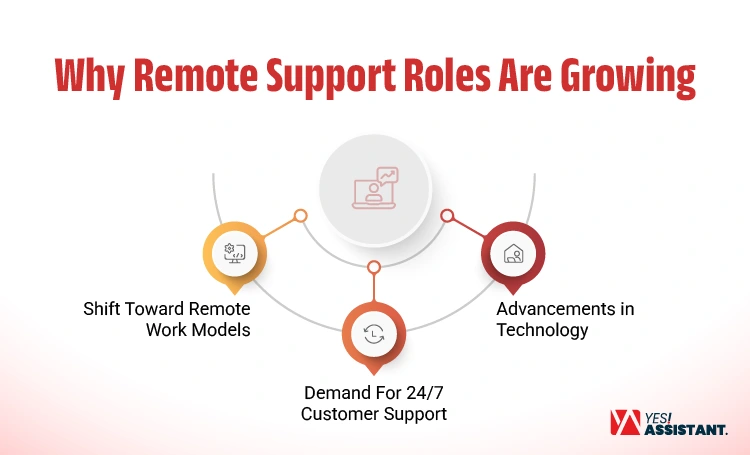
Shift Toward Remote Work Models
The remote work model was framed at time of covid-19 session, and it’s now considered remote but effective office models. Various agencies and contractors provide virtual support, assisting small businesses with operational scaling. This remote support helps the small business or solopreneurs effectively for saving costs.
- Remote roles can save a significant amount of money by reducing by different benefits costs.
- Employers can benefit from reducing overhead costs, like office space, utilities, and supplies.
- When required to expand, businesses don’t need to increase office space, hire new employees rather than deploy remote roles for specific needs.
Demand for 24/7 Customer Support
Remote work isn’t your backup plan, it’s a consistent and effective support from a distance location. Businesses scale their operations by assigning support assistants at different locations with round-o-clock services.
- Ensure consistent 24/7 support to the customers.
- Greater focus on employee well-being and flexibilities
- Following no specific office hours that may interrupt customer support.
Advancements in Technology
In traditional customs, businesses operate their customer support from office arrangement. By setting a dedicated team from remote, you can manage customers’, business or supporting documents with using advance technology.
- Integrated to cloud-based support tools like Zendesk, Freshdesk for remote helpdesk support.
- Connect to chatbot supports multiple customers within limited time.
- Engage by video conference or live services to increase your customer satisfaction.
To avoid in-house staffing, most of the business owners rush to take advantage of remote support services from different companies. This will give you more space to think about your company’s big-screens.
Types of Remote Support Roles
Businesses required remote support regarding specific positions. Besides, remote support roles required technical or customer support. These roles can get access via remote access devices, and trouble the problems and fix-up.
Customer Support Representative
Traditional companies provide support following office hours (9 to 5), which may trouble customers if problems arise after office hours. In advance setting, remote customer support assistants arrange devices like handling inquiries via chat, sending email or direct calling. Which mainly focus clear objectives on customer satisfaction and retention.
Cloud-Based Support Tools
Integrate with cloud-based support tools, like Zendesk, Freshdesk, and Intercom to collect tickets and resolve the problems.
Video Conference
For any urgent needs, remote support assistants connect to video conferences or live services to engage with customers.
Communication Platforms
Integrate with platforms, like Slack, Microsoft Teams, and Zoom are used for faster communication.
CRM Systems
Collect customer history, like users interactions, and queries, using CRM systems like Salesforce, and Hubspot.
Technical Support Specialist
Businesses are deeply integrated with technical support to enhance operation, ensure cybersecurity and maximize productivity. When technical support fails, business never grows to increase customer dissatisfaction. Therefore, advanced technical support assistance can keep your business ahead as customers demands faster solutions.
Diagnose Problems and Resolving Issues
Support assistant troubleshooting the hardware, software problems through scrutinizing the full system, and minimizing the disruptions.
System Installation and Configure
Remote assistant access to your system to install new softwares, update drivers; including test existing systems.
Documenting and Maintenance
As per regulatory requirement, technical support assistant keep records of PC/device users list, software, and its version through proper records.
Familiar with CRM Tools and Gather Information
Build skills in your support role. Therefore, technical assistants can be familiar with CRM tools, and collect necessary information.
Virtual Assistant
Most of the company hires virtual assistants for handling scheduled tasks, like administrative task, small repetitive tasks. This can free business owners from all kinds of stress and create a window for high-impacts tasks. This most common remote support roles in a virtual setting that generally benefits businesses.
Scheduling Tasks and Manage Calendar
Virtual assistants engage with company higher management to understand their jobs roles. Their duties are mainly scheduled to book their meeting, manage calendar, and arrange travels.
Prepare Documents and Update
Business has regulatory obligations to keep security, business sensitive information, or client information in secured records. Virtual assistants help businesses to keep those records updated.
Customer Service and Query Management
For a business, remote support handle a variety of customer queries, solve problems and welcome new customers. These are like answering calls, receiving phones, or live chat with prospects that grow your business.
Social Media Support Agent
If you’re a business-owner, you must not spend more time on social media management that kills your strategic time. Indeed, a social media assistant can help you to set strategic planning for engaging more audiences with your brand. These remote roles assist you to plan for creating, selecting channels and connecting users with your business.
Content Creation and Curation
Write engaging descriptions, create descriptions, add infographics, attract visuals, and select groups, channels that are highly convenient with your brands.
Scheduling and Posting
Targeting to specific users, remote assistant research on specific zones audiences, and their availability on weekdays or working days. Post content as per schedule that engage with more audiences.
Overview Analytics and Reporting
Track and monitor analytics, research user’s interaction, engagement rate. Finally, report to the business owner for further steps.
Skills Required for Remote Support Jobs
Businesses hire remote support assistants by sorting through candidates’ skills, previous support experience, and relevant hands-on training. These are mainly client communication skills, technical skills, time management skills, and problem-solving ability.
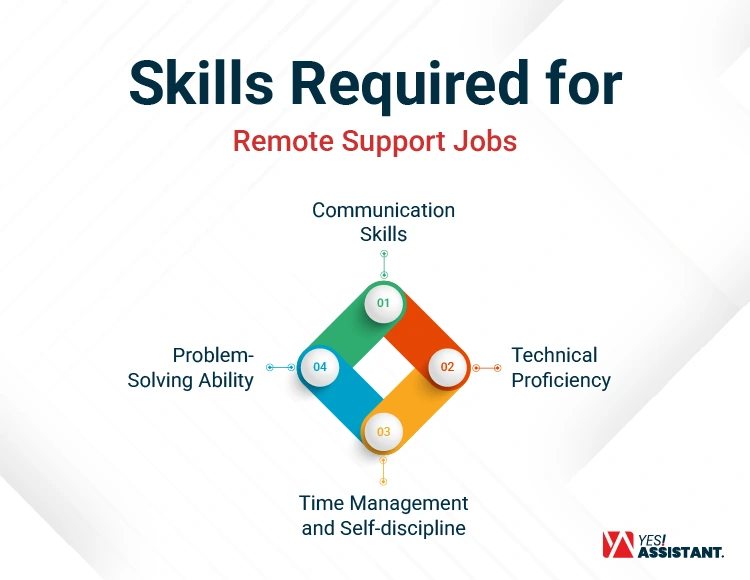
Communication Skills
Before choosing a remote support assistant, track and analyze the VA’s linguistic skills, and how previously they managed businesses’. Also, check the ability to write emails with error-free text, accurate proofreading skills. Both written and verbal communication must convey your brand perfectly.
- Clear Written & Verbal Communication: Research audiences, use Grammarly to write clear and easy email letters to the prospects.
- Tone-Management in Text-based Support: Learn about targeted area’s culture, language tone. Manage tone based on text support that is more engaging than generic.
- Active Listening and Act Accordingly: Be patient and answer deliberately on what your customer expects. Don’t hurry or feel bothered, if the conversation goes out of your temper.
Technical Proficiency
Without having technical efficiency, a virtual assistant never explores his talent to both business owner and client. Virtual assistants must have expertise on inbox management, Google workspace, Microsoft offices, with necessary tools and software. Besides, remote support roles should have typing speed (50-70WPM), proficiency on project management tools.
- Knowledge on CRM & Docs: Having knowledge CRM, your assistant can track, manage user interactions that help you to generate more sales. Also, virtual assistants should have knowledge on managing documents.
- Basic Troubleshooting Skills: Connecting with remote systems, troubleshooting your device or pc to find-out problems and fix issues.
- Remote Access & Control Skills: Skills on handling different remote access and control software like, Slack, Zoom, or Microsoft teams for internal communications.
Time Management and Self-discipline
Virtual s support assistants organize your business and save your time. Therefore, you can manage multiple clients without burnout. Indeed, a virtual assistant can manage multiple tasks with time management and keep your schedule free from distractions.
- Ability to Work Independently: As VA working from remote, they can decide, work and interact with different clients’ without waiting for your clarification.
- Meeting with SLAs and response times: Remote support assistants should meet with Service Level Agreement (SLA) by implementing task organization.
- Calendar Settings: Organizations may have tight schedules that are required to meet deadlines. Virtual assistants must have time management skills for setting calendar.
Problem-Solving Ability
This is most essential to solve customer queries that keep your brand on top of customer mind. Indeed, remote assistants must be skilled in identifying customers painpoint, fixing issues quickly.
- Identifying Root Causes Quickly: This is more effective to identify root causes of your client’s issues than answering calls.
- Providing Effective Solutions: Offer customer quick solutions to the complex issues. The dependency does not allow your customer to switch to another brand.
- Adaptability: To adapt with new challenges, learn new things, like solving problems methodically, and learn software.
Tools Used in Remote Support Roles
In remote setting roles, using necessary tools can enhance your productivity, secure roles and consistent operation. These productivity tools can also automate your support services and build rapport with your client.
Helpdesk Software
This software can instantly access a troubleshooting PC from anywhere. Use ticket management softwares (like, Zendesk, Freshdesk) to ensure your support for fast, reliable services and boosts productivity.
- Assign tickets automatically based on category, keywords and clients.
- Send follow-up emails, when ticket not updated
- Post to slack or send HTTPS to keep synchronized with third-party.
Communication Tools
Use the most reliable and high-rated tools (like, Slack, Microsoft Teams, and Zoom) to utilize brilliant communication features. Specially, you can manage Teams meeting with 100 to 1000 participants which is significant to arrange company’s virtual conferences.
- Boosts your internal & External communication.
- Secure to transfer files, documents, or video chat.
- Arrange training, meetings with 100+ participants.
CRM Systems
Using a CRM system, businesses can track and manage engaging clients with contact details. Use best CRM system (like, Salesforce, or HubSpot) to get remote access for logging, share calendars, and realistic analytics without being attended at the office.
- This cloud-based tool secures your database.
- Easy to track user’s interaction and contact details.
- User-friendly to get access from anywhere.
Key Takeaways
The future of remote work is growing faster than ever before. Companies who operate business globally, are now rushed into the virtual arrangement to utilize global talents, cost-saving and time-zones. Most importantly, remote support roles can enhance your business operations without expanding office space or increasing regulatory burdens.