

How to Onboard a Virtual Assistant: A Step-by-Step Client Guide
Most virtual assistant relationships do not fail because of skill gaps instead they fail because the client skipped the groundwork. There’s no documentation, no clear access setup, no defined expectations. The VA shows up on day one and doesn’t know where to begin, and the business owner ends up spending the next fortnight doing work that should have taken place before this person was brought on board.
If your process guides are in place before the start date, secure access to tools, a dedicated communications channel, and run structured kickoff calls. With agenda points covered, some kind of low-risk task and measurable targets and holding a short weekly check-in a new VA will hit full working speed within 5 ~ 10 business days.
TL;DR
- Before day one, write SOPs for every recurring task.
- Do not share credentials via email; instead, use a password manager while sharing.
- Before day one had a separate communication channel.
- Conduct a well-planned 30-to-45-minute kickoff call on day one.
- Within the first 48 hours, assign a short & concise test task.
- Document clearly defined, quantifiable KPIs for every recurring task
- Have a 15-minute feedback meeting at the end of every week.
In this sequence, the majority of VAs hit independent working speed in one or two weeks.
What Is the Best Way to Onboard a New Virtual Assistant?
The best way to onboard a new virtual assistant is to prepare your workflows. Set documentation before day one, grant tool access through a password manager, and set up a dedicated communication channel. Also run a live kickoff call, assign a small task in the first 48 hours, define targets, and hold a short feedback meeting. This step-by-step guide will minimize recurring training, decrease miscommunication and get a new VA producing outcomes in less than 7 days.
58% of U.S. employees believe their company did an “okay” and only 12% say their company did a “great” job onboarding, according to SHRM. That gap is more expensive when you have a remote hire with no office, no desk to share and no corridor passing conversation. Research by AIHR states that remote employees with effective onboarding in their first six months are 54% more productive than those who receive poor training.
7 Steps to Onboard a Virtual Assistant for Maximum Efficiency
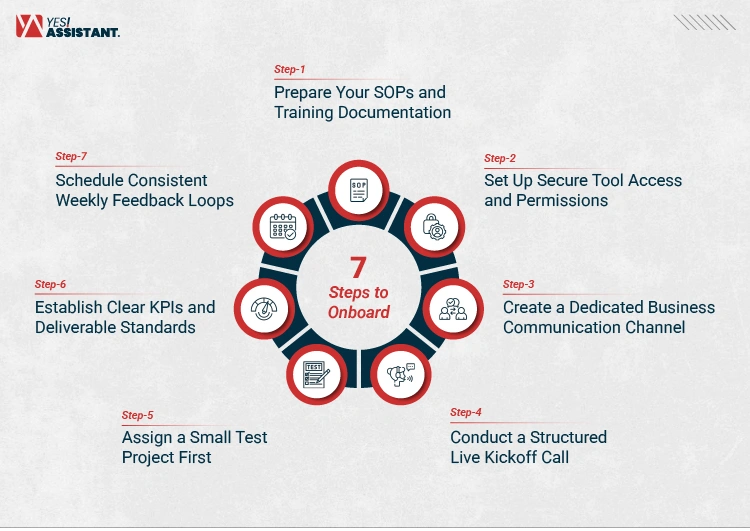
1. Prepare Your SOPs and Training Documentation
Don’t write your process guides on your VA’s start date; do it beforehand.
If they skip this step, then business owners find themselves repeating the same task three or four times. This repeats and wastes time on both sides, creating frustration. Industry data compiled by Virtual Done Well (2025) shows that businesses with SOPs written down before onboarding spend 19% less time onboarding than those who rely on verbal instruction.
SOPs or Standard Operating Procedures are a step-by-step reference document. It details how to perform the task and what tools are needed. It also says what an acceptable output of that task and who to reach out to in case things go awry. The guide does not have to be in its final form. A numbered list in GDocs, a 3-minute Loom screen-recording or even a rough draft generated by a tool like Scribe or Notion AI is fine. All you want to accomplish is that every recurring task has a written, recorded reference that the virtual administrative support can refer back to without needing to ask you.
Note down the following details for each task you are delegating before day 1
- The goal of the task
- The tools required
- The step-by-step process
- What a correct output looks like
- How to get in touch if things go wrong
If you are wondering where to start, then the tasks that take up most of your repetitive time during the week like email sorting, data entry, scheduling are the ones that should be documented first. It is always better, even a rough SOP created in 30 minutes, than no SOP at all.
2. Set Up Secure Tool Access and Permissions
Share credentials using a password manager. Do not send passwords in raw format over email or messaging apps.
Providing new VA access to your tools is one of the immediate friction points of any remote working relationship. When we send passwords by email or chat, not only are you exposing yourself to an authentic security risk, but even if you know who ever has access to what?
According to Speakwise, in 2026, 39% of remote workers reported that their organization had configured the technology access incorrectly on day one. It is a delay that directly reduces productivity from the first hour.
The solution to both of those is a password manager. Your encrypted sharing access is a one-click, removal-in-a-scratch approach; you cancel the permission immediately when the engagement finishes, and see exactly what data the VA can and cannot touch.
1Password and Bitwarden are both highly rated small business password managers in 2026. 1Password has a slick team-sharing interface. Bitwarden is open-source and independently audited and has a usable free tier. You can also use LastPass. However, a disclaimer on LastPass is that in 2022, hackers carried out a major hack against LastPass and had access to encrypted customer password vault backups. So, for any businesses managing shared credentials with contractors, security researchers now generally recommend alternatives, which have a cleaner track record.
Beyond passwords, set permissions intentionally. Are VAs given full admin access to your project management tool, or do they just need the ability to update task statuses? Do we need to send them from your account, or just draft them up for you to review? Make sure to spin up the least access possible and build on top of it as you develop trust outward. Keep the access management clean or cluttered systems slow down teams and permission gaps or tool confusion are among the new reasons why new VAs stall in the first week.
Use two-factor authentication on any business account you share. This is now a low bar expectation for any remote working relationship.
3. Create a Dedicated Business Communication Channel
Before the VA’s first day, create a business email alias or dedicated Slack or Teams channel.
To incorporate VA communication directly into your personal inbox or general chat threads is a guaranteed method for losing project updates, missing questions, and creating confusion around task status. A channel reserved for work helps contain messages, creates a search-results page of decisions or directives and establishes this as a professional relationship with expectations.
For most remote setups, Slack works well. Create a channel specific to the VA or make direct message threads organized by project. An email alias (e.g. [email protected] or [email protected]) that resides within your shared inbox keeps business correspondence separate from your personal threads. Because managing email without a clear system drains focus of both you and your VA. A dedicated communication structure removes that drain before it starts.
A study across another HR online platform from AIHR reported that 36% of remote workers considered their onboarding experience. This was the case with 32% for on-site employees. Most of the confusion comes from mixed instructions because there are many platforms. That ambiguity is obviated from the start by a single, focused channel.
4. Conduct a Structured Live Kickoff Call
Organize a video call of 30 to 45 minutes on the first day, before kicking off the first task.
Understanding context is not merely reading documentation. A real-time kickoff call allows you to share a walk-through of the role, an overview of the business that supports these tasks, answer questions immediately and outline success for a VA in 30 days
Keep the call structured. Cover six things:
- Will briefly explain your business model in 2-3 sentences.
- The main tasks the VA will handle for you
- The tools they will use
- How you prefer to communicate day-to-day
- Steps to take if anything goes wrong or they face a problem
- Their first clear assignment
Close with a clear first task so the VA gets off your call with momentum. This is a step many business owners will skip as they assume that the documentation has covered everything. Your operating style, preferences and non-obvious context are all transferred fully during the kickoff call. A VA without that context will need to interrupt you about a million times in the first week and interruptions destroy deep work. If anything, a single proper call marks against most of those interruptions. You can only do so much within a day.
5. Assign a Small Test Project First
Give the VA a low-risk, well-documented task in the first 48 hours and review the output carefully.
A test project is not about catching someone out, it is about gathering real information before you hand over work that carries actual consequences.
Assign one contained task in the first 48 hours. It should be clearly defined, have a known correct output, and carry no significant risk if done imperfectly. After the VA completes it, review the result with attention to three questions:
- Did they follow the instructions accurately?
- How did they communicate during the task — did they ask clarifying questions, or make assumptions?
- How close is their output to your standard?
This review tells you more than any interview or reference check. It shows you how the VA handles ambiguity, whether their quality baseline matches what your business requires, and how their communication style works in practice. That’s why founders delay important decisions rather than doing anything hastily. Running a small test early removes the uncertainty of committing critical work before you have evidence.
6. Establish Clear KPIs and Deliverable Standards
Set specific, countable success measures for every recurring task before the end of week one.
Vague instructions produce vague results. “Help with social media” gives a VA almost no useful direction. “Schedule and publish five posts per week by Thursday at noon using the approved content calendar” gives them everything they need.
Good performance targets are:
| Attribute | What It Means |
| Specific | Tied to a named output, not a category of work |
| Measurable | Expressed as a number, deadline, or rate |
| Time-bound | Clear frequency or due date |
| Verifiable | Checkable without a lengthy conversation |
Think in terms of outputs per week, response time targets, completion deadlines, or error rate thresholds. Write these down and share them with the VA during the first week. When expectations are documented, performance conversations become factual rather than subjective, both sides know what was agreed, and gaps are easier to address without tension. Moreover, make sure your VA understands the difference between urgent and important work so that he can define KPI.
Companies pairing VAs with automation tools like Zapier and ClickUp report a 35% boost in task output once a VA has clear KPIs and a working system. This is a natural next step.
7. Schedule Consistent Weekly Feedback Loops
Schedule a 15-minute standup every week for the first week.
Once a month feedback makes small issues big. While synchronous communication has its drawbacks, a weekly 15-minute call or async check-in at the end of each week opens up a time slot to review what was accomplished, answer questions, re-prioritize if necessary and celebrate the good things that happened.
Keep the format simple. Four questions cover everything:
- What did the VA complete this week?
- What gets pushed up to next week?
- Is anything blocked?
- Questions about the process that need to be addressed?
The short rhythm avoids compounding problems. This provides the VA with a regular opportunity to raise red flags before they affect output quality. Brandon Hall Group summarizes this by finding that organisations with a formalised approach to onboarding, and with regular feedback loops in place, see an 82% increase in new hire retention rates and above 70% higher new hire productivity. This proves how consistent support improves productivity. If a VA knows feedback is coming on Fridays, then they plan their week around it.
These sessions act as a record of how the role has changed over time, and which areas can attract more responsibility.
Virtual Assistant Onboarding Checklist
| Onboarding Phase | Core Tasks Required | Recommended Tools |
| Pre-Onboarding | Write SOPs and process guides; list all tools the VA will use | Google Docs, Loom, Scribe, Notion |
| Access Setup | Create password manager vault; set role-specific permissions; enable 2FA | 1Password, Bitwarden |
| Day 1 Orientation | Run kickoff call; share communication channel details; assign first task | Slack, Zoom, Teams |
| Week 1 Testing | Complete test project; review output; give written feedback | Asana, Trello, Notion |
| KPI Definition | Document measurable targets for each recurring task | Google Sheets, Notion |
| Ongoing Integration | Hold weekly 15-min check-in; update SOPs as processes change | Loom, Slack, Google Docs |
Conclusion
It is a tough matter to onboard a virtual administrative assistant at all. It requires careful preparation. But, the worst mistake that business owners make is to recruit someone with no documentation, no tools or no structure and wonder why the result varies so much in the first week.
When you write out SOPs, establish strong access, create a designated place to communicate, do an official kickoff call, execute with a pilot project, set expectations and then have weekly check-ups. This allows a working relationship to begin with clarity on both sides. That clarity makes all the difference between a new hire and a trusted resource.
If you are ready to bring on remote help that fits directly into a structured workflow from day one, opt for general virtual assistant services designed for exactly this kind of setup.
Frequently Asked Questions
How long does it typically take to onboard a virtual assistant?
A good onboarding lasts a minimum of 3 to 7 full working days for a VA fully fit, meaning they can work independently. Most competent VAs can beat recurring tasks by week one, so long as SOPs and tool access are ready before day one. The time frame for a more complex or client-facing role could take two to three weeks.
Use a dedicated password manager such as LastPass, 1Password, or Dashlane. These platforms allow you to share access for specific credentials without the VA ever laying eyes on the unvarnished password. It allows you to immediately revoke access once the engagement is over. Never send passwords via e-mail, SMS or through messenger apps.
What should be included in a virtual assistant contract?
A good virtual assistant agreement should include scope of work, working hours and payment terms, confidentiality obligations (an NDA clause if the VA will access client data), intellectual property ownership of any work produced, and notice period for terminating the arrangement. However, clear contracts eliminate any ambiguity about expectations beforehand, which incentivizes both weapons.