
How Virtual Assistant Manage Client Inboxes: Manage Workflow
Inbox management is the process of sorting, grouping and responding to email at your inbox. Regarding a business inbox management involves organizing email separating into two segments, like high-impact, and lower-valued. This grouping can facilitate your high-prioritized clients at the sticky notes and non-priority on the “Later reply” folder.
Definition of Inbox Management
Email inbox management is like managing emails in a structured way that is convenient to smooth your daily workflow.
- Sorting and filtering emails to to relevant label and folder
- Prioritize the high-impact customer emails at the top of the list.
- Take action on top clients’ email and delete lower-valued emails.
- Finally, clean your inbox from chaos and make “Zero inbox”
How Virtual Assistants Manage Client Inboxes
Virtual assistants manage inbox by implementing structure systems, through optimizing high-volume emails into smooth, actionable and focusing secure communication. The primary goal is to ensure the inbox remains structured, reduce email overload for the client and maintain professional, timely communication.
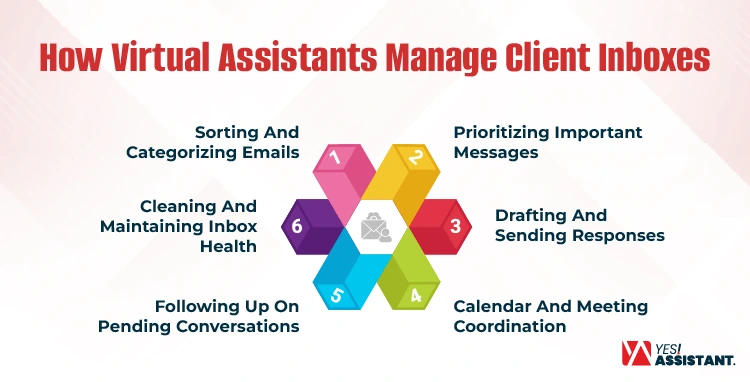
Sorting and Categorizing Emails
A remote assistant configure your email by implementing folder hierarchies and utilizing automated rules:
- Applying Rules & Filters: VA setup Gmail filters or Outlook rules to automatically direct newsletter, notification into relevant folder, and free you from inbox chaos.
- Labeling Systems: Besides, remote assistant labels, like “Need Action,” “ Waiting for Reply,” and “Project-in-progress” for easy identification.
- Inbox Prioritization: They also review emails at set-times (like, 9:00 AM, 1:00 PM, or 4:00 PM) rather than keeping in mind.
Prioritizing Important Messages
Using the Eisenhower Matrix, the VA sets the inbox in-order between “Urgent”, “Important” and routine messages.
- Use Color-Coding: They categorize email using color-code flags to mark email that need immediate action.
- High-Priority Setup: The VA creates a “VIP” filter for key clients, business-partners, and senior management to ensure messages appear at the top.
- Apply “Two-Minute” Rule: If a response leads to less than 2 minutes, they handle it immediately; otherwise, they schedule it.
Drafting and Sending Responses
Significantly, a virtual assistant maintains client decorums, and creates brand voice through drafting and sending messages to the customers.
- Using Pre-built Template: Set multiple email templates based on clients, stakeholder, or product promotions.
- Drafting and Review: For more client query, virtual assistant draft reply, sent to senior for review and send responses to the expected clients.
- AI Integrating with Email: To automate email inboxes, virtual assistants integrate AI-assistant tools to sort, prioritize and send to relevant folders.
Calendar and Meeting Coordination
For a business, an email conveys lots of messages. Virtual assistants take actions on clients messages, like manages your calendar, and arrange meetings according to schedule.
- Booked Calendar: VA review all email, and note down queries, and booked a schedule as per meeting requirements.
- Calendar tool integration: Virtual assistant integrates calendar tools like Calendar hero directly with Google Calendar or Outlook.
- Grouped Meetings: The VA consolidates your calendar for multiple within the same schedule to avoid complexities.
Following Up on Pending Conversations
You may miss important follow-ups, customer meetings, or queries, virtual assistants set up track those history and take actions.
- Tracking System: The VA searches VIP or important email history to trace the missing history and restart communication.
- Automate Reminders: From waiting list meeting or appointment needs, your remote assistant setup automated reminders to avoid missing opportunities.
- Follow-up Sequences: Maintain follow-up within sequences to reconnect the client and contact to recover due payments.
Cleaning and Maintaining Inbox Health
Everyday you receive lots of emails, all aren’t important to you. Virtual assistant working on cleaning your inbox avoiding unexpected email overload during busy hours.
- Unsubscribing Emails: Actively filter unnecessary emails to unsubscribe and reduce inbox blockage.
- Proper Archiving: Throw old email into archive for future needs but keep out of primary list.
- Spam Management: The VA handling spam email, and alert sender to avoid hacking risks.
Tools Virtual Assistants Use for Inbox Management
To advance your inbox, virtual assistants use email management tools like filters, CRM systems, and AI-powered apps. These tools help you to organize emails through sorting, designated to specific folders and reduce unnecessary email blocks.
Email Platforms
Virtual assistant using most popular email platforms, Gmail, Outlook and Zoho Mail to advance your workflow:
- Gmail: Easy to use, great part of google workspace, and integrated with Gemini AI to acknowledge email intent, draft and send replies.
- Outlook: This tool integrated with Microsoft 365, and copilot AI. This tool drafts your email using three word prompt and coordinated workflows.
- Zoho Mail: A privacy focused, free email solution, integrated with Zoho calendar synchronizing events directly to your inbox. Besides, this Zoho Mail, summarizes your email threads, draft replies, and automated workflows.
Productivity Tools
Using following productivity tools, virtual assistant integrated these tools with inbox and bridge the gap between communication and action
- Slack: The VA unified both Gmail and Outlook, facilitating users to enhance productivity by connecting email communication directly with Slack workplace.
- Trello: The Trello for Gmail add-on provides a two-way synchronization turning emails into actionable, editable Trello cards directly from your inbox.
- Asana: Offering Add-on for Gmail, and Outlook apps that enable inbox management. Besides, virtual assistants integrate these tools with emails into actionable, trackable tasks, set due dates and add comments.
- ClickUp: Integrate Gmail and Outlook, turn email into actionable tasks, with due dates, assignees and attachment via extension.
Automation Tools
Remote assistants integrate automation tools directly with inbox to manage large workflows and save valuable times.
- Zapier: Connect directly with email to automate sorting, labelling and draft reply to send inboxes.
- Filters and Rules: Applying filters to sort out email and send into designated folders based sender name, subject and keywords.
- Auto-Responders: Virtual assistant sets auto-responder with inbox management by pre-written templates, filters and rules to acknowledge categories and respond to 24/7 and reduce manual work.
- CRM Integrations: The VA uses CRM integration to automatically sync, log, and categorize email directly to client profile. These prioritize tasks, automate follow-ups and convert messages into actionable projects.
Benefits of Hiring a Virtual Assistant for Inbox Management
As a business owner, you know better about inbox management difficulties. Higher management is always busy with engaging company big-screens activities like setting strategies, longer operations and enhancing growth. Besides, different agencies or companies provide specific skilled remote assistants’, and email management for VA is one of them.
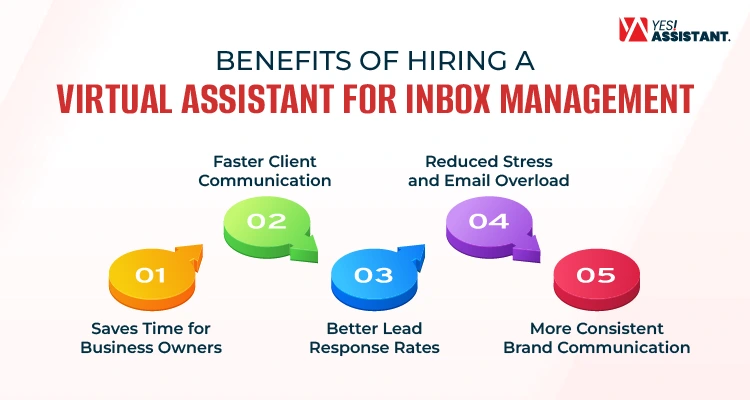
Saves Time for Business Owners
As a business owner, spending most of the time on sorting spam, newsletter that drains your mind from focusing on high-level strategy. Most of the owners assign a skilled virtual assistant who manages the inbox by setting automated tools to sort, filter, organize emails. Significantly, VA integrated third-party AI tools (Like, Asana, Trello, Zapier) directly with inbox to create summary, draft reply and send auto-reply.
Faster Client Communication
Most of the clients are experts for rapid responses. A dedicated remote assistant ensures no opportunity misses through setting automated reminders. Also, VA ensures your inbox is always monitored, providing swift interaction to your clients query or requirements.
Better Lead Response Rates
Speed is often the deciding factor in closing a deal. You can significantly improve conversion rates when you assign a dedicated assistant who is qualified to generate incoming leads quickly. These VA ensure no potential revenue slips through the cracks due to delayed reply.
Reduced Stress and Email Overload
A busy entrepreneur dreaming to make “Zero-inbox” and free from stress. You can reduce your anxiety of a messy primary folder through utilizing skills of a remote support assistant. The support assistant helps you to organize labels, archive mail, and make a clean workspace every morning.
More Consistent Brand Communication
Maintaining a professional tone across all email is vital to your brand integrity. A virtual assistant established templates and brand voices to ensure every outgoing message is polished, professional and consistent with your values.
Conclusion
Managing emails effectively creates opportunities to grow your business. Every business owner has consistent pressure on managing business with setting long-term goal, and strategic vision. But ignorance of managing inbox clearly slips your visionary client management, missing opportunities due to lack of managing emails.
A skilled virtual assistant contribute to your business as adding significant values to your strategic mission. These VA set rules, labels and manage inbox with integrating tools, add-ons, and automated entire operations.
FAQs
What is the 3 21 0 email rule?
The 3-21-0 means check email 3 times daily, spend 21 minutes per session, and make inbox “0.”
How do virtual assistants manage emails?
Sorting emails from spamming, newsletter or unnecessary promotions. Sending follow-up email through pre-designed template. Also, Virtual assistant sets third party tools to integrate with calendar that sends notification directly to inbox ensure no opportunity missed.
What are the 5 D’s of email management?
The 5D method is the extended method of managing your emails. This method included to defend it, Delete it, do it, delegate it, and defer it.
What are the 7 C’s of email?
An effective communication with your high-valued customer requires highly attentive and skilled resources. The 7 C’s refers to clarity, conciseness, concreteness, correctness, coherence, completeness, and curtesy.