
How Technology Enables Remote Collaboration and Team Productivity
Key Takeaways
- Technology transforms your remote team into fully functional virtual offices.
- Both cloud platforms and communications tools supports you instant and unparallel work accordingly.
- Project management and document tools support you to organize your remote support team.
- AI now automates meeting workflows, and knowledge sharing for distributed teams
- Remote collaboration reduces your operations costs and widens access to global talent team.
- Time zones, tool overload and security remain real challenges technology must solve.
- AI agents and immersive tools will shape the next stage of remote work.
Remote collaboration is the foundation of successful, cost-effective operations. Businesses may need resources for distinct operational needs; hiring from remote positions is the way to avoid unnecessary office costs, equipment costs, and taxes. Many digital platforms now act as “digital operations” or “virtual offices” instead of physical arrangements.
What is Remote Collaboration?
Remote collaboration involves working from a distance using digital workspaces. This is a remote alignment of a team, but individuals are handling corresponding work under an integrated platform. Besides, under remote collaboration team members share their work, ideas, digital files, and support to each other to complete projects successfully.
Managing full-scale technology for business operations can be complex. Partnering with a virtual assistant, a key aspect of remote collaboration that allows you to delegate these operational tasks. This will free you to focus on your core executive strategy.
Definition and Core Principles
In remote collaboration, organizations authorize people from different locations to perform specific business. According to collaboration settings, businesses hire skilled professionals to work effectively on a project or an assignment without losing productivity.
Core Principles:
- Using digital communications tools or platforms like digital software solutions. These are video chats, message chatbots, and AI-driven email management connected with an online workspace.
- Significantly, remote collaboration focuses on trust regarding clear expectations, visible work, open communication and psychological safety.
- Incorporate all digital files and work under a platform (like Notion), work collectively, and follow instructions from digital guides.
Difference Between Remote vs. Hybrid vs. Distributed Teams
Remote, hybrid and distributed teams are primarily focused on where your employees work. Comparatively, remote means work from anywhere, but often with a main office. Hybrid means both office and work-from-home, and Distributed Teams working out of a central office.
| Type of Work | Working Location | Working Type or Team Structure | Communications Style | Flexibility |
| Remote | Any place or location but within the same country or region. | Based on homework or remote office | Employees work at the same time. Contact with each other by chat or video conference. | Highly depends on daily targets. |
| Hybrid | Assigned persons can work from the office, home or outside the | Connecting with both remote and office staffs | Working with mixed policies. Attended meetings at the office physically, but worked from a remote distance. | No high or low. Need to stay near the location from the office. |
| Distributed Teams | Work from anywhere, any city or location | Communication maintains virtual settings. | Communicated through record video or docs | Work following any schedule or time zones. |
Why Remote Collaboration Matters in Modern Workplaces
When companies operate businesses from in-house settings, it needs costs, staff benefits as per compliance. From a remote setting, individuals or teams can work together across distances using digital tools. Employees have no bar to maintaining 9-to-5 rules, protecting the company during emergencies, and running the business better.
- Global Talent Access: Companies can hire talents from anywhere in the world following local laws. There is no obligation on local setup. Remote job listings on LinkedIn attracted over 50% of all applications despite making up only 20% of postings, showing how much wider the candidate pool becomes when location barriers are removed (Source: LinkedIn Global Talent Trends).
- Flexible Work Arrangements: Remote staff can work following any schedule at any time with no complications. This ensures a better work-life balance.
- Business Continuity: Significantly, remote collaboration employees can work from anywhere without any objections or rules.
- Operational Efficiency: In remote settings, you can save on in-house costs, employee benefits as per law, and taxes.
How Technology Enables Remote Collaboration
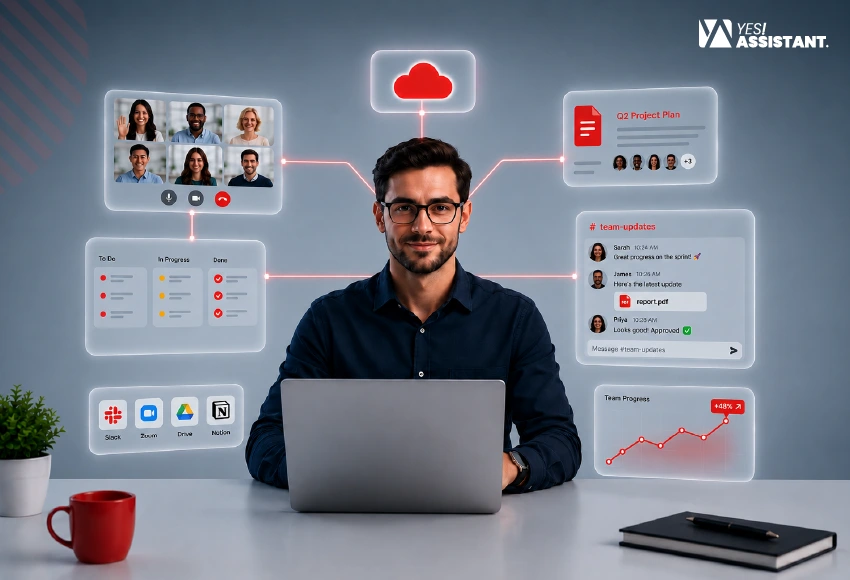
Technology facilitates businesses with the rise of remote roles through connecting with digital platforms. You can arrange team meetings using digital tools. These platforms give access to communicate instantly, share files securely, track project progress and work together with other members from anywhere.
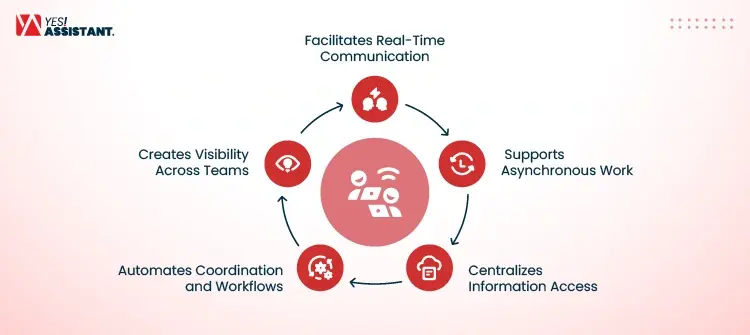
Facilitates Real-Time Communication
When individuals from different areas need to arrange meetings for urgent issues, connect with digital messaging and video conferences instantly. Therefore, your team members can provide quick answers without waiting for emails. For example, use following tools to collaborate with others:
- Use Zoom: Create links, share with other members and share issues.
- Slack: Shares instant chat or voice meetings with screen share and AI summaries.
Supports Asynchronous Work
Asynchronous work is related to Team members who work at different times. Technology supports people in updating documents or sending messages without getting a reply right away. This allows your global teams to work even after working hours.
- Use 24/7 Formula: You don’t need to follow 9-to-5 hard times. Work at your convenient time.
- No Strict Policy: Work without interruption and submit to a shared folder or platform.
Centralizes Information Access
Different people work from different locations, and cloud storage keeps all files in one safe place. It saves files automatically, and teams share space through Google Workspace.
- Auto-Update: Everyone uses the same updated link folders.
- No Risk of loss: Cloud storage protects and organizes your files and data.
Automates Coordination and Workflows
Task handling tools automate your repetitive steps and reminders. Platforms like Asana move a project from step to step automatically. When one user completes their work, the platform goes to the next person.
- Ensure Steps: Send reminders to the users following automatic sequences.
- Reduce Risks: The system automation eliminates risk of missing reminders.
Creates Visibility Across Teams
Managers overview shared dashboard to see exactly what’s the task update and remaining. Use tools like Trello to see the status of your team project at first sight.
- Stop Duplicacy: Shared platform stops duplicate work and keeps consistency.
- Inform to Everyone: Shared task information to everyone at once.
Core Technologies That Power Remote Collaboration
Remote collaboration depends on a combination of cloud systems, immediate communication and project management tools. This technology helps your remote team members to connect.
Cloud Computing Platforms
Cloud platforms help your team members to work from home, providing scalable infrastructure and storage.
- Use most popular tools like Google Cloud, Amazon Web Services (AWS) and Microsoft Azure, enabling organizations to host applications.
- These Platforms also secure your stored data and maintain business consistency from any location.
Communication Technologies
Use platforms for getting faster responses to the critical issues and bridging physical distances. These platforms also contribute to keeping all members aligned, even though geographical distance.
- Platforms like Slack, Zoom, Google Meet and Microsoft Teams that organize meetings and speed up team communication.
- These tools are essential for video conferencing and instant messaging.
Project and Task Management Software
When you intend to align your team members with workflow effectively, use highly supportive project management tools.
- Most industry leaders use Asana, Trello, Jira and Monday to track project progress.
- Using these tools, you can also assign tasks, maintain visibility and help your team to stay organized and accountable.
Collaborative Document Editing Tools
Your team members stay remote but work on the same file simultaneously. Besides, all members have access to update and edit files. The tools show exact data and time on who, when, and which files were updated.
- Google Workspace (Docs, Sheets, and Slides) provides industry-standard support to edit shared files and follow-up emails.
- Use Microsoft 365 and Notion features for document management. like creating and editing a facility.
Digital Whiteboards and Visual Collaboration Tools
Visual tools help people to share ideas online. These tools feel like all members are in the same room.
- Use applications like Miro, FigJam, and Mural to provide an infinite canvas where the team can map out ideas.
- These applications facilitate you to create flowcharts and conduct workshops to build creativity in a virtual environment.
Cybersecurity Technologies
Securing data in a distributed environment is paramount.
- Key technologies include Enterprise VPNs for secure network access and Identity and Access Management (IAM) solutions.
- Provide access to authorized persons, including company information, to mitigate the risks of remote work.
The Role of AI in Remote Collaboration
Artificial Intelligence (AI) has become an interactive tool to build remote collaboration. Besides, AI tools create a bridge that connects with distributed teams, ease complex workflows, and increase individual productivity. You can automate repetitive tasks using AI to focus on high-value creation and strategic work.
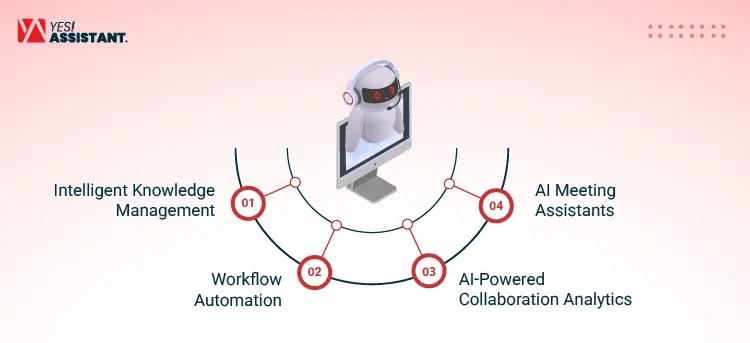
Intelligent Knowledge Management
Typically, remote teams collect and send data into the system using different apps like email and shared drives. AI-driven knowledge management systems use Notion Calendar AI or Glean for smart collaboration.
- Optimizing Benefits: Ask a question to AI directly, and you’ll find the exact answer, document, or past decisions in your company files.
- Top Tools: Zoom AI companions help surface context across third-party apps.
Workflow Automation
Use smart software that eases the remote team’s workflow. Use platforms like Asana, Monday, and Zapier AI to map dependencies and automate actions.
- What Benefits Workflow: When completing tasks in one project management tool, an AI workflow can automatically update status boards.
- The Result: Besides AI-assisted data entry update reports, this tool also notifies stakeholders and generates a draft report.
AI-Powered Collaboration Analytics
Collaboration analytics help bosses to track team’s work together and where they are stuck. AI tools analyze how team members talk to each other.
- Synchronize Benefits: AI tools track response time, meeting time and track interactions.
- Use Tools: You can use Read AI tools to get sentiment analysis and feedback from your speech at the meeting.
AI Meeting Assistants
AI meeting assistants redefined how teams capture and utilize information from synchronous interactions.
- What Benefits: Businesses use tools like Otter.ai and Firefiles.ai to transcribe discussions, capture key action items, and provide summarized transcripts automatically.
- The Results: These tools also help participants to grab missing information quickly and continue follow-up effectively.
Benefits of Technology-Enabled Remote Collaboration
Remote collaboration enhances your operational excellence and benefits you by saving costs, increasing productivity, and optimizing overall improvement. Your team members can get flexibility in work and reduce turnover.
Access to Global Talent
Business requires diversified talents but locally, you may not be able to manage similar resources. Utilize the opportunity for hiring global talents to access more skilled professionals. Effective remote collaboration helps you to build more expert resources who can explore more ideas and support beyond office hours.
Improved Flexibility and Employee Experience
Remote collaboration allows businesses to scale and improve flexibility. Employees use their time to work as per their preferred moment or spend time with family. Besides, working from home allows employees to set up quiet, private spaces and they can do deep and focused work.
Faster Decision-Making
During emergency issues, individual team members can instantly join a video conference and instant message to interact fast. Instead of sending in-house printed documents, everyone sends projects and updates all information into one place. Moreover, remote apps automate your simple and boring tasks.
Reduced Operational Costs
When you hire in-house staff, you need to manage space and provide benefits. Remote collaboration helps you to hire individuals for hourly or monthly rates. This saves your extra resource cost.
Increased Productivity
Remote work can allow employees to work at their convenience. In your office, the staff may take a tour of the long house, resulting in stopping the work. A remote individual can optimize workspace through consistent support that improves productivity and grows business.
Enhanced Business Continuity
Cloud servers provide permissions to remote members to get digital files from storage. Significantly, remote setup keeps your employees safe during emergency hours. This helps businesses to adopt new styles quickly.
Challenges of Remote Collaboration and How Technology Solves Them
Significantly, remote collaboration has a lot of benefits, regarding costs, products, and operations. But it also has challenges in operating businesses through distance talent.
Communication Gaps
In-house setup, employees talk to each other directly, creating a mutual interaction. In remote collaboration, team members talk to others via message chat and video conferencing, which has no organic interactions. This creates misunderstanding or not feeling their messages.
- Lack of emotional context
- Incorrectly noticed
- Misinterpreted silence
Time Zone Differences
Different time zones often create operational bottlenecks as individuals living in separate areas. One person may attend a team meeting, others not collaborate. More often, team members asked or forced to provide emergency service or attend the meeting at late light. 19% of remote workers cited working across time zones as one of their biggest struggles, according to Buffer’s 2023 State of Remote Work report.
- Change meeting time daily
- Overlapped timings
- Missing core meeting
Tool Overload
Businesses hire remote talent to service their customers. Different customers have distinct requirements regarding their operational needs. Therefore, remote employees need to handle lots of tools, which creates complexities and mental fatigue.
- Often mistakes while using tools
- Create operational complexities
- Create complexities and mental
Security Risks
In a remote setup, employees worked under a company, and everyone worked under rules, regulations and credentials. If one employee is from a different geo-country, they must align with company rules. It becomes risky to transfer the database to a remote person that company may face regulatory GDPR or HIPAA compliance data rules violations.
- Insecure networks and public Wifi
- Personal device Vulnerability
- Compliance and graphic credential risks
Reduced Team Connection
It’s difficult to build intimacy between team members due to distance communication. All members of the team feel isolated and disconnected from each other.
- Feeling loneliness at a remote working style
- Reduce interactions between team members
- Lack of spontaneity in a professional atmosphere
The Future of Remote Collaboration Technology
Remote collaboration increases day-by-day as it saves operational costs, hiring costs, and location costs. Most companies now hire talent from global talent as technology has eased the situation and provides access to technology.
AI Agents and Autonomous Workflows
AI has developed from a stable text-generation assistant into a proactive system capable of executing tasks with minimal intervention. Organizations assign multi-agent systems, like Microsoft Copilot or enterprise platforms like Databrics AI Agents. These tools specialize in micro-agent handling, data collection, scheduling management, and workflow updates automatically.
Immersive AR and VR Workspaces
Extended Reality (XR) tools help to encourage remote teams during video conferencing, providing individual virtual spaces. Both virtual and reality facilitate team members to work together in 3D digital spaces. Moreover, ENGAGE XR provides virtual copies of digital space or locations to manipulate project models in real time.
Unified Digital Workspaces
Leading platforms like Microsoft 365 and Google Workspace use foundational layers for group emailing, co-creation, offering shared ownership, and exact document editing. Besides, physical meeting rooms are transformed into AI-powered controlling systems, like Zoom Rooms or Microsoft Teams Room. These virtual frames automatically activate speakers and sync digital whiteboards in the room.
Conclusion
Most of business now operate their business with remote collaboration. Mainly, remote collaboration facilitates business for cost-settings, reducing operational jams, and flexible environments. Different platforms gives your facility to build realistic remote copies that accelerate teams to operate business effectively.