


Why Every Business Needs Process Mapping to Grow Faster
Key Takeaways
- Process mapping refers to visualizing a workflow or business process with necessary details such as inputs, outputs, actions, steps and decision points.
- Process mapping is important for identifying inefficiencies in business processes, creating standardized workflows, reducing errors and operational risks, etc.
- A process map can help businesses solve some common problems, such as communication gaps, the frequent need to perform repetitive tasks, delayed project completion and inefficient customer service workflows.
- Common types of process maps include flowcharts, swimlane diagrams, value stream maps, SIPOC diagrams and Business Process Model and Notation (BPMN) diagrams.
- The steps you need to follow to create a process map include defining the scope and goals, creating the steps or actions, assigning roles and responsibilities, designing the map, etc.
- Some of the common mistakes you should avoid when creating a process map include designing overly complex workflows, ignoring employee input or feedback and neglecting performance metrics.
Every business follows a process or workflow to perform different tasks or activities, which is known as a business process. Business leaders and employees need to have a clear understanding of the business process to perform their roles and responsibilities effectively.
They need to establish a standardized way of working and clearly define each step involved in carrying out a particular task. This is because without a streamlined workflow, they can often misalign their activities with organizational goals.
What is Process Mapping?
Every business has a lot of operational tasks, which they handle with their own team or BPO services. But you need to have a standard process regardless of how you handle your tasks. A well-documented and consistent workflow can help a business ensure that it gets better outcomes while executing its tasks.
Process mapping is a way of visualizing a workflow that includes the key details necessary for task execution, including
- Inputs
- Outputs
- Actions
- Steps
- Decision-points
Why Process Mapping Is Essential for Every Business
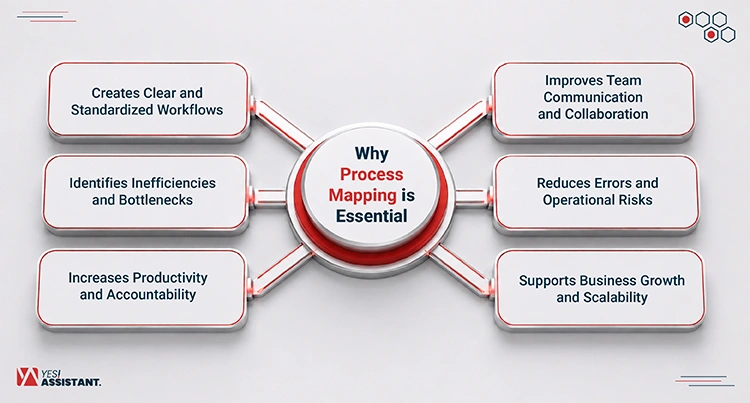
Process mapping is important because it helps businesses visualize their workflow, understand how it works, and enhance its performance. Here are some major reasons why you must create a process map:
Creates Clear and Standardized Workflows
Businesses need a documented and consistent workflow to get consistent output from their activities. Frequently changing work processes or workflow manipulation can lead to poor task organization. It can have several negative impacts on team performance, such as communication breakdowns, frequent need for rework, and loss of productive hours.
Improves Team Communication and Collaboration
A process map visualizes steps to perform a task and the responsibilities of different teams. It can help employees understand whom they need to communicate and collaborate with across the teams. This map can be used for onboarding new employees and showing them how the process works. Employees can use this map to guide themselves while working on a task. It reduces the need to wait for further instructions when someone moves through each step in a task.
Identifies Inefficiencies and Bottlenecks
Teams need to complete their tasks on time to avoid the negative impact of delayed task completion on their business. A documented workflow helps the team leaders identify the process, system, or action that is not working. It helps them to analyze the time they are taking to complete each step and where they are spending most of their time. This approach helps them solve operational bottlenecks in their workflow.
Reduces Errors and Operational Risks
A process map includes standard procedures for completing tasks. Teams from various departments follow this standard to be consistent in their performance. It helps them to avoid inefficient or failed business processes, which can lead to operational risks. A business can identify potential points of failure and take effective measures to minimize those risks.
Increases Productivity and Accountability
A process map can serve as a shared visual reference of a business, using which team members can easily understand their tasks and responsibilities. It also supports the onboarding process of new employees by informing them about the process of executing operational tasks and how they should contribute to those.
Supports Business Growth and Scalability
Managing tasks across teams and departments can be difficult when a business starts to expand. Process mapping helps a business establish clear communication among workers from different teams and departments. It ensures that everyone stays connected to the process and collaborates with other team members as the workflow becomes complex.
Common Business Problems That Process Mapping Solves
Business process mapping can solve inefficiency and operational bottlenecks and some common problems in an organization:
Repetitive Manual Tasks
Repetitive manual tasks cause loss of productivity in a business by keeping employees focused on the same type of tasks for a long time. A business can find the tasks where inefficiencies occur by observing its workflow. They can identify the steps and actions taken in each step and then automate the repetitive tasks so that employees can deliver more value to the business.
Communication Gaps Between Departments
Communication gaps can be costly for businesses. Studies show that they can cause large companies to lose $62.4 million per year and small companies to lose about $420,000 per year.
A process map helps a business overcome communication problems by:
- Providing a visual reference for following standard procedures and workflows.
- Showing the changes or updates in the standard workflow.
- Visualizing roles and responsibilities of different teams within a workflow.
- Defining process steps, activities, and decision points using charts, symbols, and diagrams.
Inconsistent Processes and Procedures
Employees can face several problems when they don’t have any standardized processes or procedures to execute their work. The first problem is that they can’t get consistent output, and they may often need to rework when a process fails.
Process mapping addresses this problem by creating a standardized way to execute tasks. It identifies inefficiencies in following a particular procedure and sees where improvements are needed. This can reduce risks of potential failure during task execution and minimize the loss of productivity, frequent rework, audit and compliance risks, etc.
Delayed Project Completion
A delay in project completion can have some serious negative effects on a business and its stakeholders. It can lead to loss of profit, increased operational costs, and penalties for missing deadlines for customers. Poor planning, resource constraints, communication breakdowns, and failing to address the potential problems in task execution are some of the major reasons for project delay. Process maps help businesses to visualize the project workflow with clear, actionable steps and can reduce the risks of project delay.
Poor Customer Service Workflows
Customer satisfaction is very important for a business to maintain steady sales growth. A business process map can help a customer service team identify redundancies and operational bottlenecks in delivering service. It can help a business identify the pain points of a customer during the onboarding process and overall journey. It can also ensure that every department that is directly responsible for providing a positive customer experience can highlight the inefficiencies in their workflow and fix those.
Lack of Accountability and Ownership
Employees can often fail to perform their roles while executing a task if they are not clear about their responsibilities. Business process mapping visualizes the responsibilities of different teams, departments, or workers while completing a task. So everyone has visibility about who is responsible for which tasks and what they should do as part of standard procedure.
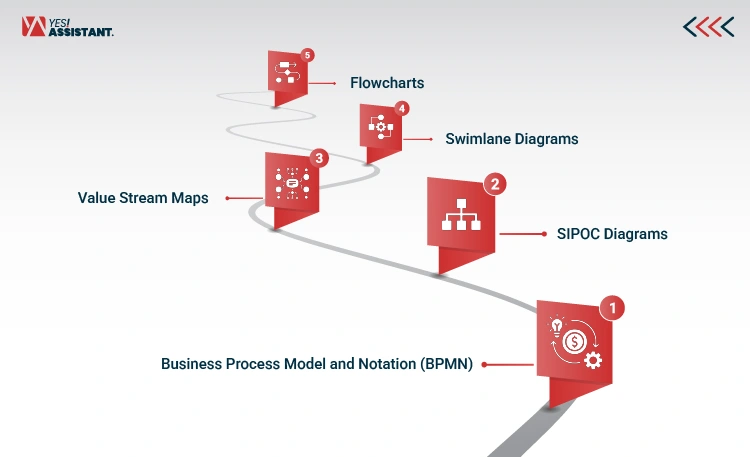
Types of Process Maps Businesses Can Use
| Type of Process Map | Description | Common Use Case |
| Flowcharts | This type of map represents the actionable steps and handoffs to produce a specific business outcome or solve a problem. | Documenting a customer service workflow, order processing procedure, or employee onboarding process. |
| Swimlane Diagrams | This type of diagram shows who is responsible for performing which tasks of a workflow. | Visualizing how sales, marketing, and customer support teams collaborate throughout the customer journey. |
| Value Stream Maps | A Lean management tool used to visualize, analyze, and improve the flow of materials and information required to deliver a product or service. | Identifying waste and improving efficiency in manufacturing, logistics, or supply chain operations. |
| SIPOC Diagrams | A visual tool that outlines the five key elements of a business process: supplier, input, process, output, and customers. | Defining the scope of a process before starting it or working on its improvement as part of a Six Sigma project. |
| Business Process Model and Notation (BPMN) | A flowchart that uses graphical notation or icons to visualize business processes for the stakeholders of a business. | Designing, analyzing, and automating complex business processes such as procurement, compliance, or enterprise workflows. |
How to Create an Effective Process Map
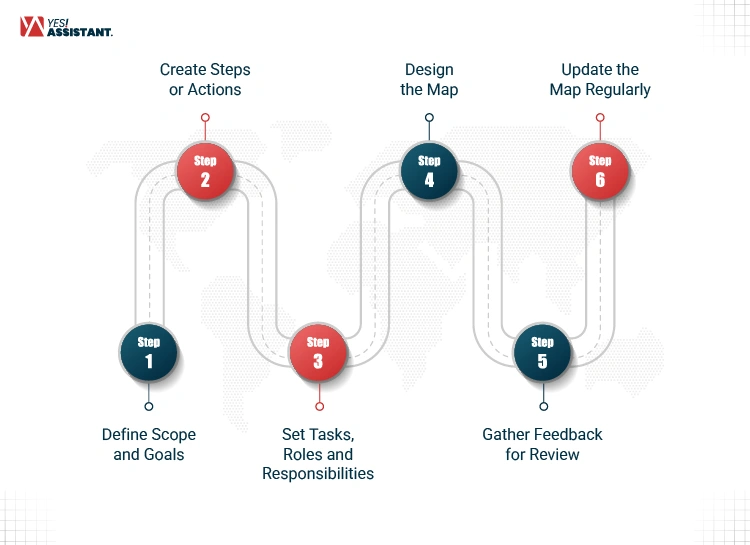
To get consistent results from your business activities, you need to create an effective process map to standardize your workflow. Here are the steps you can follow:
Step 1: Define Scope and Goals
Before you start mapping a business process, you need to establish a goal, such as improving your existing process, updating it, or identifying existing inefficiencies. Then you need to set the boundaries of your process, its starting and ending points, and what it will include and will not include. Setting these boundaries will help you to keep the process under control.
Step 2: Create Steps or Actions
Identify the steps required to complete a workflow. Use the existing workflows or records about the business processes that are already in use. Collect information from the business stakeholders about their experience, challenges, or pain points for executing specific tasks.
Step 3: Set Tasks, Roles and Responsibilities
Create a list of tasks in your process and different roles for executing those tasks. Then, set responsibilities for each role, such as who will own, manage, and execute each task. This will help you visualize a workflow and what each individual will do in it.
Step 4: Design the Map
Choose a mapping style such as a flowchart, Swimlane, or SIPOC diagram to document your workflow. Select the style based on the goals and scope of your business process. It is best to use a layout or mapping style that clearly shows the tasks, major decision points, actionable steps, and roles.
Step 5: Gather Feedback for Review
After creating the map, you need to review it yourself and share it with the stakeholders to collect their feedback. After gathering feedback, see if there are any key elements missing from it and how to make it better.
Step 6: Update the Map Regularly
Adjust the business process map based on the feedback and review, which may include adding additional steps, decision points, or reorganizing the layout. It’s essential to remember that updating a map is an ongoing process. This is because while using the map, your business process may change, and you also need to improve it when you identify inefficiencies in your workflow.
Process Mapping vs. Process Documentation
There is another term, “process documentation” that is also used to document standard task procedures but has some key differences from process mapping:
| Aspect | Process Mapping | Process Documentation |
| Definition | Typically provides a visual overview of process steps, decisions, and workflows, with varying levels of detail depending on the mapping method. | A text-based instruction or details for conducting a task. |
| Purpose | Visualize, analyze, communicate, and improve business processes by identifying inefficiencies and bottlenecks. | Create a detailed reference of standard work procedures. |
| Level of Details | Provides a visual overview of process steps, workflows, and decision points. | Provides detailed instructions, procedures, roles, requirements, and standards for executing tasks. |
| Primary Users | Process analysts, managers, business leaders, and improvement teams. | Employees, trainers, auditors, compliance teams, and operational staff. |
| Key Benefits | Improve team communication, clarify individual roles and responsibilities, and identify inefficiencies and bottlenecks in business processes. | Create standardized workflows for consistency, ensure compliance, reduce errors, and support knowledge sharing and employee training. |
| Examples | Flowchart, Swimlane Diagram, BPMN Diagram, SIPOC Diagram | SOPs, Work Instructions, Checklists, Training Manuals, Process Guides, Policy Documents |
Common Process Mapping Mistakes to Avoid
A process map is a visual reference of a workflow for executing tasks, and it should be easy to understand and logical for its stakeholders. Here are some common mistakes you should avoid when creating a process map:
Mapping Overly Complex Workflows
Sometimes, individuals who draw a process map choose a layout or add extensive details to the map, which makes it too complex to understand for the end user. While creating a process map, you should choose a layout, organize the steps, and define decision points or other details in an easy-to-follow way. When you need to visualize the workflow of a task that includes too many steps, you can use multiple maps for the same task. It will help you avoid creating a complex workflow layout.
Ignoring Employee Input
When mapping a business process and creating your visual workflow, you should consider the stakeholders, including the frontline employees. Collect feedback from them to identify friction points in task execution. Ignoring employee input can often make your business process map difficult to follow for the end users.
Failing to Update Processes
A business process map should be regularly updated because the systems or workflows for executing tasks don’t always stay the same. So when employees or individuals responsible for establishing work procedures change their work processes, the process map should reflect the change. Updating a map is also important for identifying what is and is not working in your process so you can improve your workflow.
However, many businesses don’t update the process map because they don’t know when and how to update it, who is responsible for updating it, or if they have any scheduled reminders to update it. This common mistake can often lead you to follow an inefficient workflow for executing tasks.
Focusing on Documentation Instead of Improvement
One of the primary objectives of creating a business process map is to identify inefficiencies and bottlenecks in the existing workflow and improve it. But a team or person responsible for drawing a map often gets focused on visualizing a standardized workflow, and they only include the steps and system of work. As a result, they create a process map that shows only the sequence and actions of executing tasks but can’t remove the flaws in their process.
Neglecting Performance Metrics
Process performance metrics are indicators that help you understand how your process has been performing. Neglecting to include these indicators can make it difficult for you to measure the performance of your business processes. Some of the key performance metrics to use when evaluating a process include the following:
- Efficiency metrics, which refer to the input-to-output ratio in your process.
- Effectiveness is a metric that shows whether or not a process can help you meet your specific goals.
- Cycle time is the total time it takes to complete a process.
- Process yield, the percentage of output that meets quality requirements.
Frequently Asked Questions
What is process mapping in business?
Process mapping is a technique of visually representing workflows, including the steps, actions, decision points, and handoffs.
Why is process mapping important?
Process mapping is important for providing visibility into work processes and reducing inefficiency and bottlenecks in the workflow.
What are the benefits of process mapping?
There are several benefits of process mapping, such as improving team communication and collaboration and reducing redundancy, inefficiencies and bottlenecks in the workflow and clarifying roles and responsibilities across teams and departments.
Which departments should use process mapping?
Departments that can use process mapping include HR, IT operations, sales, manufacturing, and other cross-functional teams.
How often should businesses update process maps?
Businesses should update their process maps when there is a change in their work process, such as after automating a task or using a new tool in their workflow. Some businesses also maintain a regular schedule for reviewing and updating their process maps.
Can small businesses benefit from process mapping?
Yes, small businesses can also gain several benefits from process mapping, such as improving communication and collaboration among team members, improving efficiency in task execution and identifying operational and compliance risks.
Conclusion
Business process mapping helps a business create transparency and visibility into its workflow. It also helps teams make informed decisions and avoid communication breakdowns while executing tasks.
Before creating a process map, a business should collect feedback from its users and organize the flows or sequence of steps in a simple and logical way. A process map can help a business identify inefficiencies and bottlenecks and improve its workflow. It is essential to regularly review and update its process maps when work procedures change.