


Response Time vs Turnaround Time for Virtual Assistants: What’s the Difference?
A virtual assistant accelerates your business operations. Response and turnaround time have two different meanings for the same task. Response time is when your VA confirms receipt of the task.
Turnaround time is how long a task takes from its request to delivery. This measurement also guides your remote team to maintain operations smoothly.
What Is Response Time for a Virtual Assistant?
Response time for a virtual assistant means acknowledging the task after receiving it. The VA can handle incoming messages, tasks, or customer queries. Businesses can hire a virtual assistant who manages your operations and accelerates the customer experience.
AI Virtual Assistants (Chatbots, Voice Assistants)
When AI takes the place of assistant support, it completes tasks quickly. It can be measured in seconds or milliseconds.
What it covers
- Time starts when the task enters the queue.
- The AI response time stops when it displays the response.
Human Virtual Assistants (Remote Workers, Freelancers)
A virtual assistant acknowledges tasks after reading about them. The VA’s task time is measured in minutes, hours, or standard business days.
What it covers
- Time starts after the client sends an email, text, or task.
- Response time starts when a human replies and confirms receipt.
What Is Turnaround Time for a Virtual Assistant?
Turnaround time for a virtual assistant is the total time it takes to complete the task from the start. A virtual assistant follows turnaround time using three different types.
Standard turnarounds
Spending one or two days to complete tasks (like data entry or sorting emails)
Urgent turnarounds
Reserved time for sudden demand or critical tasks.
Project-based turnarounds
Customize your milestones into small checkpoints. These will even break a big project into daily easy tasks.
Response Time vs. Turnaround Time: Key Differences
Response time shows the exact moment the virtual assistant responds to your message. Turnaround time tracks your VA’s every single hour until the whole task is fully finished. Knowing both numbers helps you plan your daily office duties.
| Parameter | Response Time | Turnaround Time |
| Main Goal | Fast message pickup | Full task delivery |
| Clock Start | When text arrives | When work begins |
| Good Target | Under two hours | One business day |
Practical Timeline Example
A practical timeline example shows these two distinct stages in your regular workflow. You send one simple spreadsheet to your remote helper at nine this morning. Your helper sends a quick confirmation note back at nine thirty.
That thirty minutes of waiting counts as your official daily response time metric. The assistant works hard and returns the finished sheet by five that afternoon. The eight full hours from start to finish mark your true turnaround time.
How to Calculate Response Time and Turnaround Time
Calculating response time and turnaround time helps teams track daily project work. Both numbers show exact hours on a simple office clock.
Response Time Formula
The response time formula takes the first reply minute minus the message arrival time. A business owner sends one task note at eight in the morning. The remote helper writes back at eight thirty on that very same office day.
Turnaround Time Formula
The turnaround time formula takes the task finish time minus the work start time directly. You hand over a new list to your assistant at nine on Monday morning. Your assistant gives back the fully cleaned list at five in the late afternoon.
Should You Measure Business Hours or Calendar Hours?
Measuring business hours or calendar hours guides how your company tracks everyday remote work. Business hours only count when people sit at their desks to work. Calendar hours count all weekend days.
What Are Reasonable Response and Turnaround Times for VA Tasks?
Reasonable response and turnaround times for virtual assistant tasks keep your daily business moving forward. Every single project needs clear clock targets to help your remote team work well. Clear targets remove all daily confusion between business owners and their skilled virtual helpers.
Sample Task-Based Comparison Table
A sample task-based comparison table sets simple goals for every common daily office duty. Different office duties require distinct amounts of focused attention from your hired helper. This clear breakdown helps both people plan out the regular working hours together.
| Task Parameter | Target Response Time | Target Turnaround Time |
| Inbox Management | Within two hours | By day end |
| Data Entry | Within three hours | In two days |
| Social Media Posts | Within four hours | In three days |
| Urgent Tech Glitch | Under thirty minutes | In four hours |
Fair business owners always set these time goals before starting any new assignment. Workers know the exact moment to reply and the hour to deliver results. Meeting these simple targets builds solid trust for your growing company every day.
How to Set Response Time and Turnaround Time Expectations With a VA
Setting response time and turnaround time expectations creates strong trust with your remote assistant. Clear remote support roles tell your assistant when to write back and when to finish work. Proper communication keeps your daily tasks moving along smoothly without any sudden interruptions.
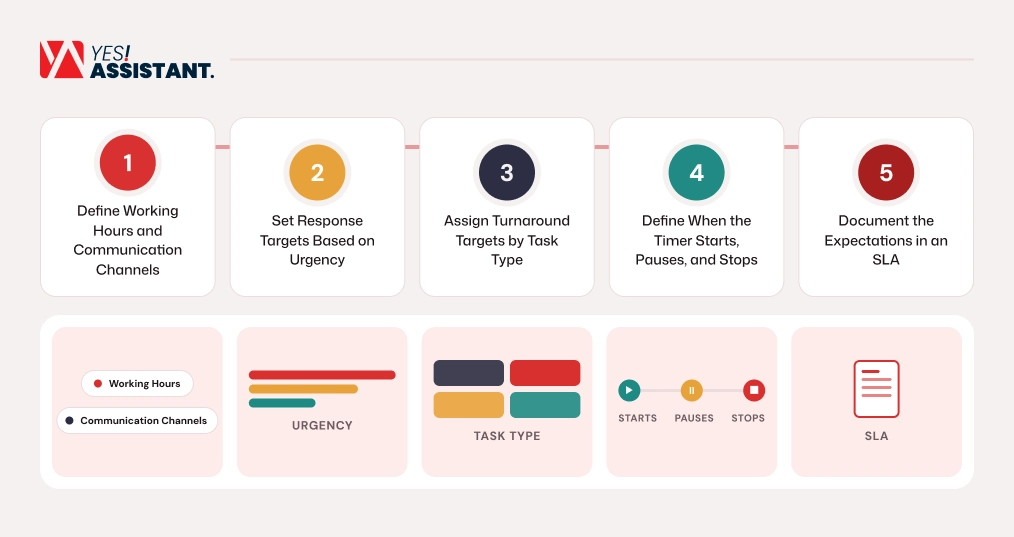
1. Define Working Hours and Communication Channels
Defining working hours and communication channels tells your remote assistant when to talk each day. Pick one single chat tool for daily notes and another tool for projects.
| Parameter | What to Do | What to Implement |
| Daily Hours | Pick exact desk hours | Set official shift schedules |
| Chat Tool | Choose one messaging app | Open one team channel |
2. Set Response Targets Based on Urgency
Setting response targets based on urgency helps your VA sort messages by actual importance. Urgent notes need quick answers, while non-priority projects can wait for later.
3. Assign Turnaround Targets by Task Type
Assigning turnaround targets by task type gives your assistant enough time for big jobs. Simple email sorting finishes quickly, while hard research reports take many business days.
4. Define When the Timer Starts, Pauses, and Stops
Defining when the timer starts, pauses, and stops prevents errors on the clock. Start the clock when notes arrive and stop when waiting on client answers.
5. Document the Expectations in an SLA
Documenting the expectations in a service level agreement (SLA) keeps all rules in a written document. Both parties read the written agreement to protect their business interests.
How to Track and Improve Both VA Performance Metrics
Tracking and improving both VA performance metrics helps your remote team finish daily jobs faster. These core metrics measure exact working hours for everyone. Using regular performance metrics keeps every team member focused on their daily company duties.
Track Weekly Response and Completion Hours
First, track your team’s numbers every Friday by using simple shared project log sheets. Count total minutes from the first message until your remote assistant sends a reply. Write down the full hours taken to finish the work from start to delivery.
Improve Workflow Speed with Clear Task Checklists
Next, improve low numbers by giving your assistant clean checklists for daily tasks. Clear instructions help the VA start fast without stopping to ask extra basic questions. Review these weekly records together to build high trust across every work shift.
Which Matters More: Response Time or Turnaround Time?
Response time or turnaround time matters more for overall business growth. Besides, time secures your daily operational communication. Turnaround time acknowledgements build your initial trust. The completed deliverables drive your business revenue and prevent operational bottlenecks.
When You Exceed Deadlines
If your remote assistant acknowledges a task later, it creates administrative delays. Besides, turnaround time failures cause operational and reputational problems.
Strategic Prioritization and Workflow Balance
Set a strategic first response time for handling client problems or emergencies. Also, prioritize turnaround time for your core administrative, technical and analytical assignments. Balancing both metrics creates a reliable, scalable remote workflow.
Conclusion
A quick client response time signals that your virtual assistant remains active and ready to assist. Besides, when your assistant sends deliverable messages, it is clear to your customer that you have effectively acknowledged tasks after reading the task operational guidelines. A virtual assistant uses a clear plan and maintains transparent communication. This builds a long-term business partnership and drives your business growth.
FAQ
Is response time the same as turnaround time?
No. Response time means the time it takes to send a reply after receiving. Turnaround time measures how long it takes to complete the task.
Does turnaround time include response time?
Yes.. Turnaround time includes response time as a starting component. It measures the total duration from the first request to the task’s completion.
What is a good response time for a virtual assistant?
A good response time for a virtual assistant depends on the type of communication and nature of the tasks. The VA should target one to two hours for routine communication. Priority or urgent tasks should take under 30 minutes.
Should VA turnaround time include weekends?
No. Turnaround time includes weekends depending on your Service Level Agreement (SLA). If you contract for 24/7, then it covers weekends.
How do you handle missed turnaround deadlines?
When you handle missed turnaround deadlines, ask your VA for the reason and a new delivery time. Then, fix unclear instructions and clarify too many tasks. If something happens again, just review the SLA to prevent missed turnaround times.