
What Is an Invoice Exception? How to Handle Invoice Exceptions
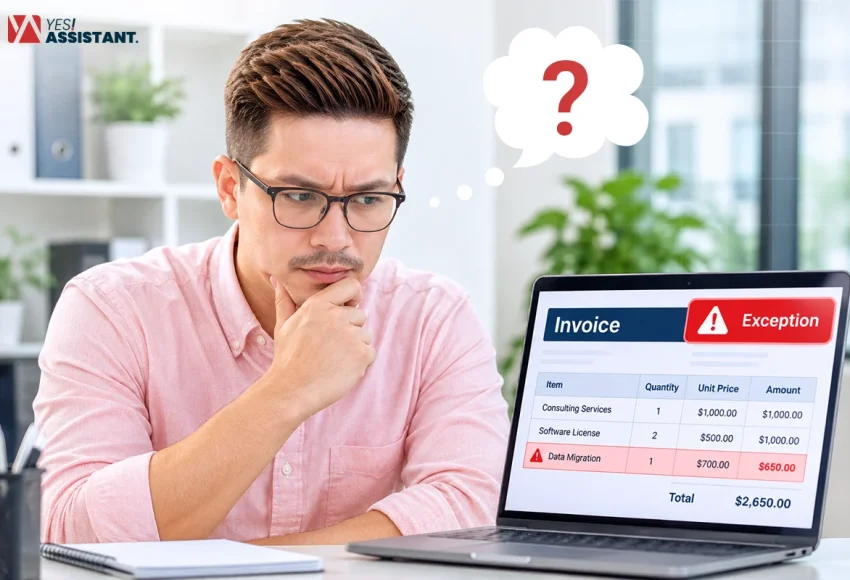
An invoice exception refers to an invoice that fails validation checks required before payment. When the Accounts Payable team runs the final check before making a payment, these invoices may come with an invalid amount, a missing purchase order (PO) reference, a duplicate, or a wrong name.
Although invoice exceptions are a critical issue, they can still be handled and fixed by taking some structured measures. These measures start with receiving the receipt and finish with proper QC and delivery. Here in this piece, you will learn the core components of invoice exceptions and how to handle exceptions.
Key Takeaways
- Invoice exceptions are routine, averaging 14% of invoices, with best-in-class AP teams closer to 9%.
- Seven recurring causes of invoice exceptions include: PO mismatches, price/quantity mismatches, incorrect data, duplicates, missing approvals, missing receipts, and coding errors.
- Resolution splits into two paths: correcting wrong data against the original invoice, or contacting the vendor/approver when data is missing entirely.
- Different exception types belong to different owners: Procurement, AP, Vendors, or Warehouse and misrouting causes delays.
- Preventing exceptions through clean data capture, no-PO-no-pay policies, and root-cause analysis beats fixing them after the fact.
What Is an Invoice Exception?
An invoice exception means a faulty invoice that contains issues big enough to stop it from getting processed. When an Accounts Payable team finds an invoice that may contain a PO mismatch, Incorrect data, a coding error, missing approval, etc these invoices are considered invoice exceptions.
Invoice exceptions are critical and it holds a payment before the invoice issue is properly solved. This comes with a lot of hassles, and most of the time, an invoice exception means an email to the buyer or a call to the vendor. This takes a lot of time from the AP team, while also contributing to payment delays and affecting total working hours and output.
Invoice exceptions are natural and common in invoice processing systems. But processing the wrong invoice can cause problems bigger than you can imagine. That’s why handling invoice exceptions properly is crucial for any invoice processing service provider.
Common Types of Invoice Exceptions
Among dozens of types of invoice exceptions, there are some that are seen often. Most of these common invoice exceptions include PO mismatch, Incorrect invoice data, missing approvals, duplicate invoices, etc. Before you learn how to handle invoice exceptions, it is important to learn what the most common types of invoice exceptions are.
Here are 7 common categories of invoice exceptions:
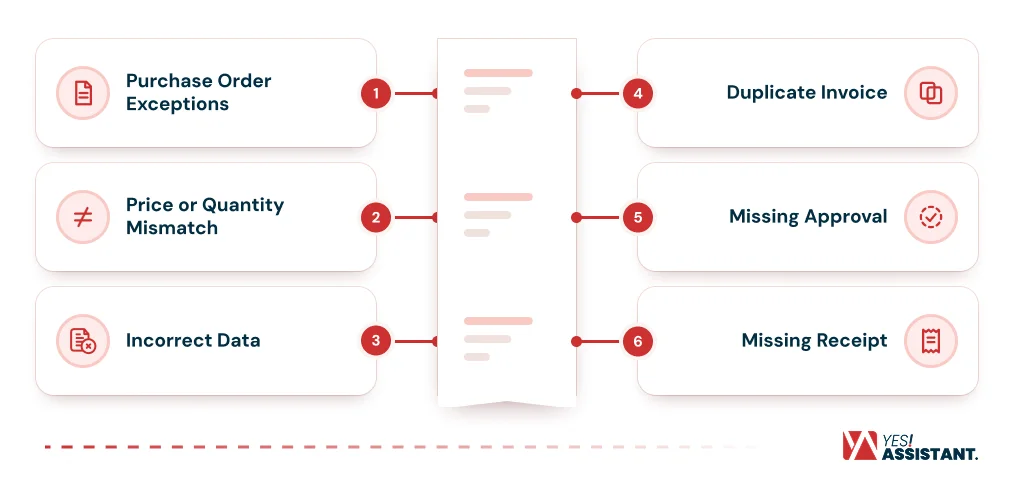
1. Purchase Order Exceptions: These can include a missing PO, an invalid PO number, an already-used PO number, or a mismatch between the invoice and purchase order.
Example: Invoice cites a PO number #1465, but the PO number does not exist in the system.
2. Price or Quantity Mismatch: This is another common type of invoice exception. In this situation, the price or quantity does not match the PO or the goods receipt.
Example: Invoice bills 100 units at $10 but the PO only approved 90 units.
3. Incorrect Data: Not only in invoice exceptions, but this issue is also common in all types of exceptions. It may contain a blank invoice number, missing tax information, an unreadable invoice or the wrong vendor information.
Example: Invoice includes the wrong vendor address or tax ID.
4. Duplicate Invoice: Duplicate invoices are a big and confusing concern in exception handling. The same invoice is submitted twice, often with a slightly changed invoice number.
Example: A previously processed invoice “INV-2201” is submitted again, creating a potential duplicate that must be checked against the original invoice.
5. Missing Approval: A common issue often encountered by the AP team. Most of the time, the invoice sits without the approval of the right approver.
Example: An invoice is submitted for payment without the signature of the manager or person responsible.
6. Missing Receipt: Sometimes goods or products are ordered and billed, but they are not receipted; in situations like that, these exceptions occur the most.
Example: Invoice bills 50 delivered laptops, but there is no delivery receipt logged for that invoice.
7. Coding Error: In this exception, the invoice contains the wrong General Ledger (GL) account, cost center, or department. This stops the invoice from getting approved and causes this error.
Example: Invoice is coded to the IT department instead of the Marketing department.
How to Handle Invoice Exceptions: Step by Step
Handling invoice exceptions is an essential process for smoother AP operations. This is a structured process that requires precision and careful execution. Most of the invoice exceptions can be identified early, even before they hold up payments. Here is how you can handle invoice exceptions.
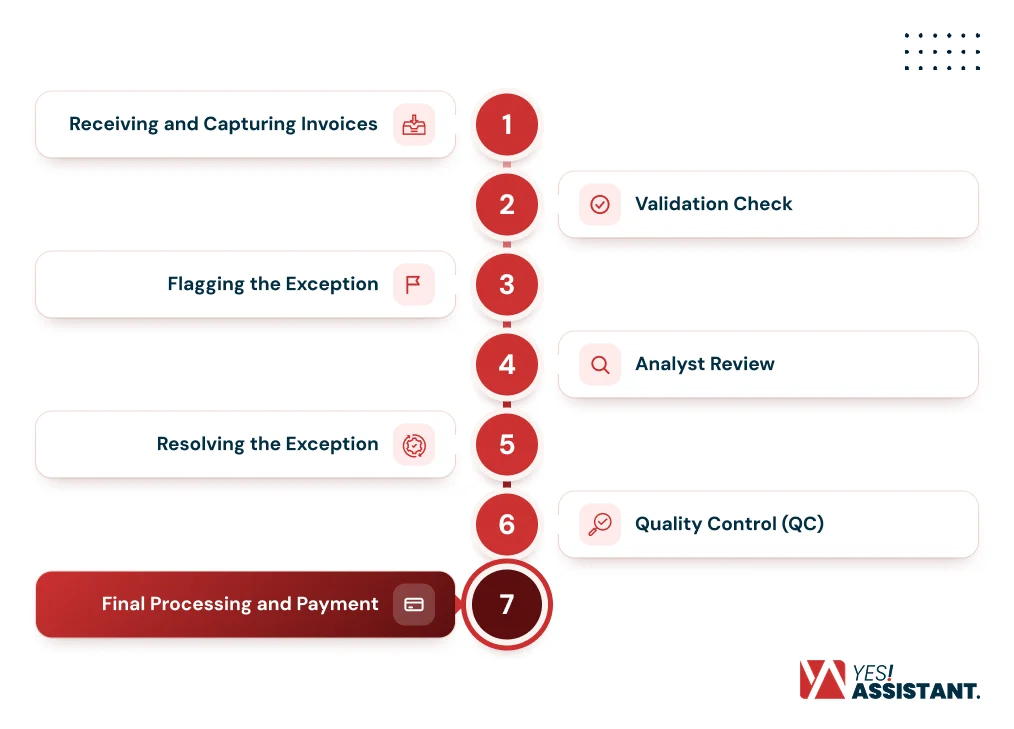
1. Receiving and Capturing Invoices
The entire process starts as soon as the invoice is received. This is the first stage of invoice processing in accounts payable, which can involve both digital and paper supplier invoices.
If in paper form, the invoices are scanned using Optical Character Recognition (OCR) so the data can be captured digitally. In this stage, all of the data is captured, including invoice number, supplier name, PO number, quantities, and prices for validation in the next step.
Example: A vendor mails paper invoices to process. The invoices are received and scanned to prepare them for entry into the digital system. It scans all the information and stores it for validation in the next step.
2. Validation Check
Before any invoice is ready for payment, it is first run through a validation check. This may include a 2-way or 3-way matching process. In the process, it is checked against the purchase orders. Approval receipts, goods receipts and other related factors can be checked. In this check, most of the common exceptions are caught.
Example: An invoice for 100 units at $10/unit is checked against a PO that authorizes 80 units. This means there is a mismatch that triggers a quantity mismatch.
3. Flagging the Exception
If any problem is found within the invoice, that invoice is marked with a flag. For instance, an invoice that cannot be extracted or a PO mismatch. Flagging these invoices helps identify which one needs to be fixed rather than working with incorrect or incomplete data.
Example: An invoice that has no PO number in it is automatically flagged as a missing PO before it reaches the approval queue.
4. Analyst Review
Flagged invoices are reviewed by analysts as part of the manual workflow to identify the specific exception. It can be incorrect data or the wrong PO. Mismatched price or quantity and the analyst takes the appropriate next step.
Example: An analyst who is reviewing a flagged invoice notices it has a wrong GL code.
5. Resolving the Exception
This is the most important step in the whole process. At this step, the solution depends on the type of exception.
Incorrect Data: For the data that exists but is incorrect, the responsible analyst tries to correct it by cross-referencing with the original invoice document.
Example: The system automatically labeled an invoice as “sales” that belongs to the marketing department. The analyst corrects the code to “Marketing”.
Missing Data: For missing data, there is nothing to check against. It means this has to be routed to the appropriate party depending on the missing information.
Example: An invoice for goods that were never documented as received. The AP team routes the information to the appropriate party to confirm whether the goods were received or not.
6. Quality Control (QC)
In this step, the corrected invoice goes through another check just to make sure all information is correct and complete before proceeding.
Example: A duplicate invoice is identified and the original is confirmed to be already paid. The QC team verifies the duplicate one is ignored instead of reprocessing it.
7. Final Processing and Payment
Once everything is checked and sorted, the invoice moves through the final stages of invoice processing in accounts payable, including approval and payment.
Example: A $4,200 invoice clears QC and is paid on time, within the 30-day term.
Who Should Resolve Each Type of Exception?
Each type of exception is unique, caused by a unique reason and requires different finance departments to fix them. For example a PO mismatch is probably caused because no PO was created or it contains wrong information. In this case, the procurement team has to review and correct the PO. Similarly, every exception may require action from a different department.
Possible causes and who should fix them for better understanding:
| Exception Type | Possible Cause | Who Should Fix It |
| PO Mismatch | No PO was created / PO is invalid / PO is already used. | Procurement |
| Price or Quantity Mismatch | PO is outdated or was entered incorrectly. | Procurement |
| Price or Quantity Mismatch | Vendor billed the wrong price/quantity. | Vendor |
| Incorrect Data | Internal typo or data-entry mistake (AP’s own error). | AP Team |
| Incorrect Data | Invoice itself is bad, unreadable, missing tax ID, wrong vendor info. | Vendor |
| Duplicate Invoice | System/matching catches the same invoice detected internally. | AP Team |
| Duplicate Invoice | Vendor genuinely sent the same invoice twice. | Vendor |
| Missing Approval | No approver has signed off yet. | Approver / Manager |
| Missing Receipt | Physical goods were never logged as received. | Receiving / Warehouse |
| Missing Receipt | Service (no physical goods) was never confirmed as delivered. | Requester |
| Coding Error | Wrong GL account/cost center/department entered. | Requester |
| Coding Error | Needs reclassification for accounting accuracy. | Finance / Controller |
What Is a Normal Invoice Exception Rate?
According to Ardent Partner’s benchmark, the normal invoice exception rate is around 14%. Basically, the invoice exception rate refers to exceptions divided by total invoices over a period. The formula is Invoice Exception Rate = (Number of Invoices With Exceptions / Total Number of Invoices Processed) × 100.
For example, a team processing 10,000 invoices a month with 2,000 exceptions has a 20% exception rate. Effective AP operations can reduce the numbers to a single digit. According to Ardent Partners, the percentage can get closer to 9%. In general, higher rates, meaning 25% to 30%, usually indicate broken or weakening matching data and rules.
How to Reduce Invoice Exceptions
As prevention is better than cure, reducing invoice exceptions is better than fixing invoice exceptions. Reducing invoice exceptions requires some special steps that include fixing data quality, enhancing PO usage, setting sensible machine tolerance, automated routing, and analyzing root causes as invoice volume increases.
Reducing invoice exceptions is not one single step, but it is a combination of steps that refine data at each possible level. Here is a brief explanation of how you can reduce invoice exceptions.
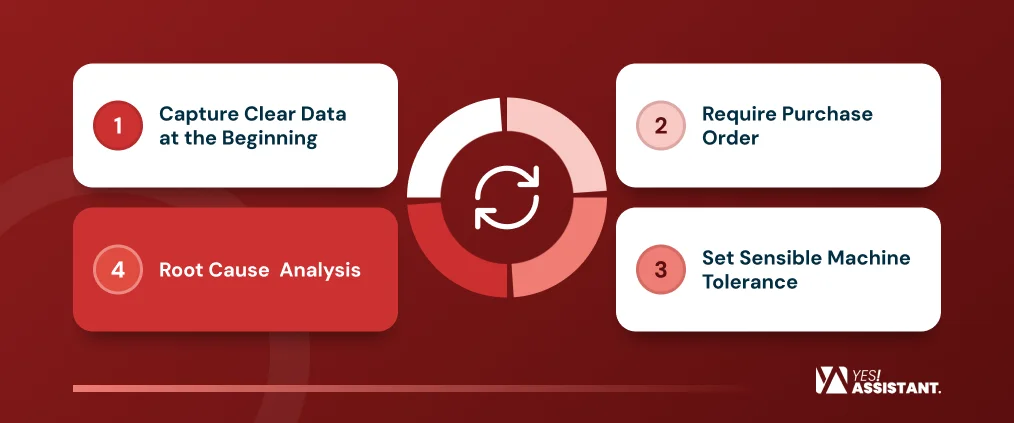
- Capture Clear Data at the Beginning: Use advanced AI technology and OCR to read data from the invoice. This ensures invoice headers and other data are read accurately as clean data is the core foundation. If the data is read incorrectly, matching the data will be impossible.
- Require Purchase Order: Implement a no-PO-no-pay policy. It ensures every spend is documented in the PO, which removes a whole category of exceptions before even starting the process.
- Set Sensible Machine Tolerance: Set a sensible small variance on price and quantity so unimportant differences get passed immediately. Saving time from stopping for every small difference because of a tiny math rounding mistake.
- Root Cause Analysis: Run an analysis each month to find the top causes, including recurring PO match failures. For example, if a vendor is causing most of the duplicate exceptions, sit with them and discuss. If that one vendor fixes their duplicate issue, most of your duplicate issues disappear.
Frequently Asked Questions
What is the difference between an invoice exception and an invoice discrepancy?
An invoice discrepancy is a mismatch between the information in the invoice and the PO or receipt. On the other hand, an invoice exception is an issue big enough to prevent it from normal approval process without manual review or correction. For example, an unapproved invoice is an invoice exception.
Can automation eliminate invoice exceptions entirely?
No, invoice processing automation cannot eliminate invoice exceptions entirely. Automation is surely helpful in catching errors early and enforcing matching rules, but human judgment is crucial. Because issues such as vendor errors or unusual transactions may require additional review or manual inspection.
What is the difference between invoice exception handling and invoice exception management?
Invoice exception handling refers to resolving individual exceptions. On the other hand, exception management is a broader process that includes tracking patterns, setting policies, analyzing root causes, etc. Invoice exception management works to improve the overall exception handling process.
How long should it take to resolve an invoice exception?
24-48 hours is the ideal time for simple exception handling. For complex exceptions such as vendor disputes and missing POs may take 2-4 days. More complex issues, including approval issues, may take 3-5 days to complete the process.
Does 2-way or 3-way matching reduce invoice exceptions?
Yes, both 2-way and 3-way matching reduce invoice exceptions. But 3-way matching is more effective as it matches PO, invoice, and receipt, unlike 2-way matching, which only matches PO and invoice. Since 3-way matching verifies actual delivery, it is more effective than 2-way matching in invoice exception handling.
Conclusion
Invoice exceptions are an unavoidable part of accounts payable, but they don’t have to consume all the time of your team. Understanding the common types of exceptions helps AP teams quickly identify and route those issues to a solution. Having a structured process helps capture, identify, route and solve invoice exceptions most effectively.
Still, prevention is always better than cure; capturing clean data, applying policies and tolerance thresholds, and conducting root cause analysis help avoid unnecessary hassle. Combining a structured process with automation shifts fixing issues to prevent them from happening. Ultimately saving time and cost and reduces vendor friction from time to time.