
How to Use AI for Email Management Like a Pro [New Edition]
Like it or not, emails are still one of the most used forms of effective communication. An average employee receives over 120 emails daily, piling up the inbox with mountains of emails awaiting sorting.
Email sorting is a headache itself. Sorting through junk emails, responding to important emails, and finding schedules for follow-ups is like sorting out a big puzzle. That’s where smarter solutions like AI can save the day.
In this guide, you’ll learn how to use AI for email management to save time, reduce inbox clutter, and improve your response rate. Whether you’re a busy professional or a freelancer managing multiple clients, this guide has something for you.
Why Email Management Needs an Upgrade
Statistics suggest that an average worker spends around 3.1 hours daily checking and responding to emails. It takes away two full workdays from the calendar. You know the math, right?
Important emails often get buried under spam, newsletters, and follow-ups. You either miss replies or waste time on unnecessary manual sorting work. Wasting time is like debt; it adds up and grows exponentially.
Manual email management is outdated, responsible for stress build-up while killing productivity. Missing or overlooking important messages is obvious in manual email management. You may also double-book meetings, or even forget follow-ups entirely.
Some try to solve this by using folders or filters. But these methods don’t scale well. As the volume grows, staying on top of email becomes overwhelming again.
That’s why more people are now looking for smarter solutions like hiring a VA for email management or using AI. They need systems that can think ahead, understand content, and act on it, not just sort it alphabetically or by date
| Expert Tip: If you’re checking email more than 5 times a day, you’re likely wasting over 20% of your work time. |
What is AI-Powered Email Management?
AI-powered email management utilizes intelligent software to organize, prioritize, and automate email inboxes. It effectively learns your behavioral patterns and makes smarter decisions over time.
Advanced technologies like Natural Language Processing (NLP) and Machine Learning (ML) are broadly used in AI-powered email management services. These technologies understand your context, intent, and priority. Thus, it sorts out emails based on subject lines, urgent reply requirements, and promotional stints.
Some email assistants can even write replies, summarize long threads, or follow up if someone hasn’t responded. They help you get to “Inbox Zero” faster without missing anything important.
Many popular services like Gmail and Outlook already have smart features built in. For example, Gmail’s Smart Reply generates reply suggestions based on your communication style. Over time, these features become more accurate as they learn from how you interact with your emails.
Leading email service providers like Gmail and Outlook have smart built-in features that can be effective. For instance, Gmail’s Smart Reply generates reply suggestions based on your communication style. As it learns steadily, it becomes more accurate.
AI tools are smarter and more stable than traditional filters. They establish a pattern to recognize and archive your reactions, and adjust their work accordingly.
Once your inbox is neatly organized, you will feel stress-free, resulting in effective and fast decision-making. Speaking of decision making, AI can also assist you in extracting critical factors from emails so that you can respond in record time.
| Expert Tip: If you’re checking email more than 5 times a day, you’re likely wasting over 20% of your work time. |
Benefits of Using AI for Email Management
Using AI for email management can significantly improve your workflow and reduce time spent on repetitive tasks. It helps you make faster decisions, prioritize better, and keep your inbox under control.
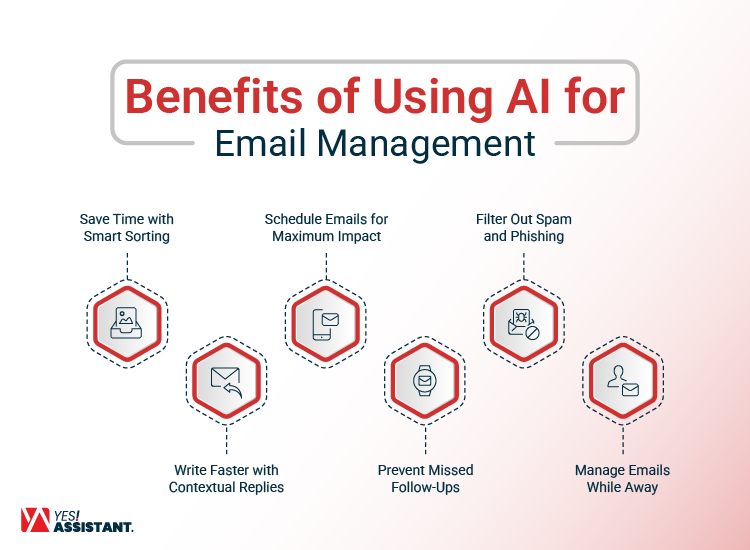
Here are some major benefits:
- Save Time with Smart Sorting
AI can automatically move less urgent emails to secondary folders and bring priority messages to the top, helping you respond faster to the right ones. - Write Faster with Contextual Replies
Many tools offer response suggestions based on the message you receive, cutting your typing time by half without sounding robotic. - Schedule Emails for Maximum Impact
You can set your emails to send when they are most likely to be read, such as early mornings or just before lunch hours, improving open rates. - Prevent Missed Follow-Ups
If a person doesn’t reply within a set timeframe, AI can remind you or even draft a follow-up. This is especially useful for business communication and sales. - Filter Out Spam and Phishing
Advanced systems can detect suspicious patterns and filter out emails before you even see them, reducing the risk of clicking harmful links. - Manage Emails While Away
AI tools can handle your inbox while you’re in meetings or on vacation, providing automatic yet human-like responses.
AI-driven email assistants give you back hours every week. They allow you to focus on tasks that need human attention, not inbox clutter.
| Expert Tip: Combine email scheduling and auto-replies to create a 24/7 communication loop without staying online. |
Top AI Tools for Email Management
There are several tools available that use smart technology to manage your emails more effectively. These tools do more than just automate, they help you prioritize, organize, and act faster. Below are some of the most popular and effective options available right now.
1. Superhuman
Superhuman is designed for speed. It helps you process your inbox in seconds using keyboard shortcuts, follow-up reminders, and predictive AI. Its interface is clean, and it’s ideal for professionals who receive a high volume of daily emails.
2. Google Gemini in Gmail
Gmail’s native AI features are growing with the integration of Gemini. You get smart replies, auto-complete suggestions, and email summaries. It can even suggest meeting times and action items based on your email content.
3. Missive
Missive is ideal for team collaboration. It lets you comment on emails, assign messages to team members, and use AI to draft replies. It combines chat and email to keep conversations in one place.
4. SaneBox
SaneBox filters unimportant emails into a separate folder so your inbox stays focused. It tracks unanswered messages, unsubscribes you from junk mail, and improves over time by learning how you manage your emails.
5. Boomerang for Gmail
Boomerang lets you schedule emails, set follow-up reminders, and use its “Respondable” feature, which scores your messages for tone and likelihood of response. It’s particularly useful for client-facing roles.
6. Spark Mail
Spark offers an AI-powered assistant that helps you prioritize emails, reply faster, and block distractions. It automatically sorts newsletters and notifications into separate folders.
7. Shortwave
Shortwave turns your Gmail into a real-time communication tool. It prioritizes emails by importance and groups them by thread, making it easier to follow conversations and reply quickly.
Instead of using it by yourself to manage email your can also use VA for email management for your marketing campaign as well. Combining both can be more powerful and effective.
Comparison of the Best AI Email Management Tools
| Tool Name | Best For | Key Features | Email Platforms | Free Version | Pricing (Starting) |
| Superhuman | Speed & productivity | Keyboard shortcuts, read tracking, and follow-up reminders | Gmail, Outlook | No | $30/month |
| Gmail + Gemini | Every day, Gmail users | Smart replies, email summaries, and suggested actions | Gmail (Native) | Yes | Free (with Gmail) |
| Missive | Team-based email collaboration | Shared inboxes, comments, assignments, and AI reply suggestions | Gmail, IMAP | Yes | $14/user/month |
| SaneBox | Email filtering & clean-up | Smart filtering, auto-clean folders, do-not-disturb, unsubscribe manager | All email clients | No | $7/month |
| Boomerang | Follow-ups & scheduling | Scheduled send, recurring emails, AI “Respondable” tool | Gmail, Outlook | Yes | $4.99/month |
| Spark Mail | Personal inbox organization | Priority inbox, smart categorization, smart replies | Gmail, Outlook, IMAP | Yes | $4.99/month |
| Shortwave | Inbox-focused productivity | Thread grouping, priority sorting, and collaborative comments | Gmail | Yes | $9/user/month |
Choosing the right tool depends on your workflow. Whether you’re a solo freelancer, a manager, or part of a sales team, there’s an AI assistant built to meet your specific email needs.
| Expert Tip: Start with tools that offer free trials. It helps you test features like smart replies, email snoozing, and priority inbox before committing. |
How to Implement AI in Your Email Workflow
Switching to AI-based email management doesn’t need to be complicated. You just need to follow a few simple steps to get started and see results quickly.
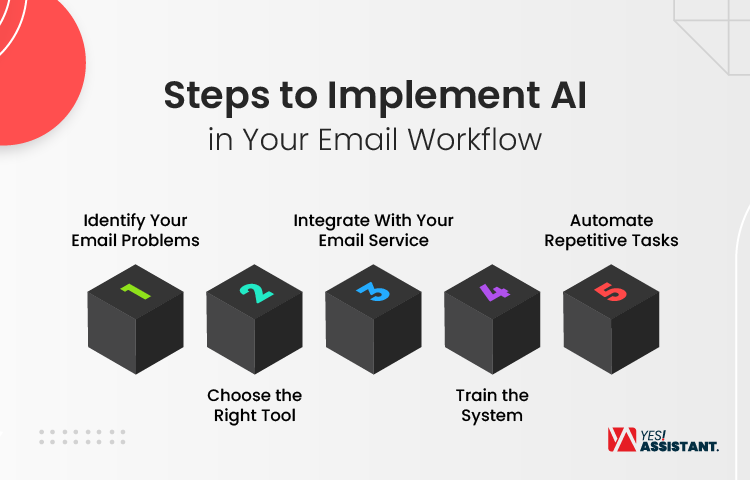
Step 1: Identify Your Email Problems
Start by tracking your email habits for a week. Are you overwhelmed with newsletters? Missing follow-ups? Replying late? Understanding your pain points helps you choose the right tool.
Step 2: Choose the Right Tool
Once you know the problem, select a tool that matches your needs. For example:
- Use SaneBox if you want smart filters.
- Use Boomerang if scheduling and follow-ups are your priority.
- Use Superhuman if speed and productivity are key.
Step 3: Integrate With Your Email Service
Most AI tools connect directly with Gmail or Outlook. You’ll need to grant access, which takes only a few minutes. Make sure you enable features like “smart replies,” “auto labeling,” or “priority inbox” during setup.
Step 4: Train the System
Use the tool consistently for a few days. Mark emails as important or unimportant, respond through the smart suggestions, and apply labels. These actions help the system learn your preferences.
Step 5: Automate Repetitive Tasks
Set up rules for routine emails. You can:
- Auto-archive newsletter emails after reading.
- Trigger reminders for messages you haven’t responded to.
- Schedule client emails to go out during peak hours.
The more you interact, the more precise the tool becomes. In just a week, you’ll notice a cleaner inbox and faster response times.
| Expert Tip: Combine email automation with task tools like Notion or Trello. This bridges the gap between communication and productivity. |
Real-World Use Cases: AI for Personal vs. Business Email
AI tools are flexible and can be used for both personal and business needs. Let’s look at how they fit into each scenario.
Personal Email Use
People with busy lives use AI tools to sort out subscription clutter, automate routine replies, and set reminders for bill payments or event RSVPs. Apps like Spark and Gmail with Gemini help clean up inboxes with minimal effort.
For example, a student can use smart labeling to keep university emails separate from newsletters. This saves time and helps them stay organized without checking the inbox constantly.
Business Email Use
In business, AI tools shine even brighter. A sales team might use Boomerang to schedule follow-ups after a pitch. A remote manager can use Missive to assign emails to team members and track conversations.
Customer service departments use Shortwave or SaneBox to route inquiries and filter spam, improving response time and team efficiency. Over time, the tools adapt to the tone and flow of conversations, reducing manual input.
AI tools are also valuable for freelancers. They can automatically draft proposal replies, remind clients of pending invoices, or summarize client feedback, all without opening every email manually.
Whether you’re managing a team or just your inbox, AI tools adjust to your routine and improve communication without adding extra work.
| Expert Tip: Personalize AI tools with your writing tone for more natural replies. It makes automation feel human and builds trust. |
Common Mistakes to Avoid When Using AI for Email
While using AI for email management is helpful, certain mistakes can reduce its effectiveness. It’s also seen that manual email management drains your focus from daily tasks.
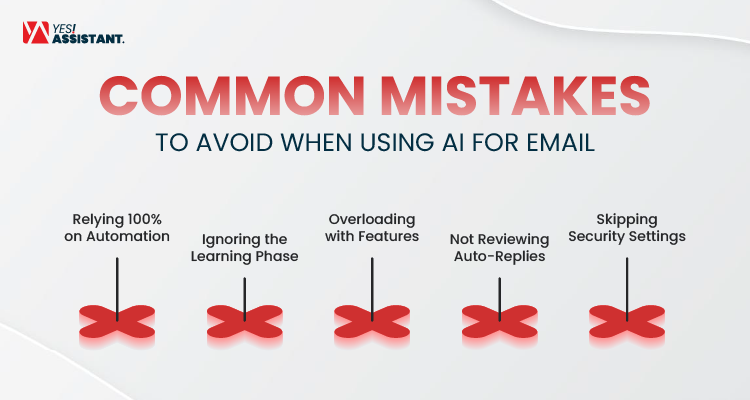
- Relying 100% on Automation
AI tools can prioritize and respond, but they may still miss emotional context. Always review high-stakes messages manually - Ignoring the Learning Phase
Many users get frustrated when the tool doesn’t work perfectly from day one. Remember, it improves with regular usage and feedback. - Overloading with Features
Adding too many tools can slow you down. Stick to one or two that solve your most pressing problems. - Not Reviewing Auto-Replies
Always customize your automatic replies, especially for professional use. A generic response might come off as cold or impersonal. - Skipping Security Settings
AI tools access sensitive information. Always enable two-factor authentication and review privacy permissions before use.
| Expert Tip: Use AI to reduce noise, not to completely replace your judgment. |
Future of AI in Email Communication
AI is already changing how we handle email, and the future looks even more promising. Soon, email tools will go beyond sorting and replying.
They’ll understand emotions, highlight urgent requests based on tone, and even rewrite unclear messages before you send them. Some platforms are already testing voice-to-email summaries and meeting-ready conversation briefs.
Expect deeper integration with workplace tools. Your inbox might soon auto-sync with your calendar, tasks, and CRM without needing manual input.
For instance, if someone mentions “next Friday,” your assistant could suggest open time slots, draft a meeting invite, and schedule it, all in one click.
Privacy will also become more central. As these tools access sensitive data, we’ll likely see more encrypted, privacy-first AI email solutions tailored for industries like healthcare, law, and finance.
In short, the email assistant of tomorrow won’t just help you manage communication. It will act like a digital secretary that thinks, plans, and organizes for you.
| Expert Tip: Stay updated with your email tool’s new feature rollouts. Adopting them early gives you a productivity edge. |
Wrapping Up!
Managing emails doesn’t have to be a daily struggle. With the right tools and setup, AI email management can turn your inbox into a productivity hub instead of a time drain.
By now, you’ve learned how smart email assistants can help you:
- Prioritize important messages
- Automate replies and follow-ups.
- Cut down clutter and spam.
- Sync tasks with your calendar and CRM
- Save hours each week with minimal effort.
More importantly, you’ve seen how easy it is to implement these tools, no technical background required. Whether you choose Spark, SaneBox, or Gmail with Gemini, the benefits are immediate and lasting.
Avoid common mistakes, choose tools that match your workflow, and keep privacy and personalization in mind. That’s how you get the most out of AI in email without losing the human touch.
If you are finding it extremely hard to manage your emails, you can hire Virtual Assistants from YesAssistant. Reach out for a free consultation.