
Shared Calendar Best Practices for Better Team Productivity
A shared calendar involves multiple platforms incorporated under a single hub and organizes all members under a dashboard. Unless you are personalized and family calendar, you can share your professional or business events, schedules, or meetings with your team members.
Under a shared calendar, provide access to the team members for adding, editing, or modifying any events and bookings.
Usually, a shared calendar is a digital scheduling tool that gives access to multiple users under a single calendar to view and update the same agenda. A user who controls the calendar can share or centralize all other single calendars into a single view. This shared calendar coordinates the team’s participation and sets deadlines and personal comments.
- Immediate Synchronization: Any update, edit, or delete events or schedules can immediately change or adjust with other platforms.
- Role-based Permissions: There are multiple events or segmented calendars under a user account. You’ve authorization to share a calendar based on roles, like view-only for one group, and senior groups can update or edit.
- Set Alert & Send Notifications: Share calendar set alert for before the meeting and send a notification before a defined specific time.
- Resource & Event Bookings: This calendar can centralize company assets like company conference rooms, vehicles, or store areas.
A shared calendar tool designed to sync with other scheduling tools and align schedules across an organization. Through segmenting your calendars by functions such as teams, resources, or projects, businesses can provide power access, prevent double-bookings, and improve overall operational visibility.
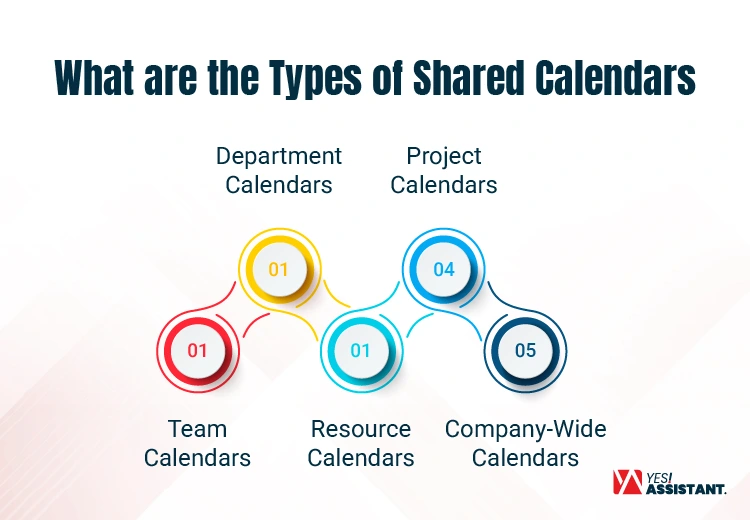
A breakdown of the different types of shared calendars and how to utilize them:
1. Team Calendars
- Purpose: Coordinate with team members on day-to-day basis, availability, meetings, sales conference, and event planning for a specific team or department.
- Best for the Groups: Set customized personal status like “Who is out of office,” schedule recurring stand-ups, and manage shared deadlines.
- Top Tools: Most significant Team calendars facility providers are Microsoft 365 Group Calendar or Google Workspace.
2. Department Calendars
- Purpose: Extends scope that covers a set of departments or multiple teams to track major events, goals, and initiatives. This is relevant to the entire department (like Marketing, HR, or Sales).
- Best for Particulars: This calendar is highly required for launching products, company-wide HR training days, or a quarterly performance management appraisal review program.
- Top Tools: SharePoint Events Web Par
3. Resource Calendars
- Purpose: Managing the booking and ensuring availability of shared physical assets or specialized arrangements.
- Best for: Allocate conference rooms, schedule for company vehicles, or specific lab or studio equipment.
- Top Tools: Outlook Room Finder for internal asset management.
4. Project Calendars
- Purpose: Focus on specific arrangements, temporary initiatives with a definitive start and end date. This calendar ties scheduling directly to deliverables and task dependencies.
- Best for: Tracking project insights, cross-functional sprints, and particular project deadlines.
- Top Tools: com Work Management, Asana, or Trello
5. Company-Wide Calendars
- Purpose: Required for a high-level overview of events, holidays, and internal announcements that are required for everyone in the organization.
- Best for: Arranging Town-hall meetings, public holidays, annual company programs, and periodic paydays.
- Top Tools: Teamup Calendar
Typically, shared calendars enable consistent coordination, immediate availability to check, and event scheduling. The best system depends on your ecosystem, ranging from foundational apps to project management heavyweights.
Google Calendar
Easy to get access to simple Gmail and get multiple facilities using Google Workspace.
- Google Workspace connects a shared Google Calendar with a large team within a single view.
- Features integrated Google Gemini to read, create, and reschedule events from simple text.
- Sync Google Calendar with other external platforms to unify multiple schedules.
Microsoft Outlook Calendar
It’s an enterprise standard. Businesses, professionals, or freelancers can get access to the calendar view.
- Outlook helps team members to set reminder for important meetings across different time zones.
- Integrated with Copilot to automate and optimize complex scheduling tasks.
- Connects with other AI tools like Reclaim.ai, Trevor AI, and Morgen AI.
Apple Calendar
This calendar natively integrates into the iOS and macOS ecosystems, making it ideal for Apple-centric professionals.
- Syncs consistently through iCloud to bridge the gap between personal and professional devices.
- Supports clean, minimum scheduling with fast, automated location data mapping.
- Natural language input allows you to quickly type casual phrases like “Lunch tomorrow at 1 PM” to automatically generate fully detailed events.
Calendly Integrations
Calendly acts as an automated bridge between your external clients and your internal shared calendars.
- End the email with up-and-down by using simple booking links.
- Deeply integrates with Google, Outlook, and major CRM tools to auto-generate meetings at the right time.
- Automatically detects your client’s time zone to display your local time accurately, which eliminates your scheduling confusion.
Project Management Calendar Systems
Platforms like ClickUp, Notion, and Monday.com that merge scheduling with task execution.
- Use a shared calendar like Google Calendar as a project management tool within interactive actions and timelines.
- Ensures that team deadlines are tied directly into active operational workflows.
- Enables virtual workload balancing by allowing managers to track team capacity within easy dragging and dropping tasks to prevent individual burnout.
Sharing Calendars requires a lot of time to set up and sync with other tools from remote controls. High professionals choose remote assistant service for managing shared calendars that have great value in the business. Besides, as a strategy builder, you’ll set your mind to focus on big games.
In modern collaborative workspace demands, a shared calendar is an operational engine. If you can’t manage your digital schedule, it quickly becomes a chaotic issue to overlap events and missed appointments. Significantly, good calendar management organizing your time, work, protecting your energy, and keeping everyone on the same page.
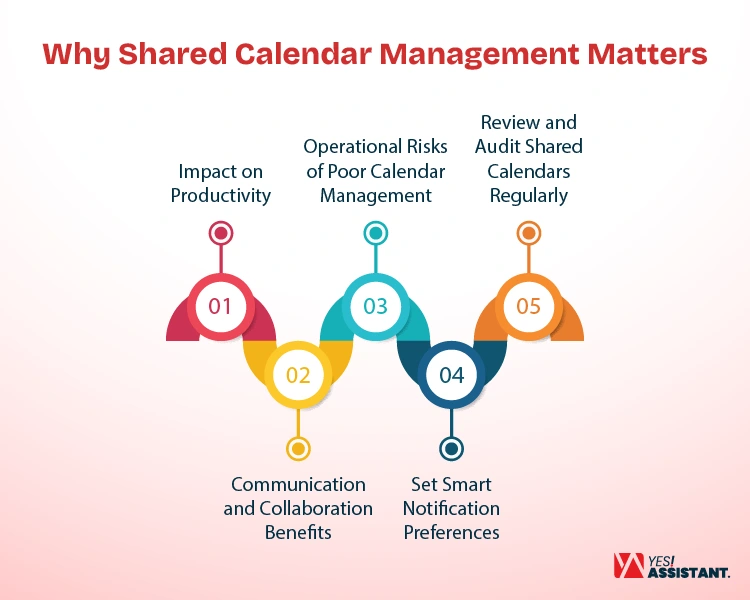
Impact on Productivity
Managing your team’s schedules effectively reduces administrative time waste and saves your valuable time for execution. Here is how structured management optimizes your daily output:
- Protects Deep Work: Clearly define high-priority blocks that accelerate your team members to focus deeply on complex tasks without any interruption.
- Streamlines Daily Workflows: Provides a clear overview of the day at a glance. This makes them attentive to professionals preparing tasks efficiently.
- Maximizes Resource Output: Ensure all critical tools and rooms are utilized without creating scheduling delays.
Communication and Collaboration Benefits
Considering communication and team collaboration, a shared calendar plays the role of a single fact that creates immediate transparency across multiple departments. It enhances your workplace relationships through clear and open communication.
- Bridges Departmental Gaps: Permits your cross-functional team to track similar project launches, precautions, or initiatives of the project.
- Sets Clear Boundaries: The project manager can inform about instantly available resources, reduce the awkwardness of declining incorporated meeting requests.
- Improves Project Handovers: Share calendar, displays clear insights into task discrepancies. So, team members know exactly when to step into the project.
Operational Risks of Poor Calendar Management
Ignoring the calendar system at your office can disrupt your complete business operation. Disorganized schedules create immediate negative consequences across your company.
- Causes Double-Bookings: Without a digital shared calendar, your team members may double-book the same events that embarrass the entire business.
- Breaks Client Trust: Missing client calls or late arrivals can severely damage your professional business relationships.
- Accelerate Staff Burnout: Filling your calendar with back-to-back meetings gives your team members zero space for daily work.
Set Smart Notification Preferences
Share calendars incorporate all events under a single view, consistent with your deep focus, and help you to avoid missing deadlines. Setting smart notifications builds your business workflow to be balanced and productive.
- Prioritizes Urgent Events: You can set loud alerts for important client calls and keep internal syncs quiet by adjusting your app’s notification settings.
- Provides Timely Reminders: Send a standard 15-minute reminder for the attendees to warn them to be attentive to urgent calls or meetings.
- Prevents Meeting Surprises: Provide all concerns and daily agenda summaries to help professionals plan their workload effectively.
Your calendar naturally gathers digital information over the years. This is like dead links and outdated recurring invites. Regular audits keep your digital workspace secure and completely accurate.
- Clears Zombie Meetings: Removes the old recurring event that is still active on the system long after a project ends.
- Validates Resource Labels: Fixes broken room links and reallocates the asset categories to match current inventory.
- Maintains Data Accuracy: Ensure global holiday lists and corporate time zones remain precise and updated.
Though your team has the best tools arrangement, your team members can easily fall into poor scheduling habits that drain your workplace productivity. Mismanaging a shared dashboard creates unnecessary workloads, destroys focus, and interrupts daily business operations. Therefore, rearrange and fix the common issues to keep your workflow consistent, predictable, and stress-free.
Overloading Calendars
Planning for every minute of your workday with overlapping meetings leaves zero space for actual project execution.
- Don’t emphasize practice quickly that drains employee energy
- Quick practice or learning also causes significant workforce burnout.
- Reinforce your team members to stick to schedules.
- Prepared to handle urgent and unexpected client requests.
Poor Event Naming
When shared calendar labeling events with unclear format like “Meeting” or “Sync.” Let clear names with specific topics help attendees understand the goal at a glance.
- Clearly naming in the calendar reduces confusion.
- Help team members prepare their notes in advance.
- Describe the actual purpose of the event.
- Clear & concise meeting minutes keep the entire workspace organized.
Lack of Permission Controls
Strictly manage calendar editorial to allow limited persons for accessing, editing or updating, helping you to avoid accidental deletions and overwritten bookings.
- Limiting modification rights to authorize managers only.
- Restricted authorization can protect critical events.
- Set proper permissions who can access to update or edit.
- A proper permission setting protects the integrity of the scheduling hub.
Ignoring Time Zones
Check local conversions to avoid accidental midnight meeting requests. Thus, you need to follow a cross-border team event schedule.
- Follow the time zone and send meetings according to standard business hours.
- Maintaining a proper time zone can avoid midnight meeting requests.
- Integrate built-in time zones tools to keep global collaboration.
- Maintain Global relationships respectful and highly professional.
Not Reviewing Calendar Hygiene
An old meeting schedule blocks your calendar and creates disorder in prime-time slots.
- Check your calendar for regular outdated projects.
- Remove migrated members from the system.
- Maintain a strict calendar with the cleaning of old history.
- Create enough space for new business opportunities.
Conclusion
A shared calendar is a powerful asset that keeps your team members aligned with goals and becomes productive. Manage your digital dashboard properly to avoid schedule confusion, protect your focus time, and improve daily communication.
Therefore, you should avoid common mistakes by setting simple etiquette rules. If your team members can collaborate effortlessly and focus entirely on business goals, this hits your business goals.