
How to Handle High-Volume Invoice Processing: 9 Steps Guide
Your invoice processing might become difficult as invoice volume increases. Those problems become a headache when your business starts to grow and receives a large number of invoices every month. There are some common aspects that delay the AP process and increase overall processing costs. Which are manual data entry, different invoice formats, approval delays, invoice differences, and payment terms.
So, how can businesses handle high-volume invoice processing efficiently? The answer is a structured workflow supported by invoice automation, OCR, AI, and accounts payable automation.
Read along as we cover all the methods for high-volume invoice processing methods for faster processing, reduced error rates, lower costs, and improved overall accounts payable processes.
Key Takeaways
- Automation saves time because smart software does the boring typing and routes invoice receipts to managers automatically.
- Fewer mistakes happen because the computer instantly catches typos, double charges, and wrong pricing details.
- Tracking invoices is easier because you can see exactly where an invoice is waiting and find any file in seconds.
- Human eyes still matter because computers finish the easy, everyday invoices while your accounts payable team fixes the problem files.
What is High-Volume Invoice Processing?
High-volume invoice processing refers to processing a large volume of data within a short period of time. This can be done using automation software to automatically organise, check and save a large number of invoices very fast and accurately. Instead of a human manually opening and checking every single line, a smart system handles the task.
Businesses may receive invoices in different formats from multiple vendors. This makes the process slow and difficult because the process contains steps like receiving invoices with purchase orders, multiple vendors, various data sources, and complex approval workflows.
Without simplifying this process. These steps will cause delays, errors, and higher processing costs. Causing issues in growing vendor relationships.
What Counts as a High Volume of Invoice Processing?
There is no single rule for the definition of high-volume invoice processing. As “High volume” depends entirely on your business size and how many people are in your finance team currently.
Here’s how a finance team can vary for different companies –
- Small businesses with a tiny team can be overwhelmed with 50 to 100 invoices per month.
- Mid-sized businesses with an average-sized team usually need dedicated sets of tools to help keep up with the heavy inflow of 500 to 1000 invoices a month.
- Large industries need to process very high volumes of invoices across multiple departments in their companies.
So, do not just count the papers. The main factor is the stress it causes instead.
Consider your invoice processing high if manual work causes data entry errors or late fees. You are also at your limit if your finance team is completely overwhelmed by daily invoice counts.
What Types of Documents Can Be Processed in Bulk?
Smart modern software can automatically process almost any kind of invoices your business receives. These invoices are generally categorised into six different categories; they are –
- Purchase Order (PO) Invoices are bills that match a pre-approved purchase order.
- Non-Purchase Order Invoices are expense bills that do not have a previous purchase order.
- Recurring Invoices are monthly repeating bills like rent or software subscriptions.
- Supplier and service invoices are common bills from your regular vendors and contractors.
- Utility Invoices are set monthly costs like electricity, water, or internet.
- International invoices are global bills that use additional currencies or foreign taxes.
Why is High-Volume Invoice Processing Challenging?
When hundreds or even thousands of invoices arrive every day, high-volume invoice processing can get very confusing. As your paperwork expands, manual tasks and system issues increase. This slows down your accounts payable team.
The biggest problems are slow typing by hand, long delays, waiting for managers to sign them off, and the resulting higher costs. Receiving invoices in very different formats also makes the job hard.
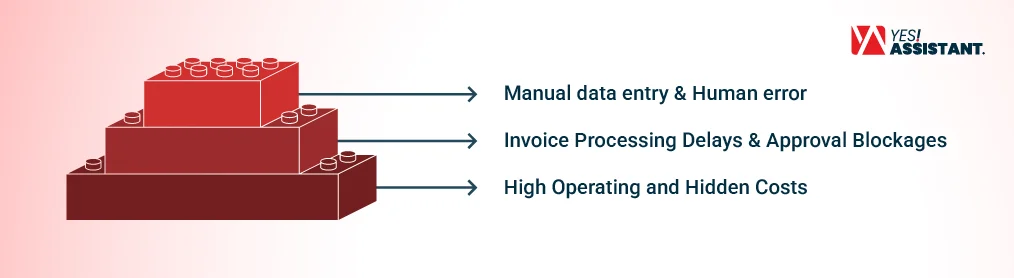
Invoice Processing Delays & Approval Blockages
Payment delays are a major headache for businesses. A single invoice must go through many steps before you can actually pay it, these steps are –
- Reading the text on the invoices.
- Checking the facts to make sure they are right.
- Matching the invoices to the original order form.
- Getting a manager to sign it off and get approval.
- Sending the money to the vendor.
If just one person is slow to answer, the whole process stops. Large volumes of invoices make these long wait times much worse. These delays cause you to miss due dates and lose out on early payment discounts. It also upsets your suppliers because they do not know when they will get paid.
Automated invoice systems fix this by sending invoices to the right individual manager instantly and improving cash flow.
Manual Data Entry & Human Error
Manual data entry is a huge problem. Employees must type in invoice numbers, vendor names, dates, amounts, taxes and due dates completely by hand.
When people type out hundreds, if not thousands of numbers, mistakes are bound to happen. A wrong number or duplicate invoices cause payment mistakes and hours of extra cleanup work.
Getting invoices in different ways also slows things down. The many ways your business can receive its invoices are:
- PDF Files in email
- Scanned papers on a computer
- Paper pages in the mail
- Digital files from online systems
Opening and typing all these different files takes way too much time. And the solution to this is either to automate the whole task or outsource data capture services for faster, error-free data processing.
High Operating and Hidden Costs
Processing thousands of invoices by hand costs too much money. You have to pay just to enter data, check each line, and resolve disputes with vendors.
According to experts at the Institute of Finance and Management (IOFM), the more invoices you get, the more time your accounts payable team wastes on the same tasks. This makes every single invoice expensive to process and stops your business from expanding properly.
Manual work also brings hidden costs, such as:
- Fixing mistakes caused by human error.
- Paying late fees because you forgot a due date.
- Losing savings from early-payment discounts.
- Wasted hours speaking to angry vendors.
Automated software lowers these costs by eliminating repetitive tasks. And it speeds up your work time, so your team can focus on more important business targets. If automation is out of your budget right now, you can also hire a professional accounts payable outsourcing company that reduces errors and costs.
9 Steps to Handle High-Volume Invoice Processing
Processing a high volume of invoices quickly gets difficult when everything is done by a human. As the invoices grow, mistakes, delays, and extra costs are more likely to occur.
Here are 9 simple steps that help to reduce manual work, improve accuracy and keep invoices moving –
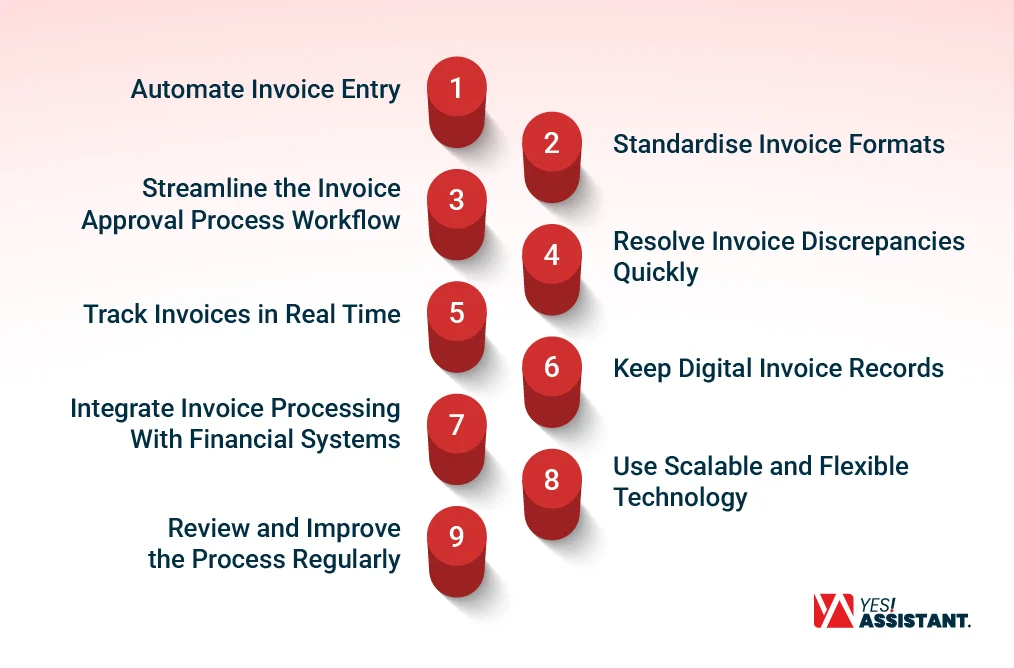
1. Automate Invoice Entry
Let smart software read your files and use AI AP automation to type your data automatically to save time and stop human entry errors. This can be done using-
- OCR (Optical Character Recognition) for invoice capture by reading data off PDF’s, scanned invoices and other documents into usable data.
- AI AP automation can help beyond basic data entry. AI can learn basic coding rules and help assign invoices to the correct general accounts payable team, departments or cost centres.
2. Standardise Invoice Formats
Different invoice formats can make high-volume invoice processing harder. Businesses receive invoices as PDFs, paper documents, email attachments or electronic files.
So, Group your invoices together by asking suppliers to send digital files to one central email inbox so nothing gets lost in the process.
For accurate invoice data capture, A standard format also makes it more manageable for automated systems to work on.
3. Simplify the Invoice Approval Process Workflow
Speed up manager sign-offs by setting up clear automatic rules that route invoices to the right boss instantly based on cost or department.
The approval rules can be based on factors such as –
- Invoice amount
- Department
- Branch or location
- Vendor
- Cost Center
- Purchase order
These rules can be automated. So that each invoice is sent to the correct approver. Automated approval process workflows reduce manual follow-ups and help invoices move through the processes a lot faster.
4. Resolve Invoice Discrepancies Quickly
Set up your system to check incoming invoices with original orders so you can find and fix invoice mistakes quickly.
An invoice can have a different amount from the purchase order, missing information, incorrect quantities or other differences. For POs and other documents, automated matching can identify each of the differences and send them to an employee for review.
This allows AP teams to focus on invoices with actual invoice discrepancy instead of manually checking every invoice.
5. Track Invoices in Real Time
Keep track of your progress in real time with a central dashboard that shows exactly where every single invoice stands.
A centralised system can show whether the invoice has been –
- Received
- Data captured
- Validated
- Matched
- Sent for approval
- Approved
- Scheduled for payment
- Paid
This way, it’s easier to find invoices that have been delayed or denied approval.
6. Keep Digital Invoice Records
Store your financial records digitally so your team can search for and find any old file in just a few seconds. High-volume invoice processing produces a large amount of financial information to handle. Keeping digital records makes it easier for invoices to be found and reviewed when needed.
A searchable system can help employees locate invoices by –
- Vendor
- Invoice number
- Date
- Amount
- Department
7. Integrate Invoice Processing With Financial Systems
Connect your billing software directly with your main accounting tools so data flows smoothly between departments without any double typing.
Automation software integration allows data to move between systems automatically. This saves time and reduces repeated data entry. It also helps keep financial records accurate and up to date.
8. Use Scalable and Flexible Technology
Invoice volumes can change over time. A business may receive more invoices during busy seasons or as it grows. To manage the growing needs, use flexible, cloud-based technology that easily scales up to manage a sudden rush of seasonal paperwork without needing extra staff.
9. Review and Improve the Process Regularly
Check and improve your system regularly by looking for slow spots every few months and making small tweaks to stay fast.
Regularly reviewing these processes can help improve accuracy, handle higher invoice volumes more easily, and help with cost savings.
The main goal should not be only to process more invoices and reduce accounts payable errors. Instead, create a system that is faster, more accurate, and easier to work with. And scales as the business grows too.
Manual vs. Automated Invoice Processing
When businesses manage only a few invoices, manual processing may be manageable. But as the number of invoices grows. Manual work becomes slow, costly, and difficult to control.
Smart AI automation software makes invoice processing easier. It handles repetitive tasks like reading invoices, checking facts, matching orders, routing approvals, and updating records.
This helps businesses process large volumes of paperwork faster while cutting down on manual labor.
Here is a simple comparison of manual and automated processing:
| Manual Invoice Processing | Automated Invoice Processing |
| Staff enter invoice details by hand | Software enters invoice details automatically |
| Data entry takes more time | Data is captured much faster |
| Mistakes are more likely to happen | Fewer data entry mistakes occur |
| Staff send manual emails to get approvals | System sends invoices to the right person automatically |
| Hard to know exactly where an invoice is | Easy to see the real-time invoice status |
| Staff check invoices against purchase orders manually | Software matches invoices with purchase orders instantly |
| Staff spend valuable time fixing invoice problems | System flags specific problems for staff to check |
| Operating costs increase as invoice volume grows | AP Automation cuts down processing costs per invoice |
| Paper and email invoices are harder to manage | Invoices can be stored and managed in one digital system |
Manual Invoice Processing
Processing invoices by hand means your staff must receive the paperwork, check the facts, and type data into your computer system. They also have to match documents, send files to managers for sign-off, and chase down final payments.
This style gives workers total control over every single paper. It is helpful when an invoice looks strange or needs a human to make a smart decision.
However, doing this work by hand gets too stressful as your company grows. Typing mistakes, duplicate invoices, missing info, and long delays create a mountain of extra chores. For busy businesses, these problems cause slow workflows and high processing costs. If your internal team is unable to handle the workload, you can always hire a trusted document processing outsourcing company for accurate and scalable operations.
Automated Invoice Processing
Automated invoice processing uses smart software to completely skip the boring manual tasks. The software reads the invoice text, checks the data against your business rules, matches order forms, and alerts managers to approve payments automatically. Finally, it sends the clean data straight to your main accounting software. Perfectly processed invoices move through the system with little to no human effort. If an invoice has a mistake or missing details, the software flags it and hands it to an employee to look at. This allows your team to spend time solving real problems instead of wasting days on typing data and chasing down bosses.
Which is Better for High Volume of Invoices?
Choosing between manual and automated data entry is easy. If you manage hundreds or thousands of invoices each month, software is much easier to manage than doing it manually every time.
AP Automation cuts out boring routine work, tracks your files, speeds up manager approvals, and saves costs. Still, human eyes are vital for fixing weird mistakes and making final decisions.
The best strategy is a mix of software speed and human brains. The software handles the easy, everyday invoices while your employees focus on the problem files that need extra attention.
FAQs
What is high-volume invoice processing?
It means sorting and checking a huge number of invoices quickly without making mistakes. Businesses use automation software to read invoices, look for errors, get managers’ sign-offs, and save files automatically.
How many invoices are considered high volume?
There is no single number because it depends on the size of your business. For a tiny business, doing 50 to 100 invoices a month manually can be an overwhelming task. Big corporations often handle thousands of invoices every single month.
How do you process thousands of invoices?
You do it by following a clear, step-by-step routine. The steps include reading the text, checking the numbers, matching invoices to order forms, getting approvals, and sending the cash. Using software cuts out the boring manual paperwork and improves cash flow.
How can invoice processing be automated?
You use software that automatically reads incoming files, checks the math, and alerts the right manager to sign off. The system does all the repetitive tasks and updates your accounting records instantly.
What is OCR invoice processing?
OCR means Optical Character Recognition. It is just a type of computer tool that can read text on paper scans or email PDFs and type that info into your system automatically.
How much does invoice processing cost?
The price depends on how much slow typing your staff has to do by hand. Doing it manually gets very expensive as you grow because workers waste too many hours fixing typos and chasing down lost papers. Software cuts these costs by stopping repetitive tasks.
Conclusion
Managing a high volume of invoices does not have to be slow or stressful work. Using smart automation tools, digital records, and live tracking stops mistakes, saves time, and cuts down on business costs. This also helps to improve vendor relationships.
The best plan is to mix software speed with human brains. Let the computer handle the easy, everyday invoices automatically so your workers can focus on fixing the problem files.